
WhatsApp OTP authentication is rapidly replacing SMS and email-based verification for web and mobile applications. With over 2.7 billion active users worldwide and open rates exceeding 90%, sending OTP via WhatsApp gives your app faster delivery, stronger security through end-to-end encryption, and significantly lower costs than traditional SMS.
Whether you are building a new app or migrating from SMS OTP, this guide walks you through everything you need to know — from how WhatsApp OTP works, to API integration with code examples, pricing, template setup, and a step-by-step implementation using ChatMaxima.
What Is WhatsApp OTP?
A WhatsApp OTP (One-Time Password) is a dynamically generated numeric or alphanumeric code delivered to a user’s WhatsApp account for identity verification. The code is time-sensitive, typically valid for 5 to 10 minutes, and can only be used once.
Businesses use WhatsApp OTPs for:
-
- User signup and login verification — Confirm phone numbers during registration or returning logins
- Two-factor authentication (2FA) — Add a second layer of security beyond passwords
- Transaction and payment confirmation — Verify high-value actions like fund transfers or purchases
- Password reset authentication — Ensure only the account owner can reset credentials
- Appointment and booking confirmations — Reduce no-shows by verifying user identity before finalizing
- Access to restricted content — Gate premium features or confidential documents behind OTP verification
Unlike SMS OTPs that travel through carrier networks (and can be intercepted via SIM-swapping attacks), WhatsApp OTPs benefit from end-to-end encryption, making them inherently more secure.
WhatsApp OTP vs SMS OTP vs Email OTP: Which Should You Use?
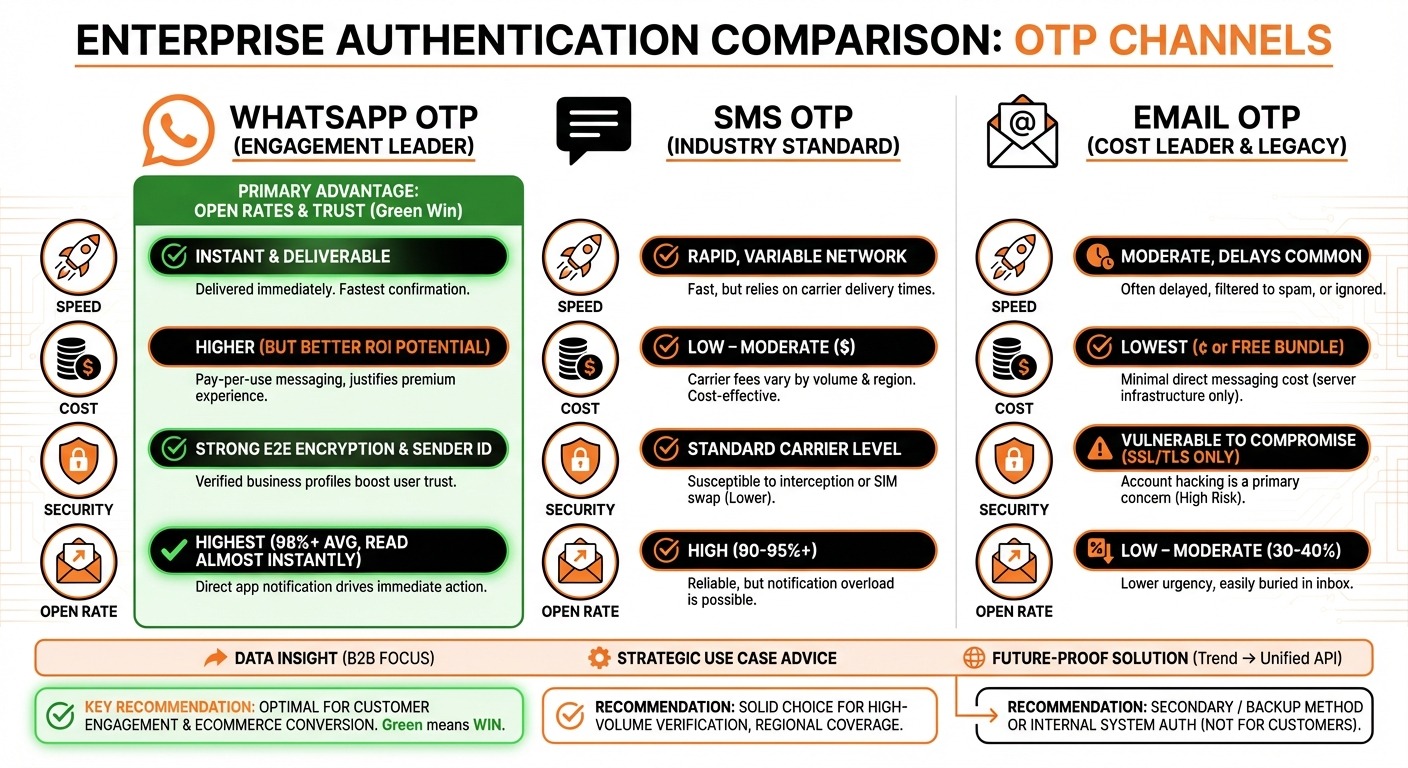
Choosing the right OTP channel directly impacts your conversion rates, delivery reliability, and costs. Here is how the three main channels compare:
Delivery Speed and Reliability
WhatsApp OTP delivers messages in under 2 seconds over internet connectivity. There is no dependency on carrier networks, which means no delays in rural areas or during network congestion.
SMS OTP relies on telecom carrier routing, which can introduce 5-30 second delays. In some regions, SMS delivery rates drop below 85% due to carrier filtering and DND restrictions.
Email OTP can take anywhere from instant to several minutes depending on server load. Worse, OTP emails frequently land in spam or promotions tabs — a problem WhatsApp simply does not have.
Open and Engagement Rates
WhatsApp messages achieve 90-95% open rates within 3 minutes of delivery. SMS sits at roughly 70-80%, while email OTP open rates hover around 20-30%. For authentication workflows, higher open rates translate directly to fewer abandoned signups and logins.
Cost Comparison
WhatsApp authentication messages cost between $0.02 and $0.05 per message in most regions (Meta charges vary by country). SMS OTP costs range from $0.01 to $0.15 per message depending on the destination country, with international SMS being especially expensive. Email is the cheapest per-message but has the lowest reliability for time-sensitive codes.
For apps with a global user base, WhatsApp OTP typically delivers 40-60% cost savings compared to SMS, while providing better delivery guarantees.
Security
WhatsApp provides end-to-end encryption by default. SMS is unencrypted and vulnerable to SIM-swapping, SS7 network exploits, and interception. Email offers TLS encryption in transit but messages sit unencrypted in inboxes.
For applications handling financial transactions, healthcare data, or personal information, WhatsApp OTP offers the strongest security posture of the three channels.
How WhatsApp OTP Authentication Works
The technical flow for WhatsApp OTP is straightforward:
-
- User triggers authentication — A user clicks “Sign Up,” “Log In,” or initiates a transaction in your app
- Your backend generates an OTP — A random 4-6 digit code is created with a defined expiry (typically 5-10 minutes)
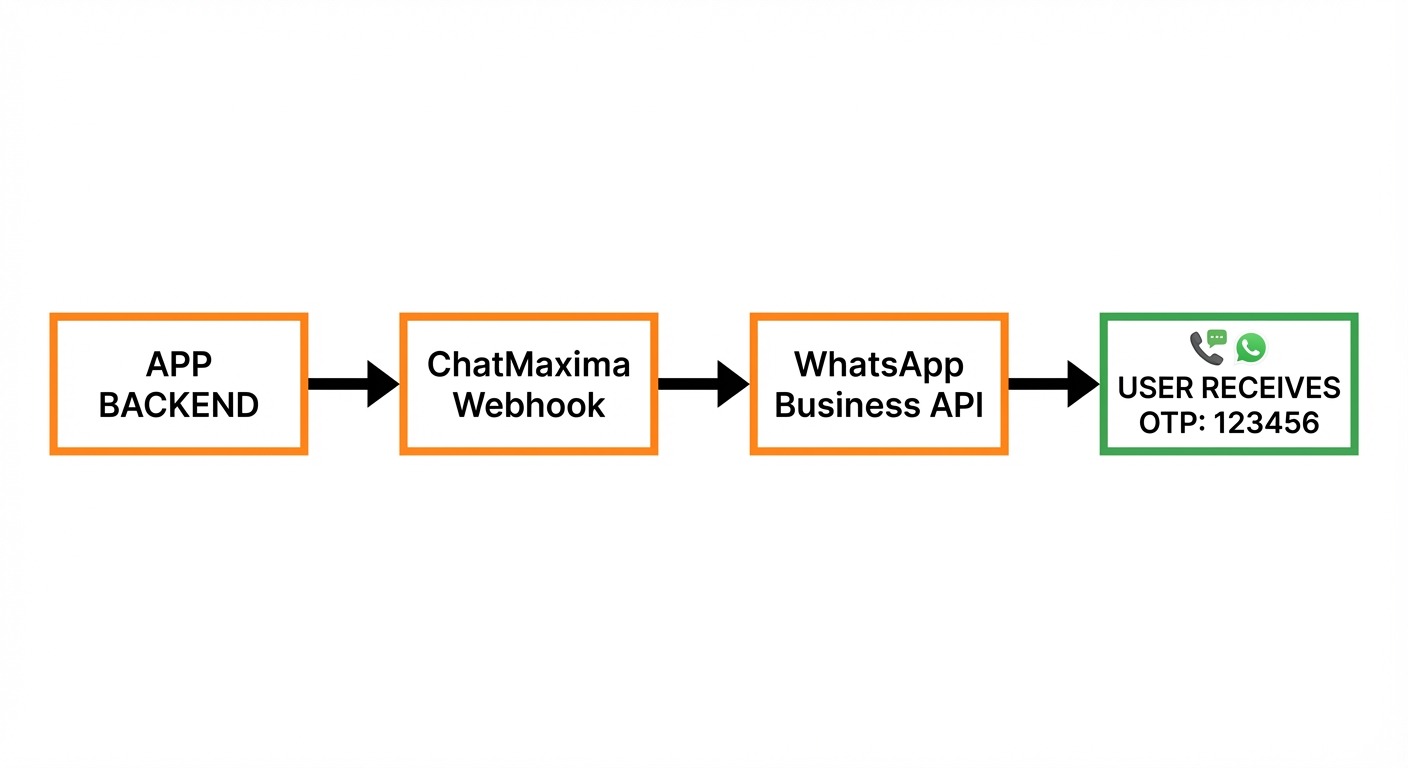
- API call to WhatsApp Business Platform — Your server sends the OTP via a pre-approved WhatsApp message template through the WhatsApp Business API
- User receives OTP on WhatsApp — The message arrives instantly on the user’s WhatsApp, from your verified business account
- User enters the OTP — The code is submitted back to your app
- Backend validates — Your server checks the code against the generated value and expiry timestamp
This flow works identically for web apps, mobile apps, and hybrid platforms. The key requirement is that your user has an active WhatsApp account linked to their phone number.
WhatsApp OTP Message Templates and Samples
Meta requires all business-initiated WhatsApp messages to use pre-approved templates. For authentication, Meta provides a dedicated “authentication” template category that gets faster approval.
Authentication Template Format
WhatsApp authentication templates follow a specific structure:
Body text: “Your verification code is {{1}}. This code expires in {{2}} minutes.”
The {{1}} placeholder contains the OTP code, and {{2}} contains the expiry time. Meta also supports an optional one-tap autofill button that allows users to verify without manually typing the code.
Sample Templates for Different Use Cases
Signup Verification: “Welcome to [YourApp]. Your signup verification code is 482917. This code expires in 10 minutes. Do not share this code with anyone.”
Login Authentication: “Your login code for [YourApp] is 731045. Valid for 5 minutes. If you did not request this, please ignore this message.”
Transaction Confirmation: “You are confirming a payment of $249.99. Your verification code is 619283. This code expires in 5 minutes.”
Password Reset: “Your password reset code for [YourApp] is 854762. Valid for 10 minutes. If you did not request a password reset, secure your account immediately.”
Template Approval Tips
-
- Keep body text under 160 characters for best delivery rates
- Do not include promotional content in authentication templates — Meta will reject them
- Use the “AUTHENTICATION” template category, not “MARKETING” or “UTILITY”
- Include the code expiry time in the message body
- Templates typically get approved within 1-24 hours
How to Send WhatsApp OTP Using ChatMaxima
ChatMaxima simplifies WhatsApp OTP integration with a no-code chatbot builder and built-in WhatsApp Business API connectivity. Here is the step-by-step process:
Step 1: Create Your ChatMaxima Account
Sign up at ChatMaxima’s pricing page and select a plan that includes WhatsApp integration. The 7-day free trial gives you full access to test the OTP workflow.
Step 2: Connect Your WhatsApp Business Account
Navigate to Channels in your ChatMaxima dashboard and link your WhatsApp Business account using the Meta Embedded Signup flow. This process takes about 5 minutes and authenticates your business for WhatsApp messaging.
If you do not have a WhatsApp Business account yet, the signup flow guides you through creating one with Meta.
Step 3: Create an OTP Message Template
Use ChatMaxima’s MaxIA AI assistant to generate a compliant OTP template through a conversational interface. Alternatively, create one manually:
-
- Go to Templates in your WhatsApp section
- Select “Authentication” as the template category
- Enter your message body with the
{{1}}OTP placeholder - Optionally enable the one-tap autofill button
- Submit for Meta approval (usually approved within hours)
Step 4: Build the OTP Chatbot Flow
In ChatMaxima’s AI Studio chatbot builder, create a new bot with two key blocks:
-
- Webhook Block — Receives the authentication request from your app’s backend (containing the user’s phone number and the generated OTP)
- Send WhatsApp Template Block — Sends the approved OTP template to the user with the code dynamically inserted
Step 5: Integrate the Webhook Into Your App
Call the ChatMaxima webhook URL from your app’s signup, login, or transaction flow. Here is a basic example:
// Node.js example - Trigger WhatsApp OTP via ChatMaxima webhookconst axios = require(‘axios’);
async function sendWhatsAppOTP(phoneNumber, otpCode) {
const response = await axios.post(
‘https://chatmaxima.com/webhooks/chatbot/<BOT_ID>/11/’,
{
type: ‘Workflow’,
phone: phoneNumber,
otp: otpCode,
expiry_minutes: 10
},
{
headers: {
‘Content-Type’: ‘application/json’,
‘Authorization’: ‘Bearer <YOUR_BEARER_TOKEN>’
}
}
);
return response.data;
}
// Usage in your signup flow
const otp = Math.floor(100000 + Math.random() * 900000); // 6-digit OTP
await sendWhatsAppOTP(‘+919876543210’, otp.toString());
# Python example - Trigger WhatsApp OTP via ChatMaxima webhookimport requests
import random
def send_whatsapp_otp(phone_number, otp_code):
response = requests.post(
‘https://chatmaxima.com/webhooks/chatbot/<BOT_ID>/11/’,
headers={
‘Content-Type’: ‘application/json’,
‘Authorization’: ‘Bearer <YOUR_BEARER_TOKEN>’
},
json={
‘type’: ‘Workflow’,
‘phone’: phone_number,
‘otp’: otp_code,
‘expiry_minutes’: 10
}
)
return response.json()
Usage
otp = str(random.randint(100000, 999999))
send_whatsapp_otp(‘+919876543210’, otp)
# cURL example - Trigger WhatsApp OTP via ChatMaxima webhookcurl -X POST https://chatmaxima.com/webhooks/chatbot/<BOT_ID>/11/ \
-H ‘Content-Type: application/json’ \
-H ‘Authorization: Bearer <YOUR_BEARER_TOKEN>’ \
–data ‘{
“type”: “Workflow”,
“phone”: “+919876543210”,
“otp”: “482917”,
“expiry_minutes”: 10
}’
Step 6: Test and Go Live
Send a test OTP to your own WhatsApp number, verify the template renders correctly, and confirm the end-to-end flow works. Your WhatsApp OTP authentication is now live.
The entire setup — from account creation to sending your first OTP — can be completed in under 30 minutes with ChatMaxima’s no-code tools.
WhatsApp OTP Pricing: What Does It Cost?
WhatsApp OTP pricing is based on Meta’s per-conversation pricing model. Authentication messages fall under the “Authentication” conversation category, which has dedicated (and generally lower) rates compared to marketing or utility messages.
Regional Pricing Examples (2026)
-
- India: $0.004 per authentication conversation (among the cheapest globally)
- United States: $0.035 per authentication conversation
- United Kingdom: $0.033 per authentication conversation
- Brazil: $0.031 per authentication conversation
- Indonesia: $0.030 per authentication conversation
- Germany: $0.045 per authentication conversation
These rates are for the WhatsApp conversation charge from Meta. Your WhatsApp Business Solution Provider (like ChatMaxima) may add a small platform fee.
Cost Comparison: WhatsApp OTP vs SMS OTP
For an app sending 10,000 OTPs per month to users in India:
-
- SMS OTP: ~$200-350/month (carrier-dependent, with DND failures requiring retries)
- WhatsApp OTP: ~$40/month (near 100% delivery rate)
- Savings: 80-85% cost reduction with WhatsApp
For international OTPs (e.g., US-based app verifying global users), the savings are even more dramatic — international SMS can cost $0.10-0.15 per message versus WhatsApp’s flat regional rates.
Best Practices for WhatsApp OTP Implementation
Security Best Practices
-
- Set short expiry times — 5 minutes for login OTPs, up to 10 minutes for signups. Never exceed 15 minutes.
- Rate limit OTP requests — Block users after 3-5 failed attempts to prevent brute-force attacks. Implement exponential backoff.
- Never log OTP codes — Store only hashed versions in your database. Delete after verification.
- Use one-tap autofill — Enable Meta’s one-tap button to reduce phishing risk (users do not need to type codes that could be socially engineered).
Delivery Best Practices
-
- Implement fallback channels — If WhatsApp delivery fails (user does not have WhatsApp, or network issue), fall back to SMS, then email. ChatMaxima supports automated fallback routing.
- Verify phone numbers format — Always store and send in E.164 format (e.g., +919876543210)
- Monitor delivery rates — Track delivery, read, and failure rates. Healthy WhatsApp OTP delivery should exceed 95%.
- Handle WhatsApp-inactive numbers — Not all phone numbers have WhatsApp. Pre-check where possible, or use instant fallback.
User Experience Best Practices
-
- Tell users to expect WhatsApp — Display a message like “Check your WhatsApp for a verification code” so users know where to look
- Show the masked phone number — Display the last 4 digits so users confirm the right number
- Provide a “Resend” option — With a 30-60 second cooldown to prevent spam
- Offer an alternative channel — Always let users choose “Send via SMS instead” as a backup
WhatsApp OTP API: Direct Integration Option
For developers who prefer direct API integration without a chatbot builder, the WhatsApp Business Platform API (Cloud API) supports OTP sending natively.
API Endpoint
POST https://graph.facebook.com/v21.0/{phone-number-id}/messages{
“messaging_product”: “whatsapp”,
“to”: “919876543210”,
“type”: “template”,
“template”: {
“name”: “your_auth_template”,
“language”: { “code”: “en” },
“components”: [
{
“type”: “body”,
“parameters”: [
{ “type”: “text”, “text”: “482917” }
]
},
{
“type”: “button”,
“sub_type”: “url”,
“index”: “0”,
“parameters”: [
{ “type”: “text”, “text”: “482917” }
]
}
]
}
}
This approach requires managing your own WhatsApp Business API credentials, template approvals, and delivery monitoring. For most teams, using a platform like ChatMaxima that abstracts this complexity is faster and more maintainable.
Common Issues and Troubleshooting
OTP not delivered: Check that the recipient has an active WhatsApp account on the number. Verify the phone number is in E.164 format. Confirm your template is approved and active.
Template rejected by Meta: Ensure you are using the “Authentication” category. Remove any promotional language. Keep the message body focused solely on the OTP delivery.
High failure rates: Monitor your WhatsApp Business API quality rating. If your quality drops to “Low,” Meta may throttle your messaging. Maintain high delivery rates by validating numbers before sending.
OTP arriving late: WhatsApp delivery is typically under 2 seconds. If you see delays, check your API response times and ensure your backend is not introducing latency in the OTP generation step.
Getting Started with WhatsApp OTP Today
Integrating WhatsApp OTP into your application is one of the highest-impact authentication upgrades you can make in 2026. You get better security through encryption, higher delivery rates than SMS, better user experience through WhatsApp’s familiar interface, and meaningful cost savings — especially for international users.
ChatMaxima makes this integration straightforward with its no-code chatbot builder, built-in WhatsApp Business API connectivity, automated fallback channels, and 200+ integrations with your existing tech stack.
Start your free 7-day trial at ChatMaxima and have WhatsApp OTP running in your app within the hour.