
Legal Chatbot Templates
Law firms turn away potential clients who cannot reach them after hours. Browse templates for client screening, consultation scheduling, case status inquiries, document collection, and fee estimation.
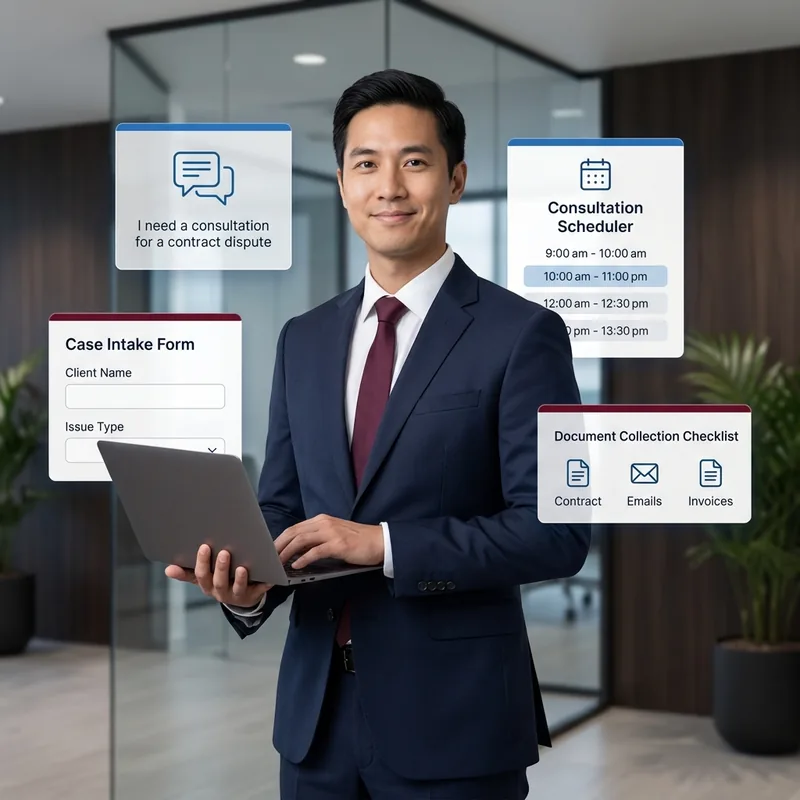
Legal Clients Call After Hours and Expect a Response
Legal inquiries do not follow business hours. A potential client involved in an accident or facing a legal deadline needs to reach a firm immediately, not wait until Monday morning. These templates capture after-hours inquiries, screen for practice area fit, and book consultations around the clock. For existing clients, bots enable self-service case progress checks and document submission, reducing paralegal workload. Clone a template, customize it with your practice areas and consultation availability, and start capturing leads from day one.
LegalCivic – Public Legal Services Concierge
File complaints, find legal aid, and get case guidance by voice
Lexa – Legal Intake Specialist
Screen new clients, collect case details, and route legal inquiries
LegalBuddy – Legal Services Assistant
Connect with legal services, book consultations, and get case info
What Legal Bots Can Do
These templates cover every aspect of law firm client management, from screening new inquiries and scheduling consultations to sharing case updates and collecting documents. Each template is ready to deploy on WhatsApp and web so you can capture every potential client inquiry.
Client Intake and Screening
Screen potential clients for practice area fit, collect case details, assess urgency, and route qualified leads to the appropriate attorney. The bot captures all intake information in a structured format for immediate review.
Consultation Scheduling
Prospective clients book initial consultations by selecting available time slots, choosing consultation type, and providing preliminary case information. Automatic confirmations and reminders reduce no-shows.
Case Status Updates
Existing clients check their case progress, upcoming deadlines, next steps, and hearing dates through self-service chat. This reduces the volume of status inquiry calls that interrupt attorney workflow.
Document Collection
Collect required documents from clients through WhatsApp with guided prompts for each document type. The bot tracks which documents have been received and sends reminders for outstanding items.
Fee Estimation
Provide prospective clients with fee ranges based on case type, complexity, and service level. The bot explains fee structures, payment options, and retainer requirements before the initial consultation.
Legal FAQ
Answer common legal questions about processes, timelines, rights, and requirements through an automated knowledge base. This builds trust with potential clients while reducing repetitive inquiries to your team.
Deploy a Legal Bot in 3 Steps
Go from browsing to a live legal chatbot in minutes. Pick a template, customize it with your practice areas and consultation availability, and publish across every channel your clients use. No coding, no expensive agency, just results from day one.
Browse and Preview
Explore legal chatbot templates above. Preview any template to see client intake flows, consultation scheduling, and case status updates before you clone it.
Clone and Customize
Clone any template into your workspace with one click. Add your practice areas, attorney availability, fee structures, and intake questions using the no-code AI Studio builder.
Deploy to Any Channel
Publish your legal bot to WhatsApp, your website, Instagram, Messenger, Telegram, and more simultaneously. One bot, every channel, all interactions in one inbox.
Templates for Every Legal Practice Area
Whether your firm focuses on family law, corporate matters, real estate, personal injury, immigration, or criminal defense, there is a template built for your specific practice area. Each one comes pre-configured with the intake questions and client communication flows your specialty demands.
Family Law
Divorce inquiries, custody questions, mediation scheduling, support calculations
Corporate and Business
Entity formation, contract review, compliance questions, partnership agreements
Real Estate Law
Property closings, title searches, lease reviews, zoning inquiries
Personal Injury
Accident intake, medical record collection, case evaluation, settlement updates
Immigration
Visa eligibility screening, application tracking, document checklists, deadline reminders
Criminal Defense
Urgent intake, bail information, court date reminders, case progress updates
Built for Law Firm Operations
ChatMaxima gives law firms the tools to screen clients, schedule consultations, collect documents, and share case updates through a single platform. Everything works on WhatsApp, the channel your clients already use, with no coding required and no per-agent fees.
Practice-Area-Aware Intake Triage
The bot identifies the practice area from the inquiry, asks relevant screening questions, and routes qualified leads to the appropriate attorney with a structured intake summary ready for review.
Conflict-Check Data Collection
During intake, the bot collects all parties' names, related entities, and relevant details needed for conflict checks. This data is delivered in a structured format that integrates with your existing conflict check workflow.
Secure Document Upload
Clients submit required documents through WhatsApp with guided prompts for each document type. The bot tracks received and outstanding documents and sends automated reminders for missing items.
After-Hours Lead Capture
Every inquiry that arrives outside business hours is captured with full contact details, case summary, and urgency level. Attorneys receive a prioritized lead list each morning with all the information needed to follow up.
Explore More Industry Templates
Legal chatbots share many capabilities with templates built for other industries. Browse related industry pages to find additional templates for client management, scheduling, and professional services.
Capture Every Inquiry, Even at Midnight
Clone a legal template and automate client screening, consultation scheduling, and case status updates. Free to start.
No credit card required · Free forever plan · Live in under 15 minutes
Frequently Asked Questions About Legal Chatbots
Get answers to common questions about using chatbots for client intake, consultation scheduling, case status updates, and document collection in law firms.
Yes. The bot asks targeted questions to identify the practice area, assess case viability, and collect key details. Qualified leads are routed to the appropriate attorney with a structured intake summary.
Yes. Prospective clients select from available consultation slots, choose the meeting type, and provide preliminary case details. Confirmations and reminders are sent automatically to reduce no-shows.
Yes. Clients check their case progress, upcoming deadlines, next steps, and hearing dates through self-service chat. This significantly reduces status inquiry calls that interrupt attorney workflow.
Yes. Clients submit required documents through WhatsApp with guided prompts. The bot tracks received documents and sends automated reminders for outstanding items until the file is complete.
Yes. The bot provides fee ranges based on case type and complexity, explains fee structures and payment options, and outlines retainer requirements so prospects know what to expect before consulting.
Yes. Every after-hours inquiry is captured with full contact details, case summary, and urgency level. Attorneys receive a prioritized lead list each morning ready for follow-up.
Yes. The bot identifies the relevant practice area from the inquiry and routes to the appropriate attorney. Templates support family law, corporate, real estate, personal injury, immigration, and criminal defense.
Yes. ChatMaxima offers a 7-day free trial. Clone any legal template and test client intake, consultation scheduling, and case status updates with full access.