You invested in a customer support chatbot. Your team says it’s helping. Customers seem satisfied. But when leadership asks, “What’s the actual return on this investment?” do you have a confident answer?
If you’re like most businesses, you probably don’t. A recent study found that while 67% of companies have deployed chatbots, only 23% actively measure their ROI. That’s a problem. Without clear metrics, you can’t justify continued investment, optimize performance, or demonstrate value to stakeholders.
The good news? Calculating chatbot ROI isn’t complicated once you know what to measure. This guide breaks down the exact formulas, metrics, and benchmarks you need to prove your chatbot is worth every dollar.
Why Measuring Chatbot ROI Matters
Before diving into calculations, let’s address why this matters beyond satisfying finance teams.
Tracking ROI helps you identify what’s working and what isn’t. Maybe your chatbot handles order tracking brilliantly but struggles with refund requests. Without measurement, you’d never know where to focus improvements. ROI tracking also builds the business case for expanding automation to other departments or channels.
Most importantly, it shifts the conversation from “Is this chatbot useful?” to “How much value is this chatbot creating?” That’s a much stronger position when budget discussions come around.
The Basic ROI Formula
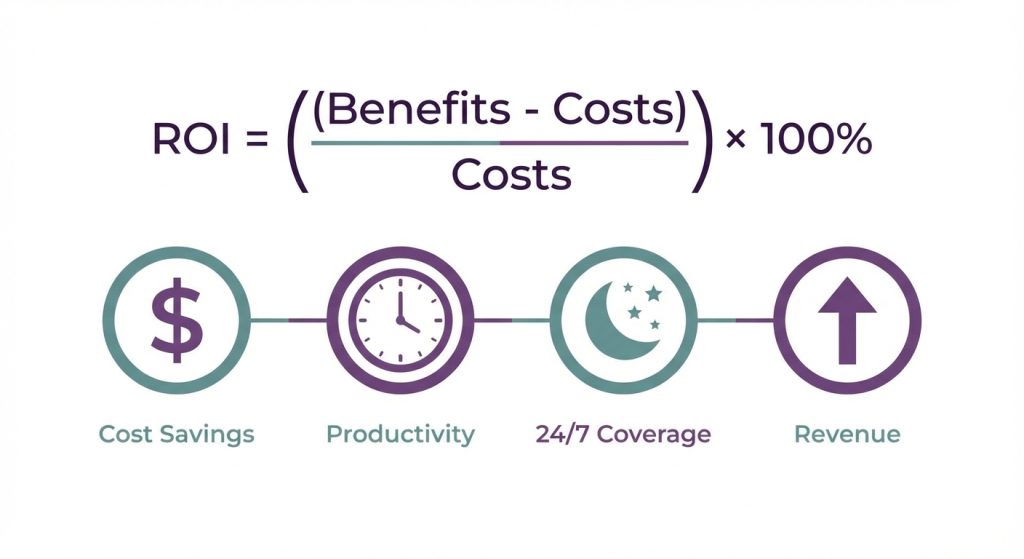
At its core, chatbot ROI follows the standard formula:
ROI = ((Total Benefits – Total Costs) / Total Costs) × 100
The challenge lies in accurately quantifying both sides of that equation. Let’s break down each component.
Calculating Total Costs
Your chatbot investment includes more than just the platform subscription. Account for these cost categories:
Platform and Licensing Costs
This includes your monthly or annual subscription fees. If you’re using WhatsApp Business API, factor in per-conversation costs after your free tier. Include any additional seats or user licenses for your team.
Implementation Costs
Consider the time your team spent building and deploying the chatbot. Even with no-code platforms where setup takes under 10 minutes for basic bots, there’s still training time and workflow design to account for. Multiply hours spent by the hourly rate of the employees involved.
Ongoing Maintenance
Your chatbot requires regular updates, conversation flow improvements, and monitoring. Estimate the monthly hours your team dedicates to chatbot management and multiply by their hourly cost.
Integration Costs
If you connected your chatbot to your CRM, help desk, or e-commerce platform, include any associated costs. This might be Zapier credits, developer time for custom integrations, or fees for premium connectors.
Example Cost Calculation:
| Cost Category | Monthly Cost |
|---|---|
| Platform subscription | $299 |
| WhatsApp API usage (5,000 conversations) | $75 |
| Staff time for maintenance (5 hrs × $35/hr) | $175 |
| Integration tools | $50 |
| Total Monthly Cost | $599 |
Calculating Total Benefits
This is where it gets interesting. Chatbot benefits fall into four main categories.
1. Direct Cost Savings
The most straightforward benefit: money you’re not spending because the chatbot handles work that would otherwise require human agents.
Formula: Cost per Human Ticket × Tickets Deflected by Chatbot = Direct Savings
To find your cost per human ticket, divide your total support team costs (salaries, benefits, tools, overhead) by the number of tickets they handle monthly. Industry averages range from $5 to $25 per ticket, depending on complexity and location.
Track “deflected tickets” through your chatbot analytics. These are conversations where customers got their answer from the bot without escalating to a human agent.
Example:
- Cost per human ticket: $12
- Monthly chatbot conversations: 3,000
- Resolution rate without human intervention: 65%
- Tickets deflected: 1,950
- Monthly savings: $23,400
2. Agent Productivity Gains
Even when conversations do reach human agents, chatbots create efficiency gains. They collect information upfront, provide conversation context, and handle routine follow-ups.
Formula: Time Saved per Escalated Conversation × Escalated Conversations × Agent Hourly Rate
Measure this by comparing average handle time before and after chatbot implementation. Most businesses see a 30-50% reduction in handle time for escalated conversations because the chatbot has already gathered customer information and attempted initial troubleshooting.
Example:
- Average time saved per escalation: 4 minutes
- Monthly escalations: 1,050
- Agent hourly rate: $25
- Time saved: 70 hours
- Monthly productivity value: $1,750
3. Extended Service Hours Value
If your chatbot operates 24/7 but your team doesn’t, you’re capturing value outside business hours. Calculate the cost of providing equivalent human coverage.
Formula: After-Hours Conversations × Cost to Handle with Human Staff
Consider what it would cost to staff a night shift or weekend team. Or calculate the value of leads and sales that would have been lost without round-the-clock availability.
Example:
- After-hours conversations handled: 800/month
- Cost if handled by overnight staff: $18/conversation
- Monthly extended hours value: $14,400
4. Revenue Impact
This is often overlooked but can be substantial. Chatbots impact revenue through:
Lead Generation and Qualification: Track how many leads your chatbot captures and their conversion rate. If your chatbot pre-qualifies leads, compare close rates of chatbot-qualified leads versus unqualified leads.
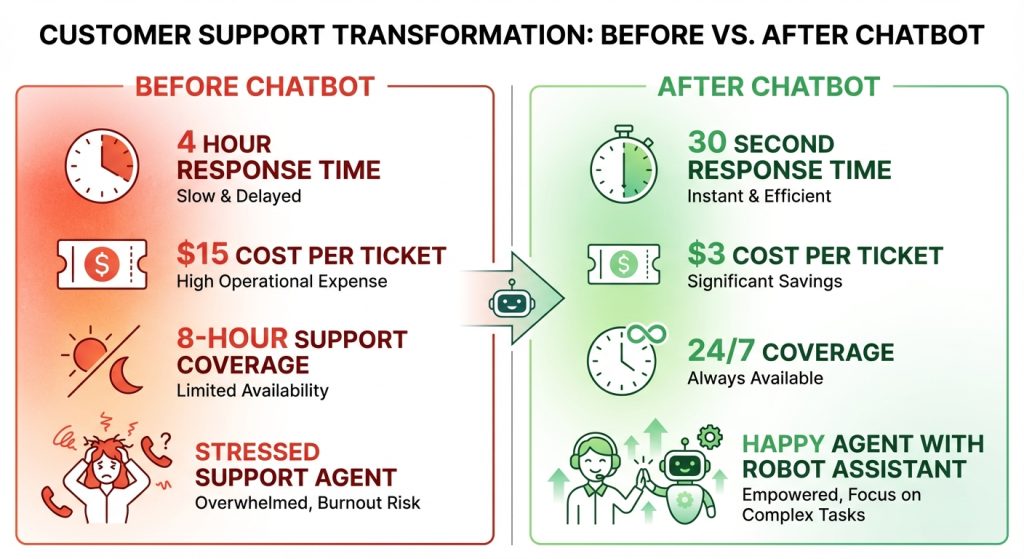
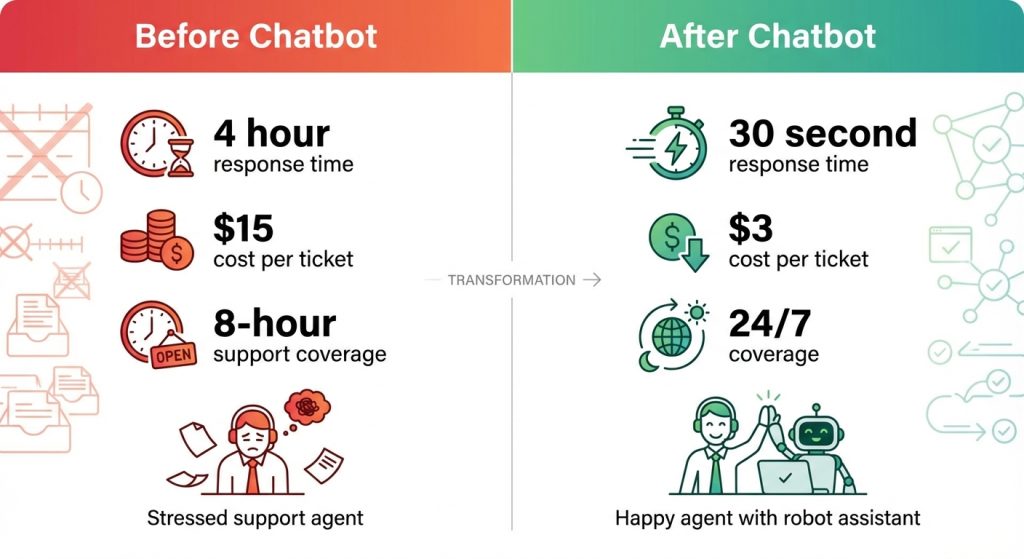
Reduced Churn: Faster response times correlate directly with customer retention. If your chatbot reduced average response time from 4 hours to 4 minutes, estimate the churn prevention value.
Upselling and Cross-selling: Some chatbots handle product recommendations. Track conversion rates and average order values from chatbot-assisted purchases.
Cart Recovery: For e-commerce, WhatsApp cart abandonment messages typically recover 15-25% of abandoned carts. Calculate: Abandoned carts recovered × Average cart value × Profit margin.
Example (E-commerce):
- Monthly abandoned cart reminders sent: 500
- Recovery rate: 20%
- Carts recovered: 100
- Average cart value: $85
- Profit margin: 30%
- Monthly revenue impact: $2,550
Putting It All Together
Let’s calculate total ROI using a realistic example:
Monthly Costs:
- Total: $599
Monthly Benefits:
- Direct cost savings: $23,400
- Agent productivity: $1,750
- Extended hours value: $14,400
- Revenue impact: $2,550
- Total: $42,100
ROI Calculation: ROI = (($42,100 – $599) / $599) × 100 = 6,928%
That’s not a typo. Customer support chatbots routinely deliver ROI in the thousands of percent because the cost base is low relative to the labor they offset. Even conservative estimates typically show 300-500% ROI within the first year.
Key Metrics to Track Continuously
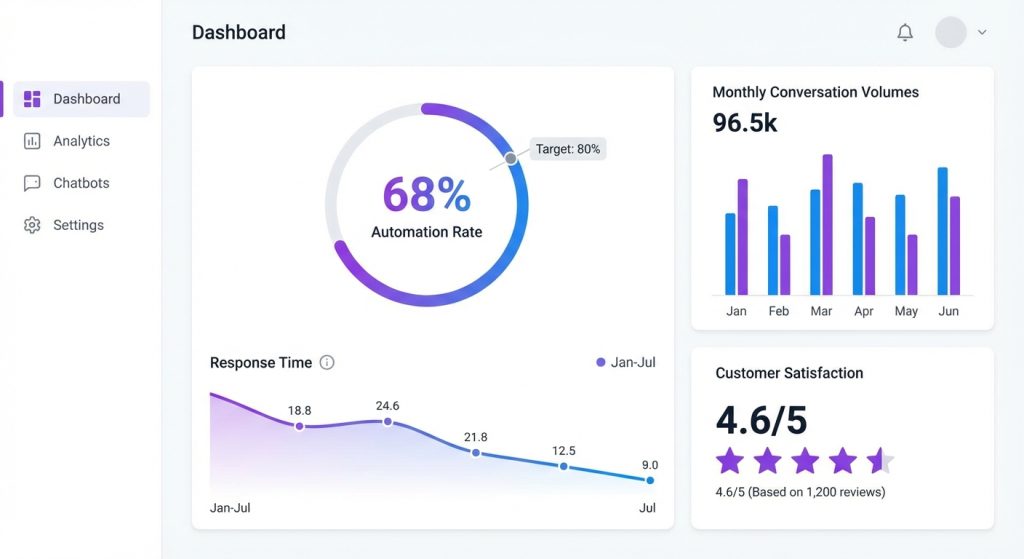
ROI isn’t a one-time calculation. Set up dashboards to monitor these metrics monthly:
Efficiency Metrics:
- Automation rate (conversations fully resolved by chatbot)
- Average response time
- First response time
- Resolution time for escalated conversations
Quality Metrics:
- Customer satisfaction scores (CSAT)
- Conversation ratings
- Escalation rate
- Drop-off points in chatbot flows
Business Metrics:
- Cost per conversation
- Tickets deflected
- Leads generated
- Revenue influenced
Most conversational AI platforms provide built-in analytics dashboards that track these automatically. Look for platforms offering real-time updates, custom date ranges, and exportable reports for stakeholder presentations.
Common ROI Calculation Mistakes
Avoid these pitfalls when calculating your chatbot ROI:
Only counting direct cost savings. The biggest benefits often come from extended hours coverage and revenue impact. Don’t undersell your chatbot by ignoring these categories.
Using industry averages instead of your actual numbers. Generic benchmarks are useful for projections, but actual ROI should use your real data. Your cost per ticket, resolution rates, and handle times are specific to your business.
Forgetting soft benefits. Agent satisfaction, reduced burnout, and improved customer experience are harder to quantify but still matter. Consider including employee retention savings if your support team has lower turnover since implementing the chatbot.
Measuring too early. Chatbots improve over time as you refine conversation flows and expand coverage. Wait at least 90 days before calculating ROI to get an accurate picture.
Real-World Benchmark: What Good Looks Like
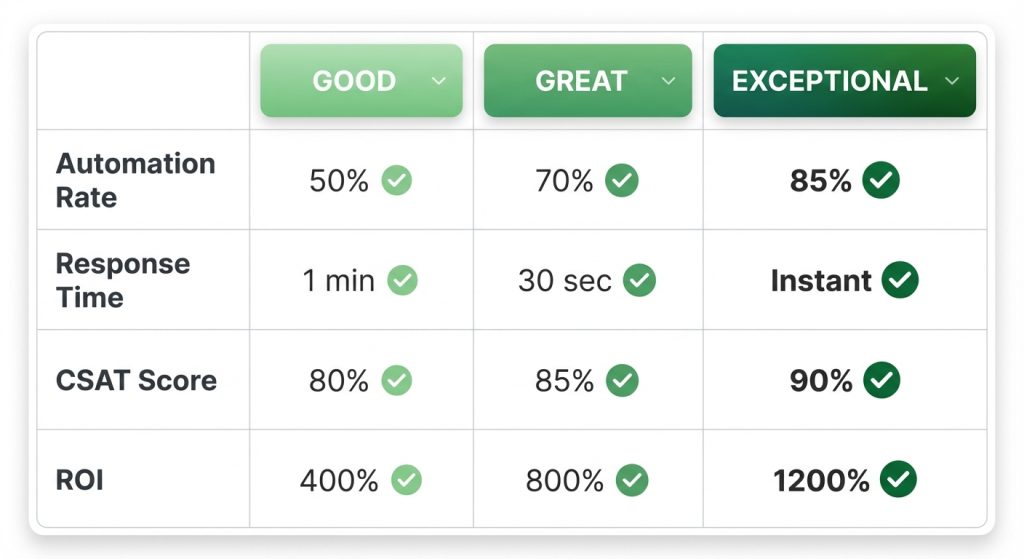
Based on industry data, here’s what successful chatbot implementations typically achieve:
| Metric | Good | Great | Exceptional |
|---|---|---|---|
| Automation rate | 40-50% | 50-70% | 70%+ |
| First response time | Under 1 minute | Under 30 seconds | Instant |
| Customer satisfaction | 80%+ | 85%+ | 90%+ |
| Support cost reduction | 25-35% | 35-50% | 50%+ |
| ROI (Year 1) | 200-400% | 400-800% | 800%+ |
If your numbers fall below the “Good” column, focus on improving conversation flows, expanding FAQ coverage, and training your chatbot on more use cases before recalculating.
How to Present ROI to Stakeholders
Numbers alone don’t tell the full story. When presenting chatbot ROI:
Lead with the headline number. “Our chatbot delivered 1,200% ROI last quarter” gets attention. Then break down the components.
Show before and after. Compare key metrics from before implementation to current performance. Visual charts showing declining costs and improving response times are compelling.
Include customer feedback. Quantitative data supported by qualitative feedback (“Customers love getting instant answers at 2 AM”) builds a complete picture.
Project future value. If you’re planning to expand the chatbot to new channels or use cases, show the projected additional ROI from those expansions.
Getting Started with ROI Tracking
If you’re not currently tracking chatbot ROI, here’s how to start:
First, establish your baseline. Document your current cost per ticket, response times, and after-hours coverage before making any chatbot changes. This becomes your comparison point.
Second, enable analytics tracking. Ensure your chatbot platform is capturing all relevant metrics. Most platforms include this by default, but verify you’re tracking resolution rates, not just conversation counts.
Third, create a simple monthly dashboard. You don’t need complex business intelligence tools. A spreadsheet tracking the metrics outlined above, updated monthly, is sufficient for most teams.
Fourth, set quarterly review cadence. Calculate formal ROI quarterly. Monthly tracking catches trends, but quarterly analysis smooths out anomalies and provides more reliable figures for stakeholder reporting.
Conclusion
Calculating customer support chatbot ROI transforms vague impressions into concrete business value. By tracking direct cost savings, productivity gains, extended hours value, and revenue impact, you can demonstrate that your chatbot investment isn’t just useful: it’s profitable.
Start with the formulas and metrics in this guide. Set up your tracking dashboards. And the next time someone asks what return you’re getting from your chatbot, you’ll have an answer backed by real numbers.
Ready to see what ROI your business could achieve? Start your free trial and access built-in analytics that make ROI tracking automatic.