Your support team lives in Slack. Your customers live on WhatsApp, Instagram, Facebook Messenger, and Telegram. Every time a customer sends a message, an agent has to leave Slack, open the support dashboard, read the message, type a reply, send it, and switch back. Multiply that by dozens of conversations per day and the result is predictable: slow response times, missed messages during busy hours, and constant context switching that kills productivity.
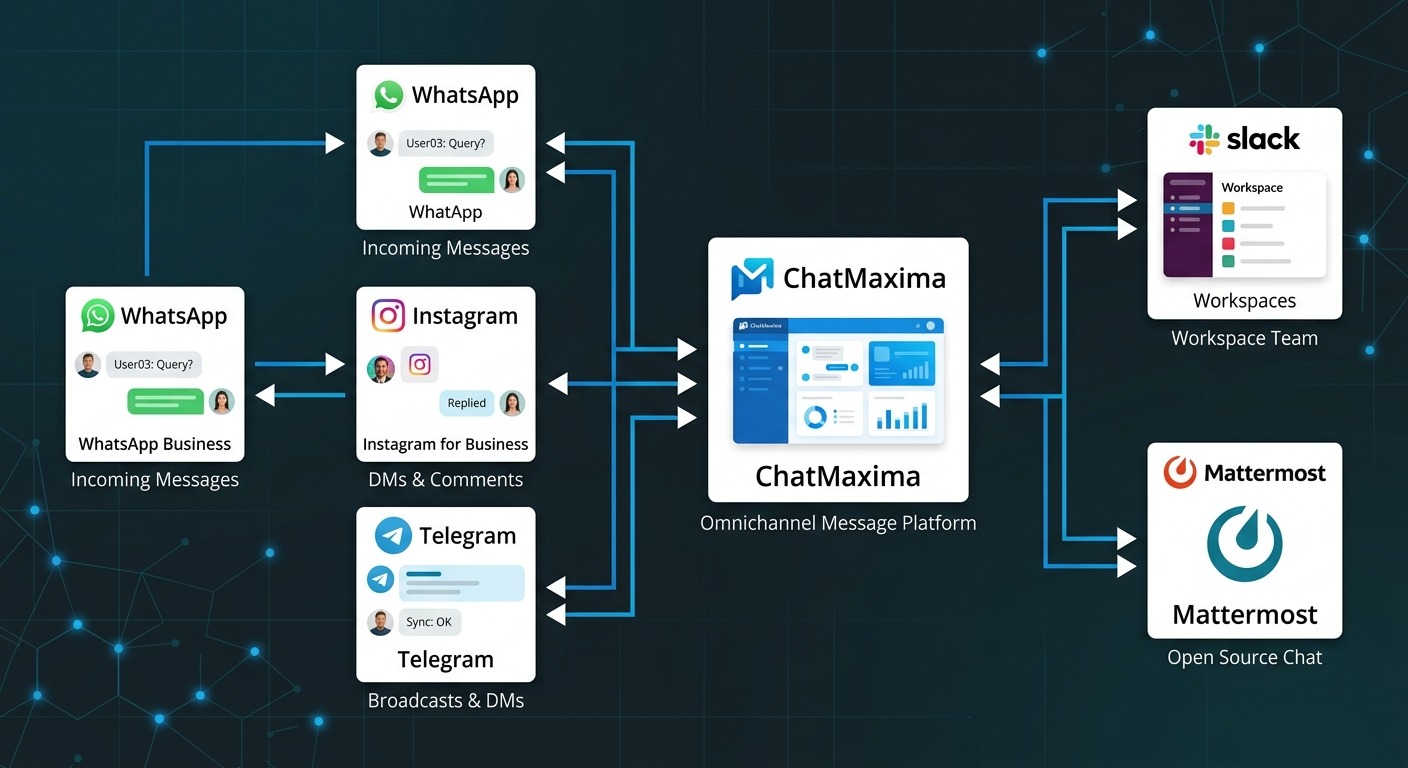
ChatMaxima’s Connected Workspaces solves this completely. It forwards every customer message from WhatsApp, Instagram, Facebook, and Telegram directly into a Slack or Mattermost channel. Each conversation becomes a thread. Agents reply from within the thread. That reply goes back to the customer on their original channel. Two-way communication, zero tab switching.
This is not a notification feed. It is a fully functional WhatsApp Slack integration that supports text, images, documents, audio, and video in both directions. The feature works with Mattermost as well, and Microsoft Teams support is coming soon.
The Problem: Context Switching Costs More Than You Think
The average support agent switches between 3-5 tools during a single customer interaction. Research from Zendesk shows that 6 in 10 agents say they lack sufficient customer data or context during interactions, and the root cause is usually data scattered across disconnected tools rather than missing data.
When a WhatsApp message arrives, here is what happens without channel forwarding:
- Agent gets a notification (maybe)
- Agent switches to the ChatMaxima dashboard
- Agent reads the message, checks conversation history
- Agent types and sends a reply
- Agent switches back to Slack to continue internal work
- Another WhatsApp message arrives – repeat the cycle
During busy hours, agents miss messages entirely because they are focused on internal Slack conversations. Response times stretch from minutes to hours. Customer satisfaction drops.
Companies using unified omnichannel solutions report 31% faster first-resolution times and 39% shorter customer wait times compared to teams working across siloed tools. The productivity improvement from eliminating context switching alone can reach 30%.
The fix is not building a better inbox. It is bringing customer conversations to the tool agents already have open all day.
How Connected Workspaces Works
The flow is straightforward and works in both directions.
Customer to Slack/Mattermost
When a customer sends a WhatsApp message (or Instagram DM, Facebook message, or Telegram message), ChatMaxima receives it through the connected channel. The platform then automatically forwards that message to your designated Slack or Mattermost channel. Each customer conversation becomes a separate thread, keeping the channel organized instead of becoming a flat notification dump.
Bot auto-replies also appear in the thread. If ChatMaxima’s AI chatbot handles the initial response, agents see the full conversation – the customer’s message, the bot’s reply, and any follow-up – all within the same Slack thread.
Slack/Mattermost to Customer
When an agent types a reply in the Slack or Mattermost thread, ChatMaxima picks it up via webhook and sends the reply back to the customer on their original channel. The message also appears in the ChatMaxima inbox, maintaining a complete conversation history across both platforms.
This two-way flow supports text and media – images, documents, audio files, and video sent from Slack reach the customer on WhatsApp. Photos shared by a customer on Instagram appear in the Slack thread. Nothing gets lost in translation.
The Complete Flow
A customer messages on WhatsApp. ChatMaxima receives it, runs it through the AI chatbot for an initial response, and forwards both the customer’s message and the bot’s reply to a Slack thread. The agent sees the thread, reads the context, and types a follow-up reply. That reply flows through ChatMaxima back to the customer’s WhatsApp. The customer sees a seamless conversation. The agent never left Slack.
What Makes This Different from Other Slack Integrations
Most “Slack integrations” in the customer support space are one-way notification pipes. You get an alert that a message arrived, but you still have to open the support platform to reply. ChatMaxima’s approach is fundamentally different.
Slack has no native integration with WhatsApp Business, Instagram DMs, or Facebook Messenger. There is no built-in way to receive and reply to customer messages from these channels inside Slack. Third-party tools that attempt this are typically limited to one channel, one direction, or both.
Most competitors only offer one-way notifications. Zendesk’s Slack app sends ticket notifications and allows basic status updates, but the reply experience is ticket-centric rather than conversational. Intercom sends conversation notifications to Slack but charges $85 per seat per month on the Advanced plan just to access the integration, plus $0.99 per AI resolution.
ChatMaxima supports multiple target platforms. Not just Slack – Mattermost is fully supported with Microsoft Teams on the roadmap. Organizations can choose the collaboration platform that fits their security and compliance requirements.
Threading keeps conversations organized. Each customer conversation gets its own Slack thread. Compare this to competitors that dump all notifications into a single flat channel where messages from different customers intermix and context is impossible to follow.
Full conversation visibility. The customer’s message, the AI bot’s auto-reply, and the agent’s response all appear in the same thread. Agents see exactly what the customer has been told before they step in.
Team-level simplicity. One toggle enables forwarding for all chatbot channels. There is no per-account, per-channel, or per-agent configuration required. Enable it once and every connected channel – WhatsApp, Instagram, Facebook, Telegram – forwards to your selected Slack or Mattermost channel.
Pricing that makes sense. ChatMaxima’s Pro plan at $99 per month includes Connected Workspaces alongside five workspaces, 15 team members, all messaging channels, and AI chatbots powered by OpenAI, Claude, Gemini, Deepseek, and Llama. There are no per-message fees, no per-resolution charges, and no add-on costs for the forwarding feature. Compare that to Intercom’s five-seat Advanced deployment at $85 per seat ($425 monthly) plus AI resolution fees that can push total costs past $1,400 per month for the same functionality. Even Crisp’s Plus plan at $295 per month, while offering decent Slack integration, lacks the multi-workspace management that agencies and growing teams need.
For a detailed breakdown of how ChatMaxima stacks up, see the comparisons for Intercom alternatives, Tidio alternatives, and Drift alternatives on the alternatives page.
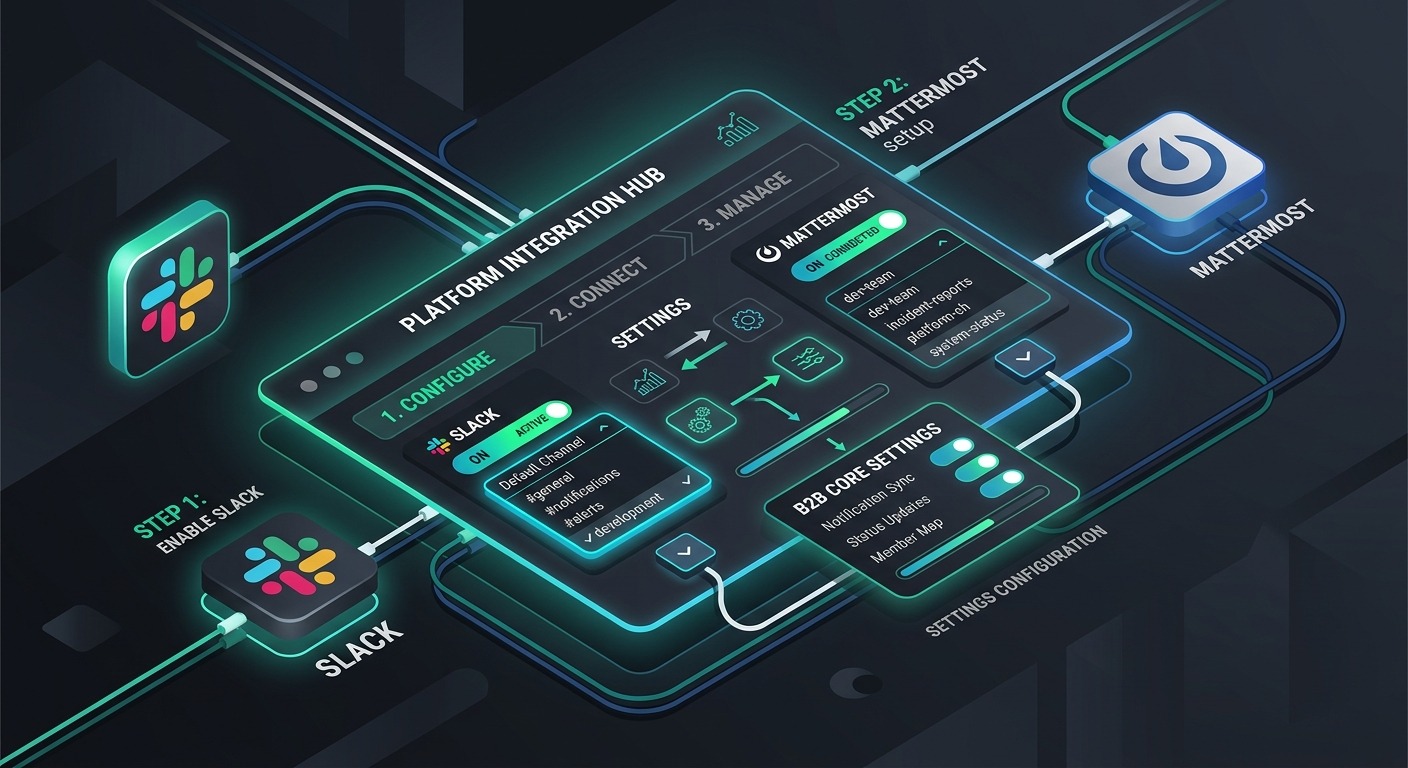
Setting Up Slack Forwarding (Step by Step)
The entire setup takes under five minutes and requires no code.
Step 1: Open the Integration Settings
Log into your ChatMaxima dashboard and navigate to Integrations > Slack. Click “Add Integration” to begin the OAuth authentication flow.
Step 2: Authenticate with Your Slack Workspace
You will be redirected to Slack’s authorization page. Select your workspace and grant the requested permissions. Once authenticated, you will be redirected back to ChatMaxima where the “Message Forwarding” card appears in your Slack integration settings.
Step 3: Select a Slack Channel
From the Message Forwarding card, use the dropdown to select the Slack channel where customer conversations should appear. Choose a dedicated channel like #customer-support or #whatsapp-messages to keep things organized.
Step 4: Enable Forwarding
Toggle “Enable Forwarding” to on and click “Save Forwarding Settings”. This single toggle activates forwarding for all connected chatbot channels – WhatsApp, Instagram, Facebook, and Telegram messages will all flow into your selected Slack channel.
Step 5: Invite the ChatMaxima Bot
This step is critical and easy to miss. Open your selected Slack channel and type:
/invite @ChatMaxima
The bot needs to be a member of the channel to post messages and read replies. Without this step, forwarding will not work.
Step 6: Test the Connection
Send a test message from WhatsApp (or any connected channel) to your chatbot. Within seconds, the message should appear as a new thread in your Slack channel. Reply in the thread and verify that the reply reaches the customer on their original channel.
That is it. Customer messages are now flowing into Slack, and your team can reply without leaving the platform they already use all day.
Setting Up Mattermost Forwarding
Mattermost setup follows a similar flow with a few differences to accommodate self-hosted deployments.
Step 1: Gather Your Credentials
You will need your Mattermost server URL and a personal access token. To generate a token, go to your Mattermost profile settings and create a personal access token with the appropriate permissions.
Step 2: Connect in ChatMaxima
Navigate to Integrations > Mattermost in your ChatMaxima dashboard. Enter your server URL and personal access token. ChatMaxima will verify the connection and display your available channels.
Step 3: Select a Channel and Enable Forwarding
Choose the Mattermost channel for customer messages and toggle forwarding on. Just like with Slack, this enables forwarding for all connected chatbot channels at once.
Step 4: Set Up Two-Way Replies (Optional but Recommended)
To enable agents to reply from Mattermost back to customers, configure an Outgoing Webhook in your Mattermost system console. Point the webhook at ChatMaxima’s endpoint and copy the webhook token back into ChatMaxima’s Mattermost integration settings.
This extra step gives your team full two-way communication – messages flow from customers to Mattermost threads, and agent replies in those threads flow back to customers on WhatsApp, Instagram, or wherever the conversation started.
Use Cases That Deliver Immediate Value
Small support teams (2-3 people) that live in Slack can handle all WhatsApp customer queries without ever leaving the platform. No separate dashboard logins, no missed messages during busy internal discussions. The entire support operation runs from Slack.
After-hours monitoring becomes simple when customer messages forward to a Slack channel monitored by an on-call team member. WhatsApp messages that arrive at midnight appear in Slack alongside the on-call alerts the agent is already watching.
Sales teams benefit when Instagram and Facebook leads appear in the same Slack workspace where the sales team coordinates. A potential customer sends a DM on Instagram asking about pricing – it appears in Slack, a sales rep replies from the thread, and the response reaches the customer on Instagram. The lead never waits for someone to check the Instagram inbox.
Multi-location businesses can route different chatbot channels to different Slack channels. The downtown location’s WhatsApp messages go to #support-downtown while the airport location’s messages go to #support-airport. Each team sees only their relevant conversations.
Agencies managing multiple clients can route each client’s chatbot messages to separate Slack channels. The agency team works from one Slack workspace with channels like #client-acme and #client-globex, keeping client data isolated while managing everything centrally. ChatMaxima’s Pro plan supports five client workspaces, and the Ultra plan scales to unlimited workspaces with full white-labeling.
Regulated industries using Mattermost for compliance can now offer omnichannel customer support without sending data to a third-party platform. Healthcare providers, financial services, and government agencies keep conversation data within their self-hosted Mattermost deployment while ChatMaxima handles the channel routing.
The AI Advantage: Bot and Human Working Together
Connected Workspaces does not bypass ChatMaxima’s AI capabilities – it amplifies them. Here is how the AI and human collaboration plays out in practice.
A customer sends a WhatsApp message asking about return policies. ChatMaxima’s AI chatbot responds immediately with the relevant information from the knowledge base. Both the customer’s question and the bot’s answer appear in the Slack thread. If the customer is satisfied, the agent sees a resolved conversation without needing to intervene.
If the customer follows up with a complex question the AI cannot handle, the bot escalates. The Slack thread is flagged for human attention. The agent reads the full context – what the customer asked, what the bot already told them – and picks up the conversation seamlessly. The reply goes from Slack through ChatMaxima back to the customer on WhatsApp.
This combination means the AI handles routine queries automatically while humans focus on conversations that need judgment, empathy, or specialized knowledge. Organizations using this approach report agent productivity increases of up to 30% and significant reductions in average response time.
Supported Channels
Connected Workspaces works with every messaging channel available in ChatMaxima:
- WhatsApp Business API – the most requested integration for Slack forwarding
- Instagram DMs – Instagram DM Slack notifications with full reply capability
- Facebook Messenger – page messages forwarded and replied to from Slack
- Telegram – bot conversations mirrored in Slack threads
- Email – inbound emails appear as threads for quick response
- Web Chat – website visitor messages forwarded to your workspace
All channels support text and rich media in both directions. Check the full list of supported integrations for the latest additions.
Getting Started Today
Connected Workspaces is available on all ChatMaxima paid plans:
- Starter ($19/month) – one workspace, Slack or Mattermost forwarding
- Pro ($99/month) – five workspaces, all channels, AI chatbots, team members included
- Max ($299/month) – unlimited workspaces, unlimited channels, unlimited AI chatbots, team members included
- Ultra ($499/month) – unlimited workspaces, white-label, custom domain
Visit the ChatMaxima pricing page to choose the right plan for your team. Setup takes under five minutes and requires no code. Your team will be replying to WhatsApp messages from Slack before their next coffee break.
For teams evaluating alternatives, the ChatMaxima alternatives page provides side-by-side comparisons with Intercom, Zendesk, Crisp, and other platforms – including feature coverage and pricing for Slack integration specifically.
Microsoft Teams support is on the roadmap and will bring the same forwarding capabilities to organizations running their operations inside the Microsoft ecosystem. With over 320 million monthly active Teams users across enterprise, education, and government, this expansion will make Connected Workspaces accessible to virtually every collaboration platform in the market.
Until then, Slack and Mattermost cover the vast majority of teams looking for omnichannel customer support inside their existing collaboration tools. Whether you are a three-person support team handling WhatsApp queries from Slack or an agency routing ten clients’ conversations through dedicated channels, Connected Workspaces eliminates the gap between where your team works and where your customers reach out.
The setup takes five minutes. The productivity impact is immediate. And at ChatMaxima’s pricing, the cost of not doing it is harder to justify than the cost of getting started.