OpenAI’s API is genuinely impressive. You can build a chatbot that understands context, handles nuanced questions, and responds in natural language — all with a few hundred lines of Python. It’s no wonder so many businesses look at GPT-4o and think: “We could just build this ourselves.”
That instinct is understandable. But the gap between “building a chatbot prototype” and “running a production customer support system” is where most DIY projects quietly die — or cost ten times what anyone budgeted.
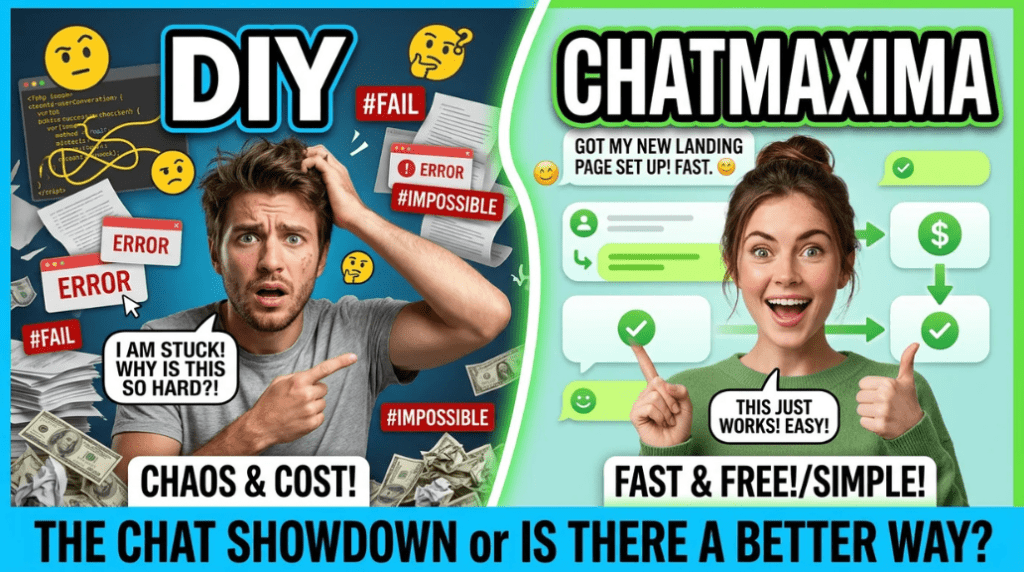
This post is a direct, numbers-first comparison of building your own OpenAI-powered chatbot versus using ChatMaxima. No hype. Just what it actually costs, how long it takes, and when each option genuinely makes sense for your business.
What “Building Your Own” Actually Involves
Most discussions of DIY chatbot development dramatically undersell the scope. The OpenAI API itself is straightforward — you pay per token, write a prompt, get a response. The hard parts are everything else.
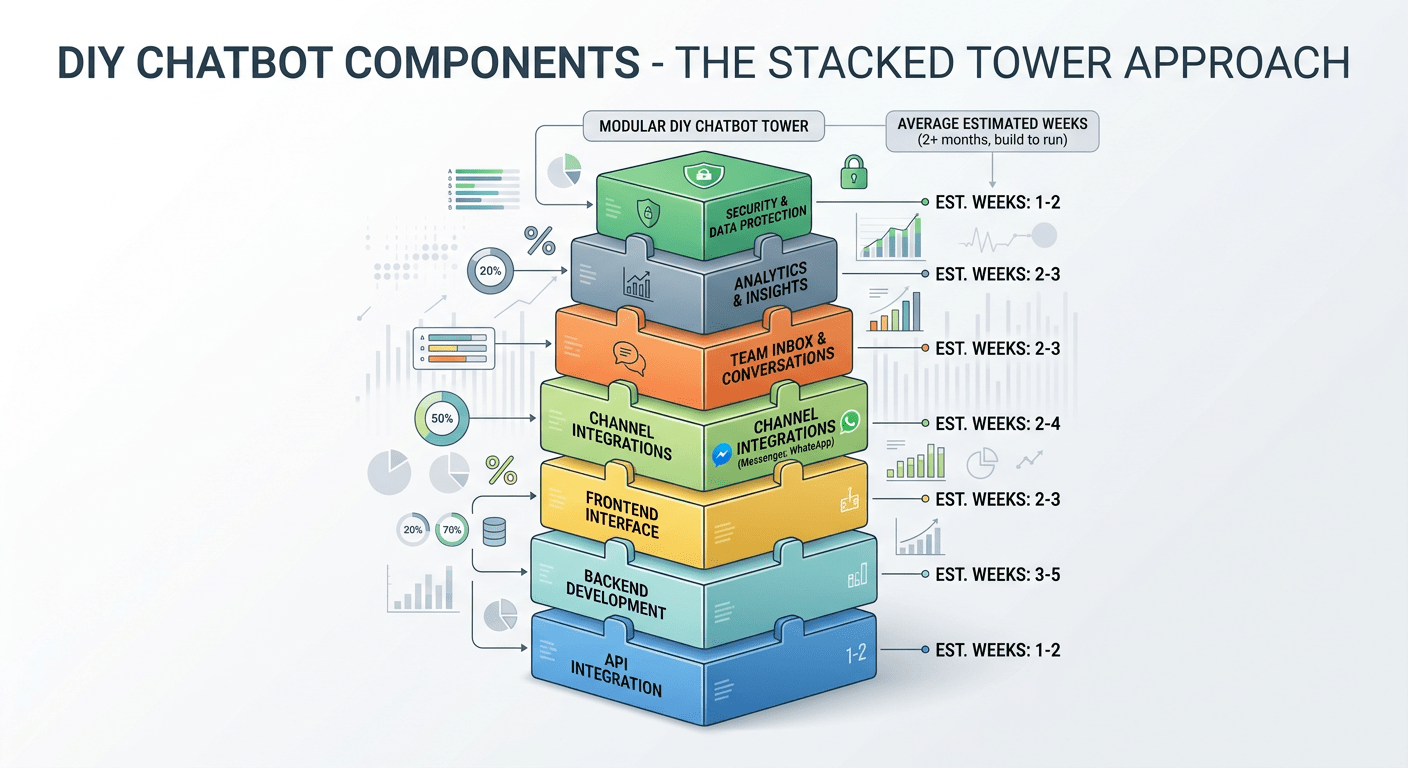
A production-ready customer support chatbot requires backend infrastructure (API server, database, session management), a frontend interface (chat widget or embedded UI), channel integrations (your website, WhatsApp, Instagram, email), a shared team inbox so human agents can take over, analytics to track performance, security and compliance measures, and ongoing maintenance as models change and bugs surface.
Building the API integration is maybe 5% of the total work. The other 95% is the infrastructure that makes it usable, reliable, and manageable at scale.
Here’s a rough inventory of what a production chatbot actually requires:
-
- Message routing and state management — tracking which user is in which conversation, across which channel, at which stage
- Knowledge base integration — connecting your docs, FAQs, and product content so the bot can answer accurately, not just generically
- Escalation logic — rules for when to hand off to a human agent, and how to do that without losing conversation context
- Rate limiting and error handling — what happens when OpenAI’s API returns a 429 or 500? Your system needs to handle failures gracefully
- Conversation logging and search — storing conversations for review, compliance, and training data purposes
- Webhook handling — receiving messages from WhatsApp, Instagram, and other channels, validating signatures, and routing events correctly
- Access control — different agents seeing different queues, admin controls, audit logs
Each of these is a small project in itself. Together, they represent months of engineering work before a single real customer conversation happens.
The Real Cost Breakdown: Year One
Let’s put concrete numbers on both options.
Building Your Own Chatbot
Developer salaries or contractor costs are the biggest line item. A mid-level backend developer in the US runs $80–$120K/year; a full-stack contractor capable of building this independently costs $80–$150/hour. Realistically, you need at least one backend developer, one frontend developer, and some DevOps involvement.
For a functional, multi-channel chatbot with a team inbox, plan for 2–6 months of development time with a two-person team. At contractor rates, that’s $25,000–$75,000 in development alone.
OpenAI API costs are often treated as the whole cost of a DIY build — but they’re actually a relatively small portion. GPT-4o costs $2.50 per million input tokens and $10 per million output tokens. GPT-4o Mini is cheaper at $0.60 per million input tokens and $2.40 per million output. For a small business handling 10,000 conversations per month with average message lengths, API costs typically land in the $200–$800/month range, or $2,400–$9,600/year.
Infrastructure (hosting, databases, CDN, monitoring) adds another $3,000–$12,000/year depending on scale and architecture choices.
Maintenance is the cost that surprises most teams. Every OpenAI model update, API change, or security vulnerability requires developer time. Budget $1,000–$1,500/month in ongoing engineering time — that’s $12,000–$18,000/year at minimum.
Security and compliance — SSL certificates, data encryption, GDPR compliance work, penetration testing — adds $2,000–$50,000+ depending on your industry and requirements.
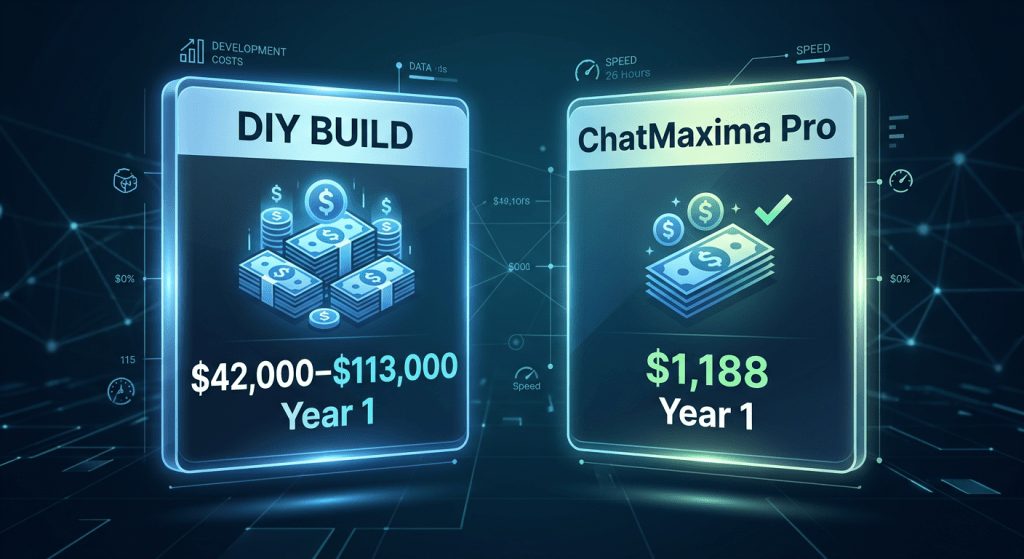
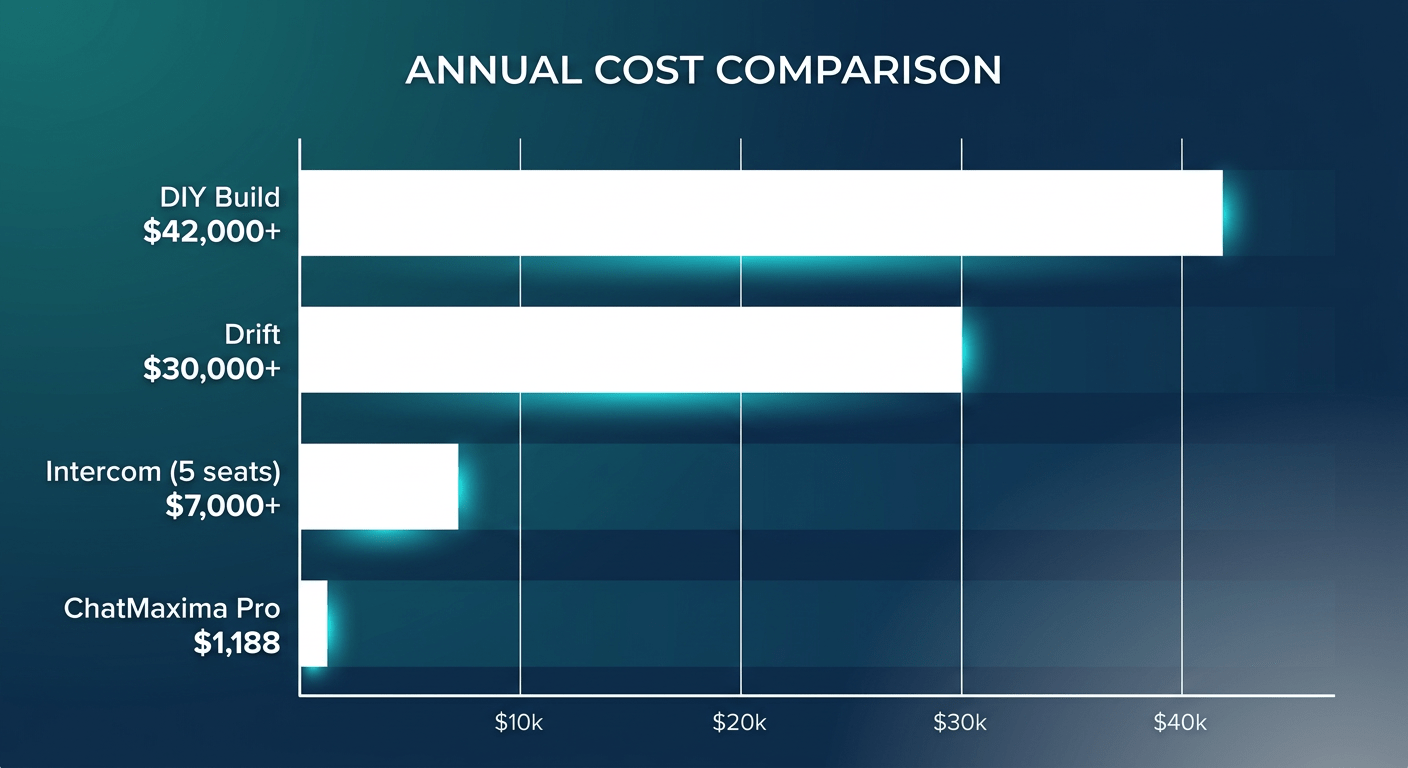
Add it up conservatively: $42,000 to $113,000+ in year one, with ongoing costs of $20,000–$40,000/year after that.
ChatMaxima
ChatMaxima’s pricing starts at $19/month for the Starter plan. The Pro plan at $99/month includes multi-channel support, shared team inbox, analytics, and CRM integrations. The Max plan at $299/month and Ultra at $499/month cover higher volumes and enterprise features.
For most small to mid-size businesses, ChatMaxima Pro costs $1,188/year — all features included, no per-seat fees, no per-resolution charges.
That’s a 35x–95x cost difference in year one.
Time to Launch: Hours vs Months
If you need a chatbot live this week, DIY is not an option.
Getting WhatsApp Business API access alone requires applying through Meta, completing business verification, and waiting 2–6 weeks for approval — before you write a single line of code. Building and testing the WhatsApp integration after approval adds another 4–8 weeks.
For each additional channel (Instagram, Facebook Messenger, your website widget, email), expect 4–8 weeks of integration work. A shared inbox for your support team takes 4–6 weeks. Basic analytics and reporting: 2–4 weeks. CRM integrations: 2–5 weeks each.
To reach feature parity with a platform like ChatMaxima, a DIY build typically takes 6–18 months and costs $80,000–$200,000 in total development investment.
With ChatMaxima, you connect your channels, configure your chatbot’s behavior, and go live in hours to one day. No application forms. No waiting for API approval. No deployment pipelines.
This isn’t just a convenience argument — it’s a business one. Every month your chatbot isn’t live is a month of customer queries handled manually, slower response times, and support team burnout.
To put the timeline gap in concrete terms:
FeatureDIY Build TimeChatMaximaLive website chatbot3–6 weeksSame dayWhatsApp integration6–10 weeks (incl. Meta approval)Same dayInstagram DM support4–8 weeksSame dayShared team inbox4–6 weeksIncludedAnalytics dashboard2–4 weeksIncludedCRM integration (HubSpot, etc.)2–5 weeks eachIncludedFull feature parity6–18 monthsDay one
If you’re in a competitive market, that 6–18 month gap is not a minor inconvenience. It’s a sustained competitive disadvantage.
Hidden Costs That Kill DIY Projects
The $42,000–$113,000 year-one estimate above is conservative. Several costs routinely get overlooked in initial planning.
Model migration costs. OpenAI regularly deprecates models and releases new ones. Each time GPT-4, GPT-4o, or their successor changes behavior or pricing, you’ll need developer time to update prompts, test regressions, and potentially refactor how you’re calling the API. Each migration typically costs $2,000–$9,000 in engineering time.
Security incidents. A single data breach that exposes customer conversation history can cost far more in remediation, legal fees, and reputational damage than the entire chatbot build. Proactive security work — regular audits, penetration tests, compliance certifications — runs $2,000–$50,000+ annually depending on your industry.
Developer opportunity cost. Every engineering hour spent maintaining your chatbot infrastructure is an hour not spent on your core product. For most businesses, that’s the most expensive hidden cost of all. At $1,000–$1,500/month in maintenance time, you’re spending $12,000–$18,000/year just to keep the lights on.
Total hidden costs: $15,000–$75,000+ per year, on top of the initial build.
Comparing Alternatives: Not Just DIY
If ChatMaxima weren’t an option, the other SaaS alternatives aren’t cheap either.
Intercom charges $79–$132 per seat per month, plus $0.99 per AI resolution. A team of five agents handling 1,000 AI resolutions per month is looking at $5,640–$9,420/year in seat fees alone, plus $990 in resolution fees.
Drift starts at $2,500/month — that’s $30,000/year before any add-ons.
Zendesk runs $55–$169 per agent per month, plus $1.50 per resolution for AI features.
ChatMaxima’s pricing model includes team members on all plans — no per-seat fees. The Pro plan at $99/month includes multi-channel support, shared inbox, and AI automation that competitors charge significantly more to unlock.
For businesses evaluating their options, the alternatives comparison covers the major platforms side-by-side.
Technical Complexity: What You’re Actually Signing Up For
Building on the OpenAI API is not the same as building a production chatbot system. Here’s what the technical work actually looks like.
Backend: You need an API server to handle incoming messages, maintain conversation context, call OpenAI, and return responses — all within acceptable latency. You need a database for conversation history, user sessions, and any knowledge base your bot references. You need queue management for high-traffic periods.
Frontend: A chat widget that works across browsers, loads fast, and doesn’t break on mobile. Or, if you’re building for WhatsApp, you skip the widget — but then you need the Meta approval process and WhatsApp Business API integration.
Multi-channel routing: When a user starts a conversation on your website and then messages on WhatsApp, how does your system handle that? Building unified conversation history across channels is genuinely hard.
Human handoff: When the bot can’t answer, how does it transfer to a human agent? The shared inbox, notification system, agent assignment logic, and conversation takeover flow each require significant engineering.
Prompt management: Your bot’s behavior is defined by prompts. You’ll need a way to update, version, and test prompts without redeploying code every time.
None of this is insurmountable — but none of it is free. ChatMaxima handles all of it. The integrations page shows the full list of channels and tools that connect without any development work.
When DIY Actually Makes Sense
DIY chatbot development isn’t always the wrong choice. There are specific situations where building on the OpenAI API is the right call.
The chatbot is your core product. If you’re building a product where the AI assistant is the thing you’re selling — not just a support tool — you need the control that comes with a custom build. A platform like ChatMaxima is built for customer support and engagement automation, not for creating AI products you’ll resell.
You have deep proprietary data requirements. If your chatbot needs to be trained on highly sensitive internal data that can’t touch third-party infrastructure, a custom build with full data control may be necessary. That said, most businesses are better served by fine-tuning or retrieval-augmented generation on a platform that supports it.
You have an existing AI/ML team. If your engineering team already includes machine learning engineers who work with OpenAI’s API daily, the marginal cost of extending their work to build a chatbot is much lower than the estimates above.
You need 100% custom UX. If your chatbot experience needs to deeply integrate with a proprietary design system, match a specific aesthetic that no widget can replicate, or operate in a context where a standard chat interface doesn’t work, custom is the only path.
For most businesses — especially those whose core product is not AI — none of these conditions apply. The ROI calculation is almost always in favor of a platform.
What About Prompt Engineering and AI Quality?
One concern teams raise when evaluating platforms: “Will we have enough control over how the AI behaves?”
It’s a fair question. With a raw OpenAI API integration, you control every aspect of the system prompt, the retrieval logic, the temperature settings, and the fallback behavior. That control comes with responsibility — you’re responsible for making it work, and for fixing it when it doesn’t.
ChatMaxima provides prompt customization, knowledge base configuration, and behavior controls that cover the vast majority of real-world support use cases. You can define your bot’s persona, restrict it to specific topics, set escalation rules, and train it on your documentation.
What you don’t get is raw API access for highly experimental use cases — multi-step reasoning chains, custom retrieval architectures, or deeply integrated pipelines that read from proprietary internal systems. For standard customer support, onboarding, and lead qualification flows, the platform’s controls are more than sufficient.
The practical question is: does your use case require fine-grained API control, or does it require a chatbot that answers customer questions accurately and routes complex ones to humans? For the second scenario, a platform wins on every metric.
The Honest Question: What Is Your Team’s Time Worth?
There’s a final consideration that numbers alone don’t capture.
When your backend developer spends six months building a chatbot instead of your core product, what did you not ship? What customer problem went unsolved? What revenue opportunity did you miss?
Engineering time is almost universally the most constrained resource at growing companies. Spending it on infrastructure that a $99/month platform already provides is a choice worth examining carefully.
The honest case for ChatMaxima isn’t that it’s technically superior to a custom OpenAI integration — a well-built custom system can do more. The case is that for the vast majority of businesses, the return on that engineering investment is far lower than the return on building your actual product.
A useful mental model: would you build your own payment processing system instead of using Stripe? Would you build your own email delivery infrastructure instead of using Postmark or SendGrid? The answer for most businesses is no — because the cost of building and maintaining those systems exceeds the value of the control they’d provide.
Customer support chatbots sit in the same category. The infrastructure problem is solved. The build-vs-buy decision has a clear answer for most companies.
Getting Started with ChatMaxima
If you’ve been running manual support, using a basic chatbot that can’t handle complex queries, or evaluating whether to build or buy, ChatMaxima is worth testing before committing to either the DIY path or a more expensive platform.
The Starter plan at $19/month lets you validate whether an AI chatbot actually reduces your support load before scaling up. The Pro plan at $99/month unlocks multi-channel deployment, the shared team inbox, and the full integration library.
Explore ChatMaxima’s pricing to see which plan fits your current volume. For a broader view of how ChatMaxima stacks up against the major alternatives on the market, the alternatives page covers Intercom, Drift, Zendesk, and others in detail.
The Bottom Line
Building a chatbot with the OpenAI API is a legitimate technical project. But “legitimate technical project” and “right business decision” are different things.
For year-one costs of $42,000–$113,000, 2–6 months of development time, and ongoing maintenance overhead — versus $1,188/year and a one-day setup — the math has to be unusually favorable for DIY to win.
If your chatbot is your product, build it. If your chatbot is a support tool, buy it. That distinction is where most of the decision lives.
ChatMaxima exists for the second scenario. It’s built to get you from “we need a chatbot” to “the chatbot is live and handling queries” in a day, not a quarter — and to keep running reliably without a dedicated engineering team behind it.