Most help centers already contain the answer to most questions. The problem is that customers cannot find it. In a Gartner survey of 5,728 customers, only 14% of service issues were fully resolved in self-service, and even for issues customers called “very simple” the figure was just 36%. The most common reason self-service failed: in 43% of cases, customers could not find content relevant to their issue (Gartner, 2024).
A knowledge base chatbot closes that gap. The customer asks in their own words, the bot finds the right passage in your articles, documents and website, and answers in a sentence or two. When it does not know, it says so and hands the conversation to a person.
This guide shows how a knowledge base chatbot works, what content to give it, how to build one in a single afternoon, and how to keep it accurate after launch. If you run an agency, the last section covers how to sell it as a monthly service.
What a Knowledge Base Chatbot Is (and How It Differs from an FAQ Bot)
A classic FAQ chatbot matches keywords or buttons to fixed answers. It works until a customer phrases a question in a way you did not predict, and then it either guesses or loops back to the menu.
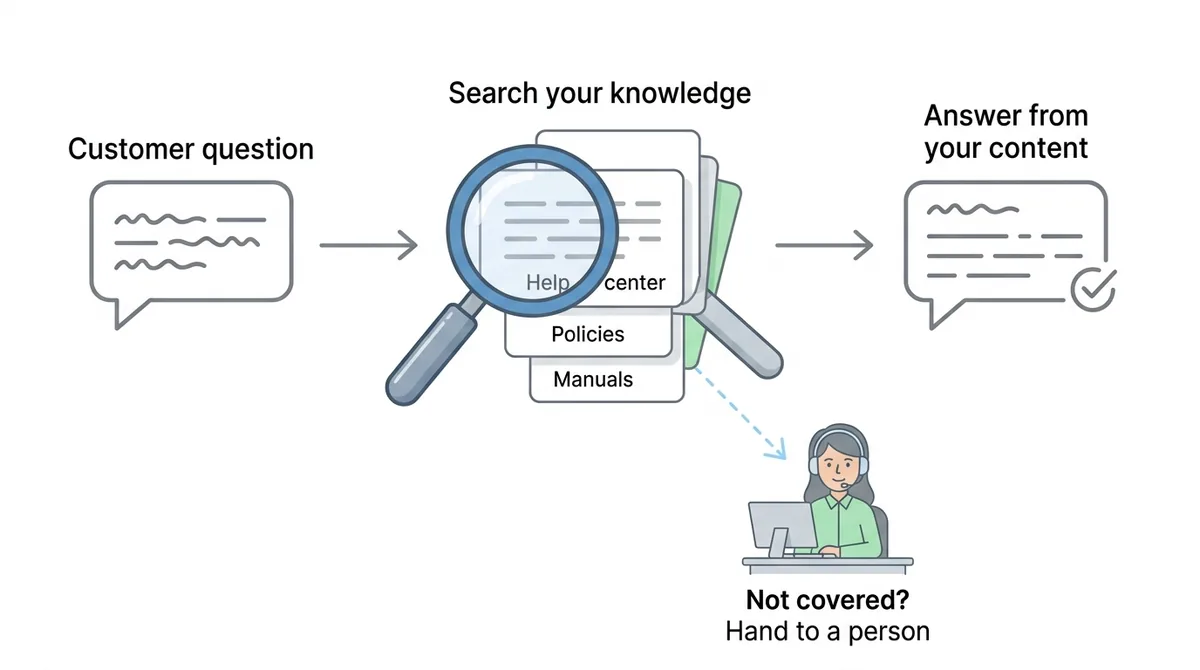
A knowledge base chatbot works differently. It uses a pattern called retrieval-augmented generation, which is why you will also hear it called a RAG chatbot:
- The question comes in, in whatever words the customer uses.
- The bot searches your content for the passages most likely to contain the answer, the same way a search engine ranks pages.
- A language model writes the reply using only those passages, in a short conversational answer.
- If nothing relevant is found, the bot says it does not have that information and offers a person instead.
The difference matters in practice. An FAQ bot needs you to predict every question. A knowledge base chatbot needs you to have written the answer down once, somewhere in your help center, policy pages or manuals. Rephrasing, typos and questions in another language are all handled by the model, not by your keyword list.
It is also different from pasting your docs into a general chatbot. A general model answers from everything it learned on the internet. A knowledge base chatbot is instructed to answer from your content only, which is what makes its answers trustworthy enough to put in front of customers.
Why “Answer Only From Our Content” Matters
In 2024 a Canadian tribunal ordered Air Canada to compensate a passenger after its website chatbot told him he could claim a bereavement fare retroactively, which the airline’s actual policy did not allow. Air Canada argued the chatbot was responsible for its own statements. The tribunal rejected that, noting that a customer has no reason to know which part of a company’s website is accurate and which is not (ABA Business Law Today, 2024).
The lesson for anyone building a support agent is simple: whatever your bot says, you said. Three rules follow from it:
- Ground every answer in approved content. The bot answers from your knowledge base, not from general knowledge.
- Prefer “I don’t know” over a guess. A handoff costs you a few minutes of an agent’s time. A wrong policy answer can cost you a refund, a complaint or worse.
- Keep one source of truth. If your refund policy appears in three places with three different windows, the bot will eventually quote the wrong one.
What to Feed Your Knowledge Base Chatbot
The quality of a knowledge base chatbot is roughly the quality of the content behind it. Before you build anything, gather sources in this order of value:
- Help center articles. These are already written to answer customer questions, which makes them the best possible source. One article per topic, with a clear title, retrieves far better than one long page covering ten topics.
- Policy and pricing pages. Shipping, returns, refunds, warranties, plans. These are the questions customers ask most and where a wrong answer hurts most.
- Product documentation and manuals. PDFs, Word files and spreadsheets, especially setup guides and troubleshooting steps.
- Exact question and answer pairs. For anything that must be answered word for word (a legal disclaimer, a price, an emergency contact), write the Q&A pair yourself so the bot never paraphrases it.
And leave these out:
- Outdated pages and old versions of policies. If it is not true today, the bot should not see it.
- Internal notes and agent macros that were never meant for customers.
- Marketing pages full of claims but short on facts. They dilute retrieval with words like “seamless” and “powerful” and rarely answer a real question.
- Duplicates. Two near-identical pages compete with each other and can produce mixed answers.
A quick way to find gaps: export your last 100 support tickets or chats, list the 20 most common questions, and check that each one has a clear written answer somewhere in your sources. Gartner recommends the same habit for self-service in general: have agents write knowledge content as part of resolving issues, so the help center grows from real questions.
Build It in One Afternoon: a Four-Hour Plan
Here is how the build breaks down with ChatMaxima. The same plan works on most platforms; the names of the screens will differ.
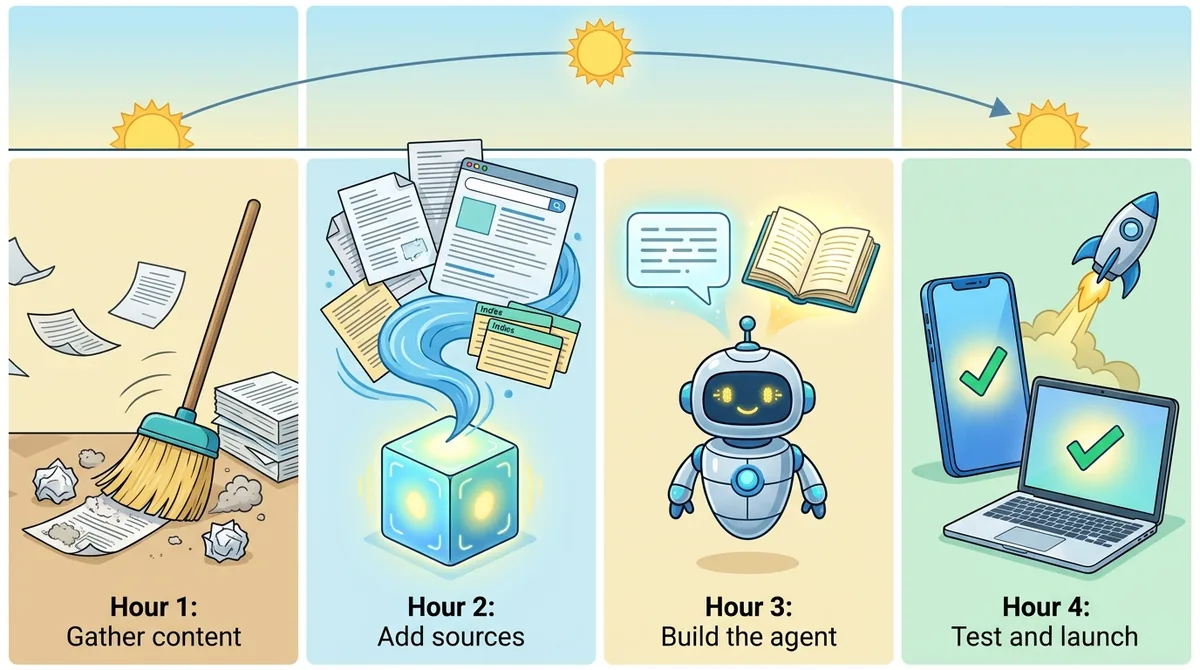
Hour 1: Gather and clean the content
Pull together the help center articles, policy pages and documents from the previous section. Delete or fix anything outdated, merge duplicates, and write the Q&A pairs for answers that must be exact. This hour does more for answer quality than any setting you will touch later.
Hour 2: Create the knowledge sources
In ChatMaxima, open Knowledge, then Knowledge Source, and add your content. You can combine several source types:
- Website: enter your site address and ChatMaxima finds your pages (up to 40 at a time) and lets you choose which ones to include, or import a list of exact URLs. Include help center and policy pages, and skip the blog and careers pages.
- Documents: upload PDF, Word (DOCX), Excel (XLS, XLSX) or text files.
- Q&A: type question and answer pairs, or import them from a spreadsheet.
- Help center articles: if you publish your help center with ChatMaxima’s Knowledgebase, each article you save is added to its knowledge source automatically, so the bot learns new articles as you publish them.
Training a source usually takes 2 to 5 minutes, depending on how much content it holds. Once a source is trained, use Edit Training Content to see exactly what the bot learned from each page and correct anything that came through badly, such as a navigation menu captured as text.
Hour 3: Build the agent
In Studio, create a bot and add a MaxIA AI Agent block. Attach the knowledge sources you created, pick the AI model, and write a short system prompt. The prompt is where the “answer only from our content” rule lives. A starting point:
You are the support assistant for Acme Home. Answer questions using only the
knowledge sources provided. Keep answers to 2-4 sentences and link to the
relevant help article when there is one.

If the knowledge sources do not contain the answer, say you don't have that
information and offer to connect the customer with the support team.
Never guess prices, delivery dates, refunds or policy exceptions.
Ask one clarifying question if the request is ambiguous.
Reply in the language the customer writes in.
Which AI model should you choose? For a support agent, speed and instruction-following matter more than raw creativity. ChatMaxima’s built-in MaxIA models need no API key, and you can connect your own OpenAI, Gemini, Groq or other provider account instead. Start with a fast, low-cost model: answers come from your content, so a smaller model that follows the “only from our sources” rule beats a larger one that improvises. Move up a tier only if testing shows it misreads complex articles.
Then add the safety net: a Talk to Agent block for when the customer asks for a person or the AI cannot help, and a Create Ticket block for issues that need follow-up outside the chat (more on both below).
Hour 4: Test with real questions, then launch
Take the 20 common questions from your ticket export and ask each one, phrased the way customers actually phrase them, typos included. Then ask five questions your content does not cover and confirm the bot hands off instead of inventing an answer. For every wrong or weak answer, fix the content first and the prompt second: most bad answers trace back to a missing or unclear article.
When the answers hold up, connect the bot to the channels your customers use: the website chat widget, WhatsApp, Instagram, Messenger and others. The same knowledge base serves all of them, so you maintain one set of content.
Handoff and Tickets: What Happens When the Bot Does Not Know
A support agent that cannot hand off is a trap, and customers notice within two messages. Design the exits before launch:
- Talk to a person. The Talk to Agent block moves the conversation into your shared inbox, where an agent picks it up with the full chat history in front of them, so the customer never repeats themselves.
- Create a ticket. For problems that need investigation (a damaged order, a billing error, a bug), the Create Ticket block files a ticket in your helpdesk with the conversation attached through the
{sys_current_conversation}variable, and a short message after it tells the customer the request has been logged. - Outside office hours. Be explicit: “Our team is offline until 9 AM. I’ve logged your request and they’ll reply by email.” An honest wait beats a silent one.
The handoff rules belong in the system prompt as well: anything about refunds, cancellations, account access or legal matters goes to a person, even if an article exists.
Keeping It Accurate After Launch
A knowledge base chatbot is only as current as its content, so give it a simple maintenance routine:
- When content changes, re-train the source. Update the article or page, then add that page to the knowledge source again; the new version replaces the old one. Articles published through ChatMaxima’s Knowledgebase update automatically when saved.
- When content is retired, remove it from the source too. Unpublishing a page does not make the bot forget it. Delete the URL from the knowledge source so old answers cannot come back.
- Review unanswered questions weekly. Every “I don’t have that information” is a missing article. Write it, add it, and the same question is answered next week.
- Turn repeat tickets into articles. If agents answer the same question three times in a week, it belongs in the help center.
Five Mistakes That Make Knowledge Base Chatbots Fail
Most disappointing support bots fail for the same handful of reasons, and none of them is the AI model:
- Training on everything. Pointing the bot at a whole website, blog and careers pages included, buries the useful answers under noise. Curate the sources.
- No way out. If a frustrated customer types “human” and gets another article, you have built a wall, not a support agent. Make the handoff one message away.
- Letting it answer policy questions loosely. Refunds, cancellations and exceptions need exact wording. Put them in Q&A pairs, and route edge cases to a person.
- Launching without real test questions. Testing with questions you wrote yourself proves only that the bot can answer you. Use real customer phrasing from your tickets.
- Treating launch as the finish line. Products, prices and policies change. A bot trained once in January will be confidently wrong by June unless someone owns the content.
How to Measure a Knowledge Base Chatbot
Track a handful of numbers from the first week, and compare them with where you started:
- Resolution rate: conversations that end without a handoff or ticket. Gartner’s 14% self-service baseline is a useful reminder of how low the starting point usually is.
- Handoff rate: conversations passed to a person. A falling handoff rate with steady satisfaction means the content is filling gaps.
- Unanswered questions: how often the bot says it does not know, and on which topics. This is your content to-do list.
- Accuracy spot checks: read 20 random conversations a week and mark any answer that was wrong or incomplete.
- Customer satisfaction: a one-question rating at the end of the chat.

The direction of travel is clear. Gartner predicts that by 2029, agentic AI will resolve 80% of common customer service issues without human intervention (Gartner, 2025). For more numbers on where AI support stands today, see our roundup of AI customer support statistics for 2026.
Selling a Knowledge Base Chatbot as a Service
If you build for clients, a help center support agent is one of the easiest AI services to explain and to renew, because the client already pays people to answer the questions the bot now handles. It appears as idea 17 in our list of AI agent business ideas, priced at $750 a month.
A package that works well:
- Setup: content audit, knowledge sources, the agent, handoff and ticket routing, and testing against the client’s real tickets.
- Monthly retainer: weekly review of unanswered questions, new articles written from them, re-training after the client’s site changes, and a short monthly report on resolution and handoff rates.
- One clear promise: measure the client’s starting point in week one and report against it, rather than promising a resolution percentage up front.
The retainer is where the value compounds. Every month of unanswered questions turned into articles makes the bot better and the client’s help center more complete. For the bigger picture of moving support from tickets to AI-first conversations, read our guide to AI-first customer support.
Start Your Knowledge Base Chatbot This Afternoon
A knowledge base chatbot does not need a new help center or a data science team. It needs the answers you have already written, a rule that it answers only from them, and a clean way to hand off when it cannot. Gather your best content, build the agent, test it against your real tickets, and launch it on the channels your customers already use.
See ChatMaxima’s plans and build your first knowledge base chatbot from your own help center today.