
Restaurants run on thin margins, and 2025 made them thinner: 42% of US operators said their restaurant was not profitable last year (National Restaurant Association, 2026). Meanwhile every delivery app order gives away a commission of 15% to 30% of the subtotal, and the phone keeps ringing during the dinner rush with questions someone has already answered a hundred times.
Most AI for restaurants guides talk about the back of house: inventory forecasting, labor scheduling, waste tracking. This one is about the front of house, the part guests touch. A WhatsApp AI agent that takes reservations, takes orders directly with a payment link, answers menu questions and asks for reviews at the right moment.
Only about 26% of restaurant operators use AI tools today (National Restaurant Association, 2026), so the opportunity is wide open, both for restaurant owners and for agencies that want to sell this as a service.
What AI for Restaurants Actually Does (Front of House vs Back of House)
AI in restaurants splits into two very different jobs:
- Back of house: demand forecasting, inventory, prep lists, staff scheduling. These tools work on your sales data and usually come from your POS or inventory vendor.
- Front of house: the conversations. Bookings, orders, “are you open on Sunday?”, “is the biryani spicy?”, “where do I park?”, and the review you hope the guest leaves afterwards.
Front-of-house AI is the faster win for an independent restaurant because it needs no new hardware and no data history. It needs a WhatsApp number, your menu and a few hours of setup. It also lives in the channel your guests already use: in many markets WhatsApp is how people message a business, and a message thread is easier for a busy guest than a booking form or a phone call that goes unanswered at 8 PM.
The rest of this guide covers five front-of-house jobs an AI agent can take off your staff, in the order most restaurants should add them.
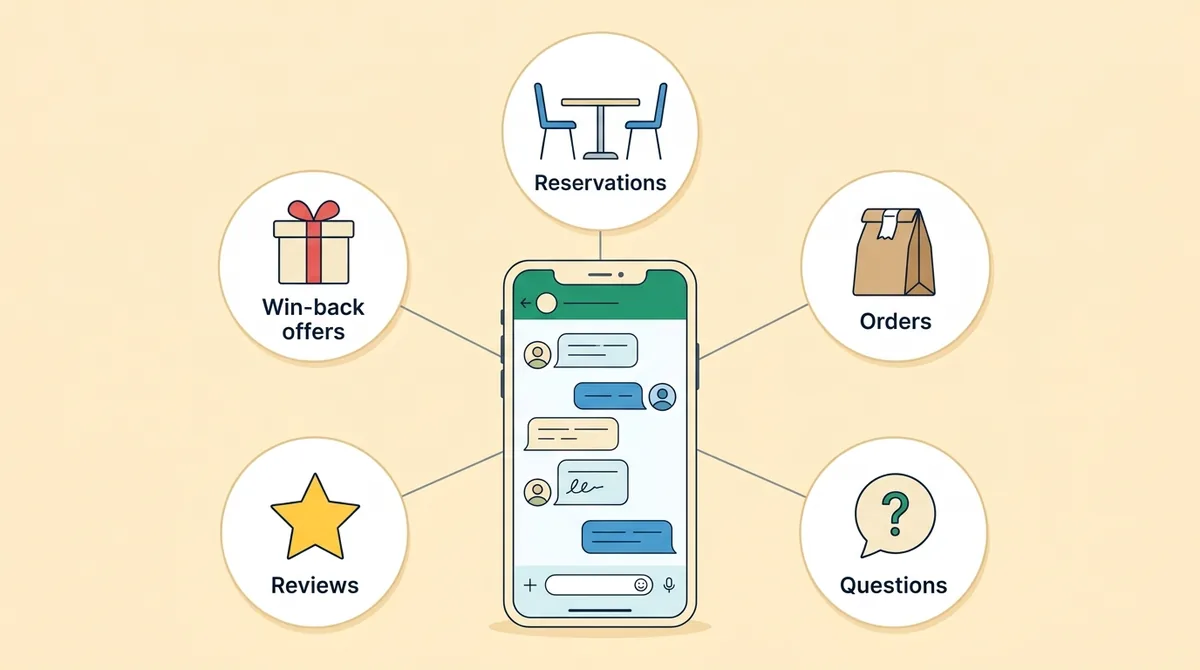
1. Reservations on WhatsApp
A guest messages “table for four tomorrow at 8?” and the agent takes it from there. On WhatsApp the cleanest way to collect booking details is a WhatsApp Flow, a small form that opens inside the chat with fields for date, time, party size, name and notes (a birthday, a high chair, a window seat). The guest taps through it in seconds, without leaving WhatsApp.
What happens next depends on how you manage tables today:
- If you take bookings in a reservation system or a book at the host stand, the agent collects the request and a staff member confirms it from the shared inbox. The guest gets a clear answer within minutes instead of a voicemail.
- If you track bookings in a Google Sheet, the agent can append each request as a row so the host stand sees it immediately, and confirm automatically for the time slots you mark as open.
Either way, be honest with guests about what is confirmed: “Thanks, we have your request for 8 PM, and we’ll confirm within 15 minutes” is better than an automatic “You’re booked!” for a table you do not have.
Then cut no-shows with a reminder on the day, with an option to cancel so the table can be released. Our guide to appointment reminder texts has ready-to-use templates and the timing that works; a “see you tonight at 8” message a few hours before works well for restaurants.
2. Takeaway and Delivery Orders Without the Commission
Delivery apps bring discovery, and many restaurants should stay on them. But every order from a regular customer through an app pays the app’s commission. On DoorDash in the US, delivery commission is 15%, 25% or 30% of the subtotal depending on the plan (DoorDash, 2026).
The math on repeat customers is simple. A regular who orders a $30 meal every week through a plan with 25% commission costs the restaurant $7.50 per order, or about $390 a year, for a customer the restaurant already has. Moving that regular to direct WhatsApp ordering keeps most of that margin, minus a card or UPI payment fee of a few percent.
A WhatsApp ordering agent works like this:
- The guest browses the menu as a WhatsApp catalog inside the chat, with photos and prices, and adds items to a cart.
- The agent confirms the order, asks for pickup time or delivery address, and handles notes (“no onions”).
- It sends a payment link: a card checkout, a UPI payment link or a UPI QR code, depending on your market and payment provider.
- The order reaches the kitchen: it lands in your shared inbox with a notification on the team’s phones, and can be copied to an order email or a Google Sheet.
- The guest gets an update when the order is ready or out for delivery.
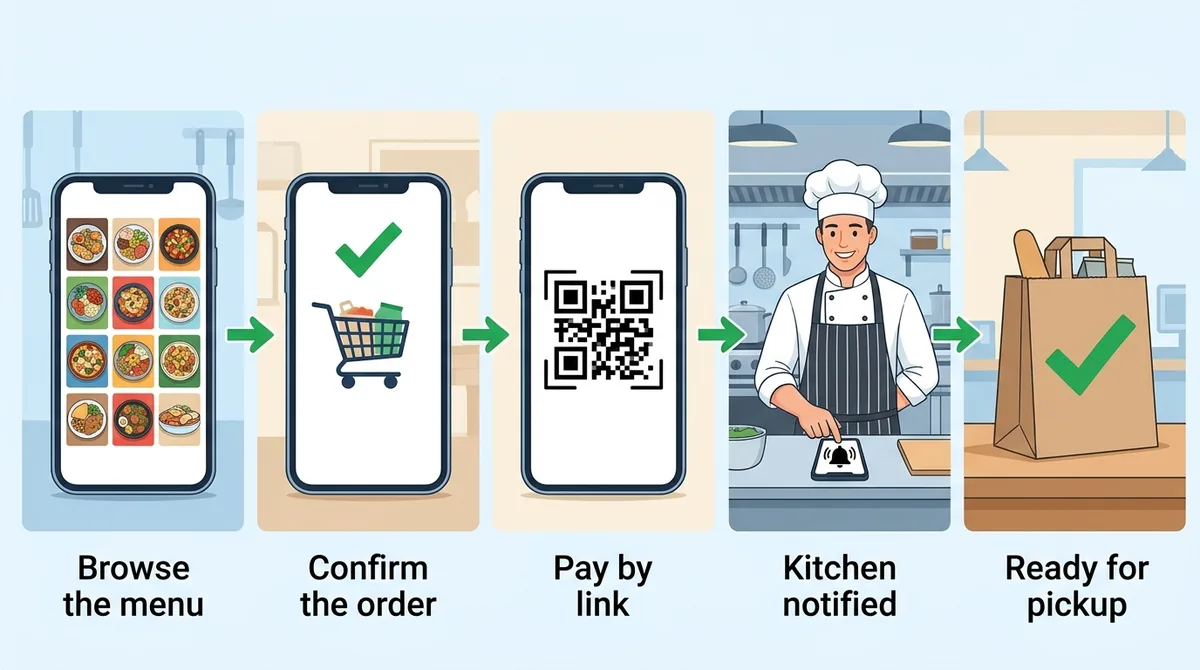
For the full walkthrough of catalogs, carts and payment links, see our guide to WhatsApp commerce. The point for restaurants is not to replace the delivery apps but to give regulars a direct, cheaper way to order, and to put a “order directly on WhatsApp” card in every takeaway bag.
3. Answering the Questions Staff Answer 50 Times a Day
Opening hours, the menu, vegetarian and vegan options, parking, whether you take large groups, whether the terrace is open. These questions arrive at the worst possible moment: during service.
Train the agent on your menu, your FAQ and your policies, and it answers them in seconds in the guest’s own language. A few details make the answers better:
- Keep the menu as text, not just an image. An AI reads a text menu with dish names, descriptions and prices far more reliably than a photo of a printed page.
- Send a map pin for “where are you?” A location message opens straight in the guest’s maps app.
- Hand off anything risky. Allergy questions are the clearest example: the agent can share what the menu says, but anything about cross-contamination or a severe allergy should go to a person who can check with the kitchen. Put that rule in the agent’s instructions.
4. Reviews: Ask Everyone, at the Right Moment
Reviews decide where people eat. In BrightLocal’s 2026 survey, 97% of consumers read reviews for local businesses, 68% will only use a business rated four stars or higher, and 74% only care about reviews from the last three months (BrightLocal, 2026). Recency matters as much as the rating, so a steady flow of new reviews beats a big push once a year.
The best moment to ask is shortly after the meal, when the experience is fresh. For takeaway, an hour or two after pickup works well; for dine-in, the evening of the visit or the next morning.
One rule is non-negotiable: ask every guest, not just the happy ones. Google’s review policy does not allow businesses to “selectively solicit positive reviews” or to discourage negative ones, and it does not allow incentives such as a discount for a review (Google, 2026). The common “only send 5-star guests to Google” trick, known as review gating, breaks that policy and can get reviews removed.
What you can do within the rules:
- Send the same review link to every guest, with a short, friendly message and no reward attached.
- Also give guests a private way to reach the manager, such as “reply here if anything wasn’t right”, so a complaint reaches you quickly. That is an extra option for every guest, not a filter that decides who gets the review link.
- Reply to reviews, good and bad. It shows new guests that someone is listening.
5. Win-Back Offers and Regulars
Your WhatsApp contact list is a list of people who have already eaten your food. That makes it more valuable than any ad audience. Use it carefully:
- Segment by behavior: regulars, people who have not ordered in 60 days, people who only order on weekends.
- Send offers to people who opted in to promotions, using approved WhatsApp marketing templates. Each one is billed by Meta per message, so a targeted message to 300 lapsed regulars beats a blast to everyone.
- Make the offer specific to the segment: a weekday lunch deal for office workers, a family meal for weekend orderers.
This is also where a simple restaurant CRM comes from: every booking, order and conversation builds a contact record with name, phone and history, without anyone typing it in.
Message Templates Restaurants Can Copy
Short, specific messages work best. Swap the details in braces and keep each one to a single action.
Reservation request received
Thanks {Name}! We have your request for {4} people on {Fri, 24 Oct} at {8:00 PM}. We’ll confirm within 15 minutes.
Reservation confirmed, with a reminder
See you tonight at {8:00 PM}, {Name}. Your table for {4} is ready. Plans changed? Reply CANCEL and we’ll release it for another guest.
Order confirmed
Got it, {Name}: {2x Chicken Biryani, 1x Mango Lassi}. Total {$28.50}. Pay here to confirm: {link}. Ready for pickup at {7:15 PM}.
Order ready
Your order is ready at the counter, {Name}. Show this message at pickup. Enjoy!
Review request
Thanks for ordering from {Spice Route}, {Name}! If you have a minute, we’d love a review: {Google review link}. And if anything wasn’t right, just reply here and the manager will sort it out.
Win-back offer (opted-in guests only)
We miss you, {Name}! This week only, your favorite {Paneer Tikka} comes with a free dessert on direct orders. Order here: {link}
Notice what the review request does not say: no discount for a review, and no “if you loved it” condition. It goes to every guest in the same words.
What It Costs to Run
WhatsApp pricing has three parts that matter for a restaurant:
- Guest-initiated chats (bookings, questions, orders the guest starts) are answered with service messages. Meta includes 1,000 free service messages per phone number each month, then charges a small per-message rate.
- Utility templates you send first, such as “your order is ready” or a booking reminder outside the 24-hour window, are billed per message at the utility rate for the guest’s country.
- Marketing templates (win-back offers) cost more per message, which is why segmenting matters.
For most independent restaurants, the bill is small next to one week of app commissions. Track it monthly and compare it with the commission saved on direct orders, so the owner sees the net result.
How to Build It on ChatMaxima
Here is how the five jobs map to ChatMaxima’s building blocks, so you can see what a working setup involves:
| Job | Building blocks |
|---|---|
| Reservations | WhatsApp Flow form, Google Sheet row, Talk to Agent for confirmation |
| Orders | WhatsApp catalog and cart, Stripe, Razorpay or PayU payment links (UPI QR on PayU), Send Email to the kitchen |
| Questions | MaxIA AI Agent with a knowledge source of the menu and FAQ, Show Location for directions |
| Reviews | Smart Delay after pickup, then a message with the review link and a “reply here” option |
| Win-back | Contact segments and WhatsApp marketing broadcasts to opted-in contacts |
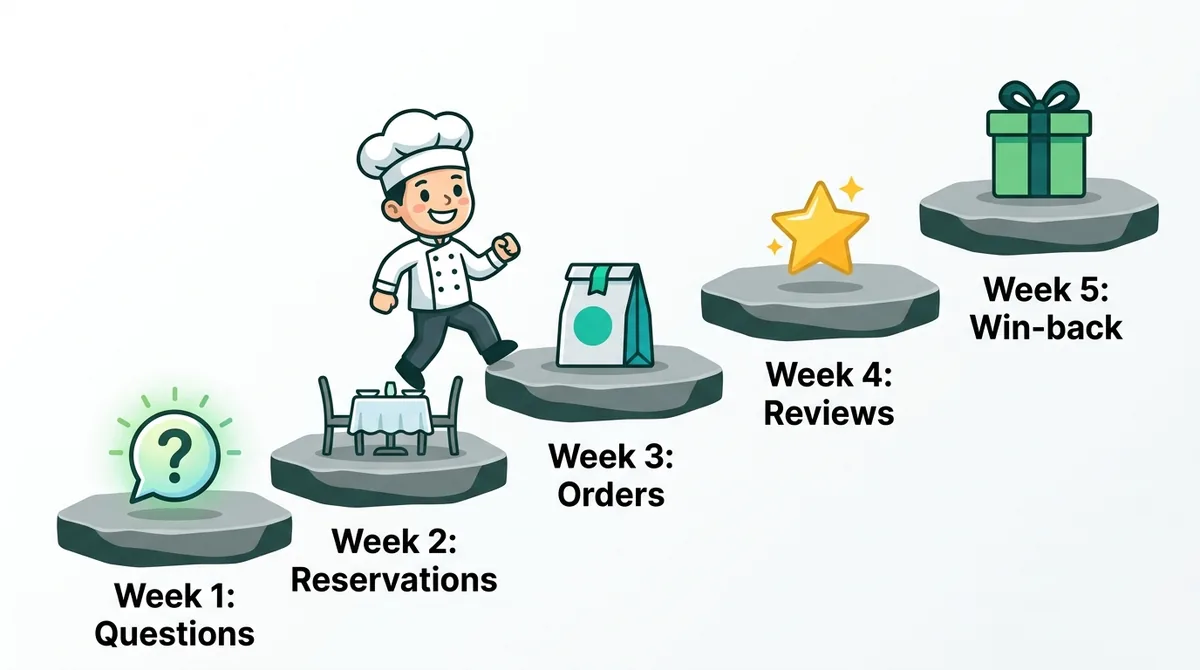
A sensible rollout is one job per week. Start with questions and reservations, because they save staff time from day one and need no payment setup. Add ordering once the catalog and payment links are tested end to end, then switch on review requests, and only then start win-back broadcasts. For a wider look at how chains such as Burger King and Domino’s are using conversational AI, read how restaurants use AI chatbots.
Two honest limits to plan around. The agent is not a table-management system: it does not see your floor plan or hold tables by capacity, so it collects and confirms requests against your existing system or sheet. And it does not replace your POS: orders reach the team through the inbox, email or a sheet, so make sure someone owns the order queue during service.
Four Mistakes to Avoid
- Auto-confirming tables you cannot guarantee. One double-booked Saturday table costs more goodwill than a week of fast replies earns. Confirm against your real availability.
- A photo-only menu. The agent cannot answer “do you have gluten-free pasta?” reliably from a picture. Keep a text version of the menu in its knowledge source and update it with every price change.
- Nobody watching the order queue. Direct orders only save money if they are picked up as fast as app orders. Assign one person per shift to the WhatsApp inbox.
- Blasting offers to everyone. Marketing messages are billed per message and unwanted ones get your number blocked or reported. Send fewer, better-targeted offers to guests who asked for them.
Selling AI to Restaurants as a Service
If you run an agency or freelance, restaurants are a good first niche. Every restaurant has the same five problems, the setup is repeatable, and the owner can see the result in their inbox within a week. It appears as idea 6 in our list of AI agent business ideas, priced at around $300 a month per restaurant. Margins in the industry are thin, so price for volume and keep the setup simple.
A package that sells:
- Setup: WhatsApp number, menu as a catalog and as text for the AI, reservation Flow, payment links, review request, staff training on the inbox.
- Monthly service: menu and price updates, seasonal specials, one targeted win-back campaign, and a short report.
- The report owners care about: direct orders and their value, commission saved compared with app orders, reservations taken on WhatsApp, and new reviews this month.
Lead with the commission math. An owner who sees “your 40 regulars cost you about $1,200 a month in app commissions” understands the value faster than any feature list.
Start With the Questions Your Staff Answer Every Night
The best AI for restaurants is the kind your guests never notice as AI: a quick answer about Sunday hours, a table booked in four taps, a takeaway order paid in the chat, and a friendly review request the next morning. None of it needs new hardware, and all of it runs on WhatsApp, where your guests already are.
Start with the questions and reservations, add direct ordering for your regulars, and ask every guest for a review. See ChatMaxima’s plans to set up your restaurant’s WhatsApp agent this week.