

WhatsApp Business Calling has quietly become one of the most asked-about features on the WhatsApp Business Platform. Customers can tap a call icon and ring your business over WhatsApp, and your business can call customers back, all inside the same thread where the conversation started. No phone line, no separate dialer, no “please hold while we transfer you to a different channel.”
But the moment teams start planning a rollout, the same question surfaces: what does WhatsApp Business Calling actually cost? The honest answer is that the per-minute rate card is the easy part. The numbers most businesses get wrong are the ones that never appear on a rate card: permission mechanics, eligibility requirements, and the difference between the calls you pay for and the calls you do not.
This guide breaks down WhatsApp Business Calling pricing as it stands in mid-2026, from billing pulses to volume tiers to the practical costs of getting a number call-ready. It comes from real production experience running calling on the platform, not just a read-through of the docs.
The Two Kinds of Calls, and Only One Is Billed
Everything about calling costs starts with one distinction:
User-initiated calls are free. When a customer taps the call button and rings your business, Meta charges nothing, regardless of call length. Inbound voice is effectively a free support channel on top of your existing WhatsApp API number.
Business-initiated calls are billed. When your business places an outbound call to a customer, per-minute charges apply once the customer answers.
This asymmetry should shape your strategy before any rate card does. If your use case is “let customers reach us by voice,” calling costs you nothing per call. The billing conversation only matters when you want to dial out: sales callbacks, appointment confirmations, delivery coordination, proactive support.
There is a third cost hiding between the two: call permission requests. Business-initiated calls require the customer’s explicit opt-in, requested through an interactive message. If you send that permission request inside an open 24-hour customer service window, it costs nothing. If you need a template message to request permission outside the window, standard per-message template pricing applies. It is a small number, but at campaign scale it belongs in your math.
How Billing Actually Works: 6-Second Pulses
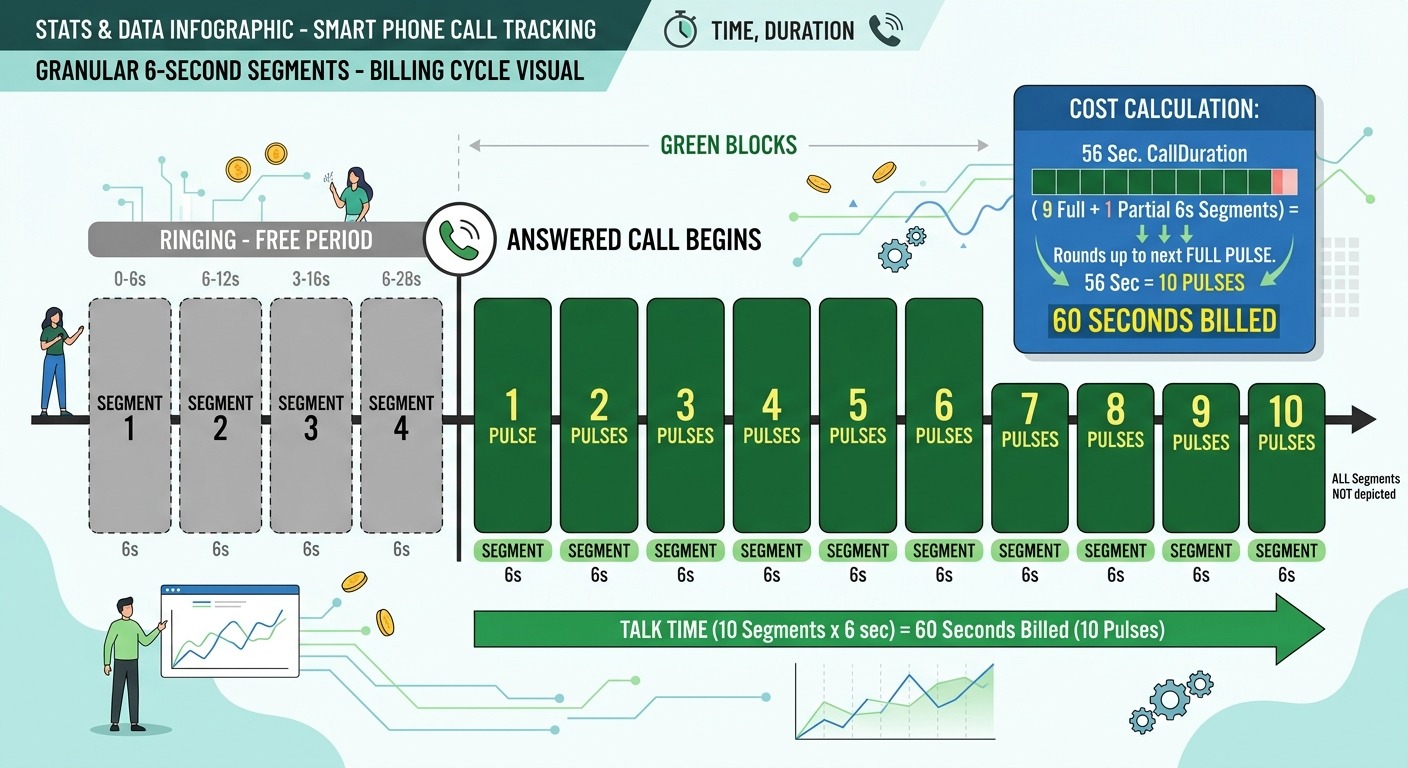
WhatsApp calling is not billed in whole minutes. According to Meta’s Calling API pricing documentation, calls are billed in six-second pulses, with fractional pulses rounded up.
A few examples make the mechanics clear:
- A 56-second call is 9.33 pulses, which rounds up to 10 pulses, so you pay for exactly 60 seconds
- A 3-minute call is 30 pulses, no rounding penalty
- A 61-second call is 10.17 pulses, rounded to 11 pulses, so you pay for 66 seconds
Compared to full-minute billing (where a 61-second call costs you 120 seconds), pulse billing is genuinely friendlier to short calls. A fleet of 45-second confirmation calls costs you close to what it should, not double.
Just as important is what you are not billed for:
- Unanswered calls cost nothing. Ringing, missed calls, and declined calls are free
- Call attempts cost nothing. You pay only from the moment the customer answers
- Inbound calls cost nothing, as covered above
So the billable event is precise: an answered, business-initiated call, metered in 6-second increments from pickup to hangup.
The Rate Card: Country Bands, Volume Tiers, Quarterly Updates
Actual per-minute rates depend on three inputs: the customer’s country code, your monthly calling volume to that country, and the current quarter’s rate card.
Country bands. Meta prices calling by destination market, in the same spirit as messaging pricing. India sits in the lowest price band alongside markets like Indonesia and parts of Latin America and Africa, with rates on the order of a US cent per minute at entry volume. Higher-cost markets in North America and Europe are priced above that. As of mid-2026 the rate card covers 16 currencies, including USD, INR, EUR, GBP, AED, IDR, MXN, and SGD, with Brazilian real support arriving July 1, 2026.
Volume tiers. The more answered outbound minutes you accumulate to a given country within a calendar month, the lower your per-minute rate becomes. Two details work in your favor. First, when a single call crosses a tier boundary, the entire call is billed at the better rate. Second, tiers reset on the first of each month, so your discount is earned fresh each month from your own volume, no negotiation required.
Quarterly updates. Meta refreshes the calling rate card on a quarterly cadence: January 1, April 1, July 1, and October 1. Any budget you build should reference the current quarter’s card rather than a screenshot from a blog post, ours included. Meta publishes downloadable rate cards (CSV and PDF) in the pricing documentation.
One operational note that surprises teams: a valid payment method on the WhatsApp Business Account is required before you can place calls at all. If your account runs on a prepaid model, a minimum balance must be available when the call is initiated. Numbers that have only ever sent free service messages sometimes discover this requirement the day they try to launch calling.
For how calling charges sit alongside your per-message costs, see our complete guide to WhatsApp Business API pricing in 2026, and you can model your total WhatsApp spend with our WhatsApp API pricing calculator.
The Permission System: The Cost Nobody Budgets For
Here is where real-world calling costs diverge from the rate card. Your business cannot simply dial any customer. WhatsApp requires a granted call permission per contact before a business-initiated call will connect, and the permission mechanics are strict:
- You can send 1 permission request per contact per 24 hours, and at most 2 requests in any 7-day window
- A granted permission is valid for 7 days; after it expires, you need a new grant
- With an active permission, you can place up to 5 connected calls per 24 hours to that contact
- Limits reset when a call actually connects between you and the contact
Read those rules again with a campaign manager’s eyes. You cannot batch-dial a cold list. You cannot retry a declined permission every morning. What the system rewards is designing the permission request into a conversation the customer is already having with you: at the end of a support chat (“want us to call you about this?”), inside a delivery flow, on an abandoned-cart follow-up where a call genuinely helps.
The practical cost implication: your effective cost per connected call includes the permission funnel. If 100 permission requests produce 40 grants and 30 connected calls, your real unit economics are measured against those 30 calls, not the raw per-minute rate. Teams that design a good ask see high grant rates because the request arrives in context. Teams that blast permission requests see the opposite, and burn their 2-per-week allowance on contacts who were never going to answer.
Eligibility: The Hidden Setup Cost
The other cost that never appears in pricing articles is getting a number call-eligible in the first place. From production experience, this is where most calling rollouts actually stall, and the errors Meta returns are opaque enough that teams waste days debugging code that was never the problem. The three gates that matter:
Messaging tier. Calling eligibility is tied to your number’s messaging limit tier. Newly registered numbers on the lowest tiers generally cannot enable business-initiated calling; numbers need an established messaging history at higher tiers. If your number is fresh, plan weeks of healthy messaging activity before calling becomes available, and treat that ramp as part of the project timeline.
Display name status. A number whose display name was declined, or is pending review, can be blocked from calling even though messaging works fine. The failure shows up as a connect error, not as a helpful “fix your display name” message. Check the display name status in WhatsApp Manager before assuming the integration is broken.
Regional availability. Business-initiated calling is not available to every destination market yet. A number that calls one country successfully can fail to another purely on availability, with the same generic error codes.
None of these carry a fee, but all of them carry cost: engineering time, delayed launches, and support tickets that read “calling is broken” when the number simply was not eligible. Budget for the eligibility check first, integration second.
The Four WhatsApp Calling Modes and What Each One Costs
WhatsApp calling is not a single product. In practice there are four distinct call flows, and each has its own cost profile. Two are answered or placed by humans, two by an AI voice agent, and the Meta charges only apply to the outbound pair.
On ChatMaxima, the platform side of these calls is covered by two addons:
- Voice Addon: $49 per month, includes 2,500 minutes for human agent calls, then $0.01 per additional minute
- Voice Bot Addon: $49 per month, includes 500 minutes for AI voice agent calls, then $0.05 per additional minute
Here is how the four modes map to those addons and to Meta’s charges.
1. Customer to Agent. A customer taps the call button on your WhatsApp profile or inside a chat, and the call rings your team in the shared inbox, with the full conversation history alongside it. Meta charges nothing because the call is user-initiated. On ChatMaxima, the minutes draw from the Voice Addon: within the 2,500-minute allowance that works out to under 2 cents a minute, and 1 cent a minute beyond it. This is the cheapest way to offer voice support you will find anywhere, because the channel itself is free.
2. Customer to Voice Agent. The same inbound call, but answered by an AI voice agent instead of a person: instant pickup, 24/7 coverage, and in the customer’s own language. The agent resolves routine questions (order status, appointment changes, FAQs) and hands anything complex to your team with context. Meta again charges nothing. The AI minutes draw from the Voice Bot Addon, so a fully automated inbound support line costs $49 a month for the first 500 minutes and 5 cents a minute after that, with no staffing dependency on call volume.
3. Agent to Customer. Your team member places an outbound WhatsApp call: a sales callback, a delivery coordination call, a follow-up on an open ticket. Now both cost layers apply. Meta bills its per-minute rate for the answered call (banded by country, in 6-second pulses, permission rules in force), and the minutes draw from the same Voice Addon allowance as mode 1. In a low-band market like India, the combined cost of an agent callback is still on the order of 2 to 3 cents a minute inside the allowance.
4. Voice Agent to Customer (Broadcasting). The AI voice agent places outbound calls at scale: appointment reminders, payment-due notifications, delivery confirmations, re-engagement of dormant leads. Meta’s per-minute rates apply per answered call, and the AI minutes draw from the Voice Bot Addon. One honest caveat belongs in every broadcasting plan: the call permission rules do not relax for AI callers. Every contact still needs a granted, unexpired call permission, which caps how “broadcast” a voice broadcast can be. Treat it as permissioned batch calling to an opted-in audience, not a cold-call cannon, and design your flows to collect permissions inside existing conversations first.
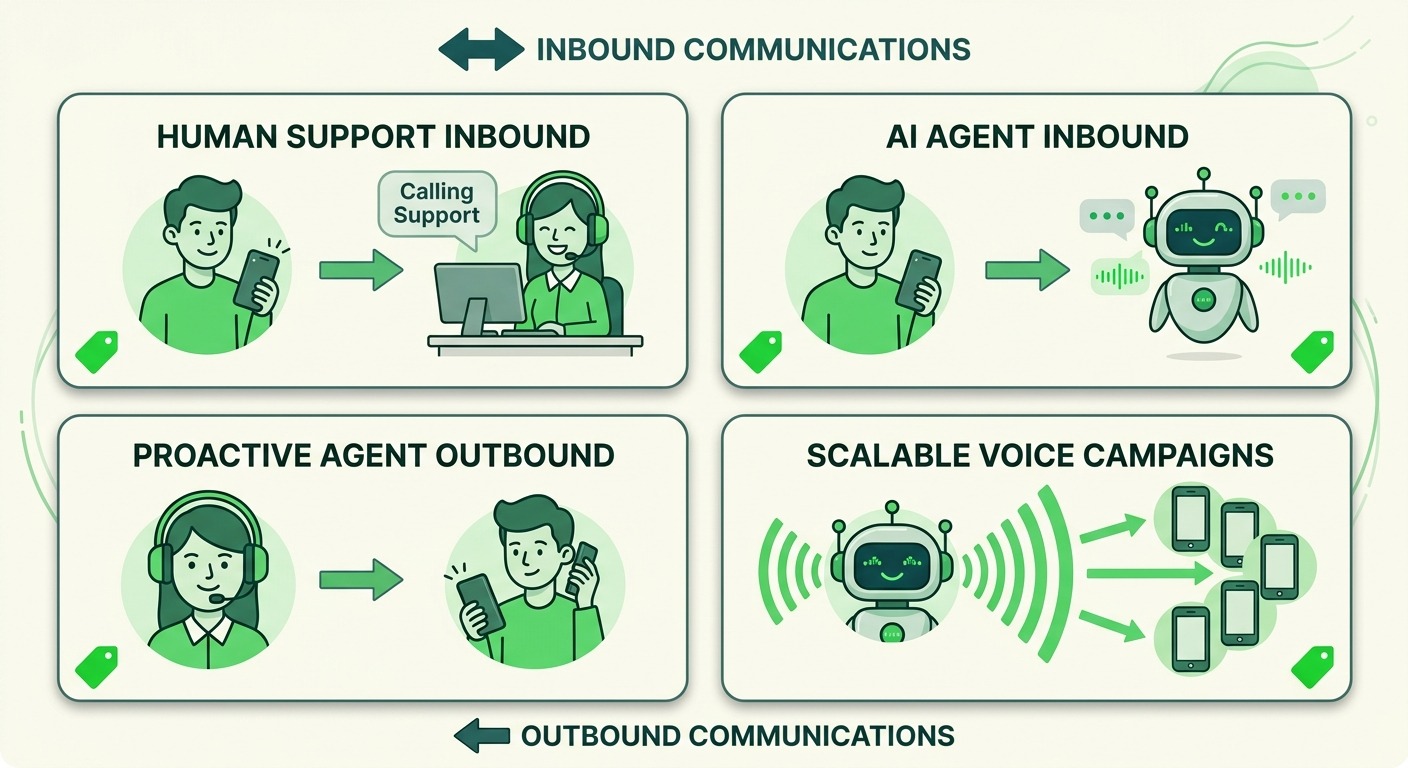
A quick way to remember the economics: inbound is free at the channel level in both modes, human minutes are cheap in bulk, AI minutes cost more per minute but replace staffed time entirely. A support line that handles 2,000 inbound AI-answered minutes a month costs about $124 in bot minutes with zero Meta charges, which is a fraction of one support salary, and it answers at 2 am.
When WhatsApp Calling Beats Traditional Telephony, and When It Does Not
With the mechanics clear, the comparison question becomes answerable: should outbound voice run over WhatsApp or over your existing cloud telephony?
WhatsApp calling wins when:
- The conversation already lives on WhatsApp. The call inherits the thread’s context, and the customer sees your verified business name on the incoming call screen instead of an unknown number, which meaningfully improves answer rates
- Calls cross borders. WhatsApp calls travel over data, so an international support callback costs the same banded per-minute rate rather than international PSTN pricing
- Inbound volume dominates. Every customer-initiated call is free, which makes voice support nearly free to offer at the channel level
- Trust is the bottleneck. Spam-call fatigue has trained customers to ignore unknown numbers; a branded WhatsApp call is not an unknown number
Traditional telephony still wins when:
- You run high-volume domestic outbound in a market where PSTN minutes are cheap and answer rates on regular calls are acceptable
- You need to reach customers who are not on WhatsApp or lack reliable data connectivity
- Regulatory or recording requirements bind you to conventional telephony infrastructure
For most customer-facing teams the answer is not either-or. Inbound and conversation-linked callbacks move to WhatsApp, where they are cheaper and convert better, while bulk outbound stays on telephony until the permission model fits.
There is also a strategic layer beyond cost. Voice on WhatsApp pairs naturally with AI: a voice agent can answer the free inbound calls, resolve routine questions, and hand complex ones to your team. We covered how to build that in our WhatsApp calling chatbot guide, and why voice in the customer’s own language is the real growth lever in our post on vernacular voice AI for India.
A Worked Example: What a Callback Program Costs
Pull the pieces together with a realistic scenario, or plug your own volumes into our WhatsApp calling pricing calculator as you follow along. Suppose an Indian D2C brand wants to call back customers who abandon high-value carts, roughly 1,000 callbacks a month, averaging 2.5 minutes per answered call.
- Permission requests ride inside the existing abandoned-cart conversation window: near zero incremental message cost
- Say 60 percent of permission requests are granted and 70 percent of those calls connect: 420 answered calls
- 420 calls at 2.5 minutes is 1,050 minutes; in India’s price band at entry-tier rates of roughly a cent per minute, that is on the order of 10 to 12 US dollars of calling spend for the month, before volume discounts
- Unanswered attempts: free. Customers who call you back instead: free
The metered cost is almost a rounding error next to the revenue of recovered carts. The real investment is the setup: an eligible number, a permission ask that converts, and an agent or team ready to take the calls. That is the honest shape of WhatsApp calling economics in 2026: operationally demanding, financially light.
What to Do Next
If you are evaluating WhatsApp Business Calling, work the checklist in this order: confirm your number’s messaging tier and display name status, verify calling availability in your target markets, design the permission request into an existing conversation flow, and only then model per-minute spend against the current quarter’s Meta rate card.
ChatMaxima supports WhatsApp Business Calling alongside AI voice agents, so inbound calls, outbound callbacks, and the chat thread they belong to live in one shared inbox with full context. If you want voice on WhatsApp without stitching together three vendors, see our pricing plans and turn calling on where your customers already talk to you.