

For years, WhatsApp Web was the half-version. You could read and reply to messages in a browser tab, but the moment a customer wanted to talk, you were back on your phone, holding it against your ear while typing notes with one hand. That gap is now closed. WhatsApp Web calling is rolling out with full audio and video support, one-on-one and group, directly from a browser.
Meta announced it on 28 July 2026 alongside four related upgrades: Call Transfer, Waiting Room, Noise Suppression, and QuickHD. Calls on the web are end-to-end encrypted, have no time limits, and cost nothing (WhatsApp Blog, 2026).
This is a bigger deal for businesses than the headline suggests, and it also comes with a catch that most coverage has skipped entirely. If your team runs customer conversations through the WhatsApp Business API, almost none of this lands in your inbox on day one. Here is the full picture: what shipped, what it changes operationally, and where the consumer app and the business platform diverge.
What WhatsApp actually shipped
The announcement bundles five things. They are easy to blur together, so it helps to separate what is genuinely new from what is an improvement to something that already existed.
Web calling. You can now make and receive audio and video calls, both one-on-one and group, from WhatsApp Web in your default browser. No separate desktop app install required. The web client also gets screen sharing, in-call reactions, and a dedicated Calls tab with full call history and favorites, matching what the mobile and desktop apps already had.
Call Transfer. An active call can be moved between devices without hanging up and redialing. Start a call on your phone during a commute, walk into the office, and push it to WhatsApp Web or Desktop for the larger screen. It works in either direction across any device where you have WhatsApp.
Waiting Room. When you create a WhatsApp call link with “Require approval to join” enabled, participants land in a waiting room until the host lets them in. Meta framed this explicitly as an update for people hosting work calls on WhatsApp.
Noise Suppression. On-device background noise removal so your voice carries in a loud environment. Useful for field teams, retail floors, and anyone taking calls from a shop counter.
QuickHD. High-definition video from the first few seconds of a call, rather than the usual few seconds of blur while the stream negotiates upward.
All five are rolling out gradually. If you check your browser today and see no Calls tab, that is expected. Gradual rollout at WhatsApp scale typically means weeks, not hours, and availability varies by region and client version.
Why browser calling matters more than it sounds
“WhatsApp Web can do calls now” reads like a convenience feature. In a business context it is closer to a workflow change, and the reason is the device split.
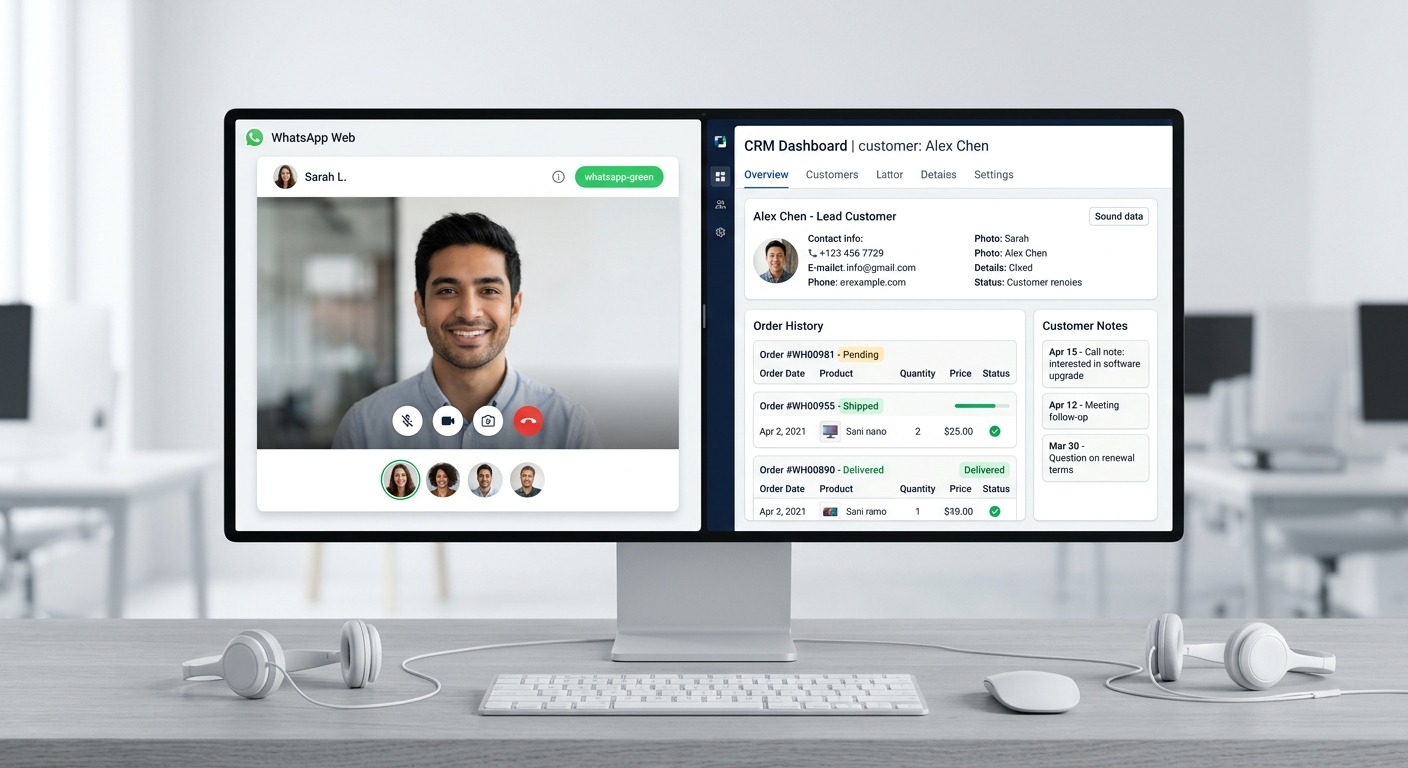
Support and sales agents work on a desktop. That is where the CRM is, where the order history is, where the shared inbox is, where the knowledge base search bar is. But WhatsApp voice has always lived on a phone. That mismatch produced a specific, familiar failure mode: the agent takes a call on a personal handset, the conversation happens entirely off-system, and the only trace left behind is whatever the agent remembers to type into the thread afterwards.
Every call taken on a personal phone is a call your business has no record of. No context for the next agent. No coaching material. No way to know whether the promise made on that call matches what the account actually gets.
Moving calls into the browser puts voice on the same screen as the record. The agent can be looking at the customer’s order while talking to them. Screen sharing means a support rep can walk someone through a checkout flow visually instead of describing it in text. That is a real reduction in handle time for anything involving a form, a settings screen, or a document.
There is also a hardware angle worth naming. Browser calling means a proper headset, a desk microphone, and a stable wired connection instead of a phone speaker in an open office. Noise Suppression stacks on top of that. Audio quality is not a vanity metric in support; it directly drives repeat questions and escalations.
Call Transfer is the feature teams will actually use
Of the five updates, Call Transfer is the one most likely to change daily behavior, and it is being undersold.
Consider the common shape of a real support call. A customer calls in while the agent is away from the desk. Today the agent either lets it ring, or picks up and spends three minutes stalling while walking back to a computer. With Call Transfer, they answer on the phone and push the call to the browser the moment they sit down. No “can I call you right back”, which in practice means a second attempt, a missed pickup, and a case that stays open another day.
The same applies in reverse for field teams. A technician on site can start on a laptop and move the call to a phone when they walk out to the vehicle. Continuity is the point. Every redial is a chance for the customer to give up.
One important clarification: this is device transfer, not agent-to-agent transfer. You are moving your own call between your own devices. Handing a live WhatsApp call from Agent A to Agent B is still not something consumer WhatsApp does. If you need warm transfer between people, that remains the domain of a proper contact center layer or the Business Calling API, which we get to below.
Waiting Room signals where WhatsApp is heading
The Waiting Room deserves attention less for what it does than for what it admits.
Approval-gated entry via call links is standard meeting-software behavior. Zoom, Google Meet, and Teams have had it for years. Meta shipping it on WhatsApp, and describing it as a feature for “people who might host work calls”, is an acknowledgement that a very large amount of business already happens on WhatsApp whether or not the product was designed for it.
In markets like India, Brazil, Indonesia, and much of the Middle East, that is not a prediction, it is a description of the present. Vendor calls, client check-ins, standups, and supplier negotiations run on WhatsApp groups because that is where everyone already is. Call links plus a waiting room plus browser calling plus screen sharing is, functionally, a lightweight meeting stack. It is missing calendaring, recording, and transcripts, and there is no sign those are coming to the consumer product. But the direction of travel is unmistakable.
For a business, the practical takeaway is a governance one. If your team is going to host external calls this way, decide now who is allowed to create call links, and use “Require approval to join” as the default for anything client-facing. A WhatsApp call link that leaks into a group chat is exactly as open as a Zoom link that leaks into a group chat.
The catch: this is consumer WhatsApp, not the Business API
Here is the part that most of the coverage this week left out, and it is the part that matters most if you are reading this as an operator.
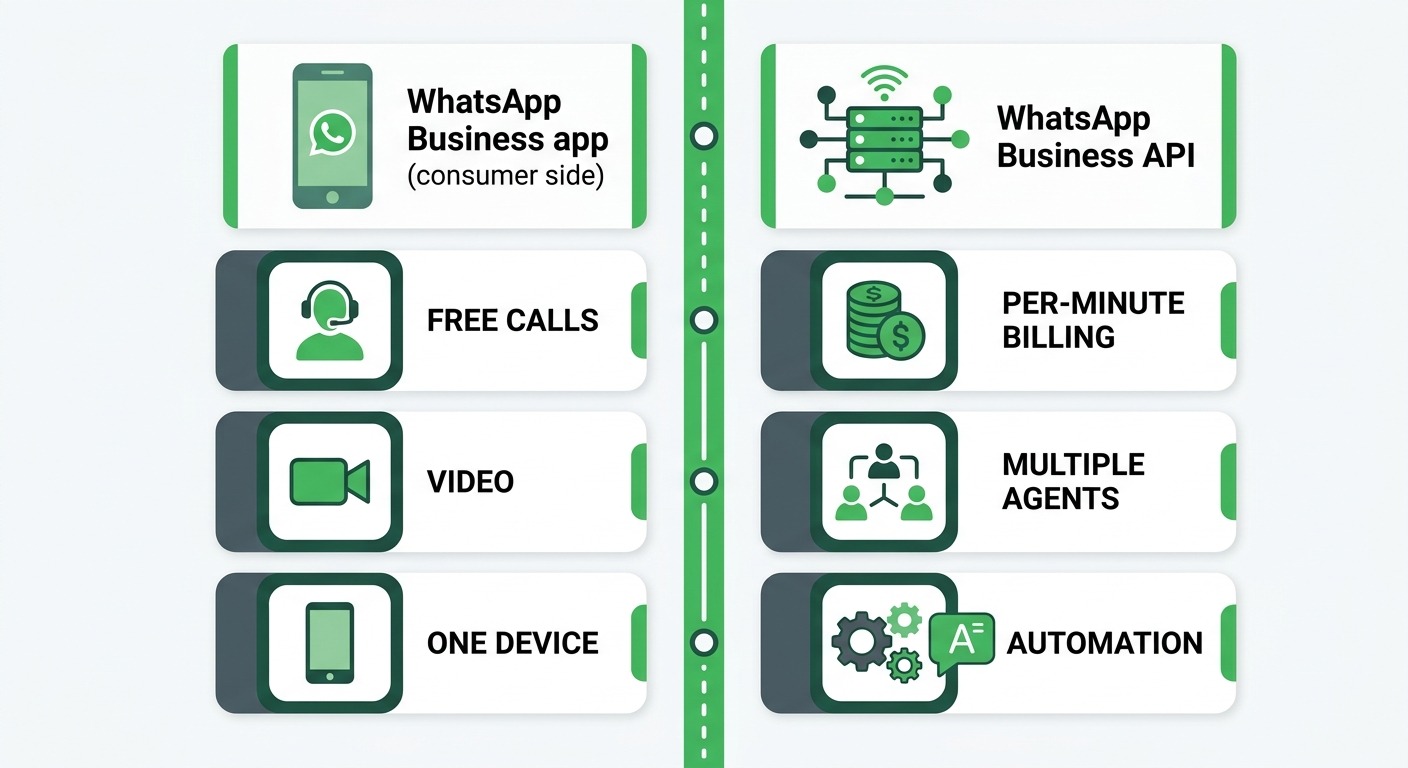
These features ship on consumer WhatsApp and the WhatsApp Business app. They are not the same thing as calling on the WhatsApp Business Platform (the API).
If your business runs on the API, through a shared team inbox, with automated flows and multiple agents on one number, then your calling capability comes from the WhatsApp Business Calling API, which is a separate product with its own rules:
- It is metered. Business Platform calls are billed per minute, in pulses, unlike the free consumer calls announced this week. We broke the full cost model down in our guide to WhatsApp Business Calling pricing in 2026.
- It has permission rules. Business-initiated calls require an explicit call permission from the user, and that permission has a validity window. You cannot simply dial a customer because you have their number.
- It has eligibility gates. Quality rating, display name approval status, and messaging tier all affect whether outbound calling is available on a number at all.
- It is audio-only today. Video calling is not part of the Business Calling API surface.
So when you read “WhatsApp is rolling out calling on the web”, the correct mental translation for an API-based business is: the consumer side of my customer’s experience just improved, and my own team may benefit if they use the WhatsApp Business app, but my API integration is unchanged.
That distinction is worth internalizing because it drives a real decision. Small teams running the WhatsApp Business app on a phone now get browser calling for free. Teams on the API get scale, routing, automation, and multi-agent access, but pay per minute for voice and cannot use video. Neither is strictly better. If you have never mapped that trade-off for your own setup, our WhatsApp Business App vs Web vs API decision guide walks through it properly.
What changes for support and sales teams
Assume the rollout reaches your team in the next few weeks. Here is what is worth doing about it, in rough order of impact.
Move voice off personal phones
This is the single highest-value change available. If agents have been taking customer calls on personal handsets because WhatsApp Web could not do voice, that reason is gone. Get calls onto the workstation where the customer record is visible, and where a headset produces audio your customer can actually understand.
The side benefit is boundary hygiene. When voice lives on the work browser session, calls stop following agents home on their personal number.
Rewrite your after-call note expectation
Voice on WhatsApp remains a blind spot for your written record. The message thread is captured; the words spoken on the call are not. Now that agents are on a desktop during the call, the friction excuse for skipping notes disappears.
Set a simple standard: every voice call gets a two-line summary written into the same WhatsApp thread while the call is still live or immediately after. What the customer asked, and what was promised. That single habit is the difference between a searchable history and a set of gaps that the next agent has to apologize for.
Decide your call link policy before someone else does
Three questions to answer this week:
- Who on the team is allowed to create WhatsApp call links for external participants?
- Is “Require approval to join” mandatory for client calls? (It should be.)
- Which conversations belong on WhatsApp voice, and which belong on a scheduled, recorded meeting platform?
The last question matters most. Waiting Room makes WhatsApp good enough for informal work calls. That does not make it the right venue for a contract negotiation you will want a record of.
Do not confuse this with automating voice
Browser calling is a human-to-human upgrade. It does not give you an automated voice agent, an IVR, or after-hours coverage. Those still require the Business Calling API plus a bot layer on top of it. If automated voice handling is on your roadmap, the architecture is different from anything in this announcement, and our WhatsApp calling chatbot guide covers how that is actually assembled.
What to watch next
A few open threads worth tracking as the rollout completes.
Whether Business Calling API gets video. Consumer video on the web makes the audio-only limit on the business side more conspicuous. Visual support, walking a customer through a broken screen, is a genuine use case that businesses will now start asking for by name.
Whether call links become a business surface. Right now call links plus Waiting Room are a consumer and small-business feature. An API-level equivalent, where a business could generate a gated call link programmatically and drop it into an automated flow, would be a meaningful addition to conversational support. Nothing has been announced.
Whether transfer semantics expand. Device-to-device transfer is a personal convenience. Agent-to-agent transfer would be a contact center primitive. The naming overlap is going to cause confusion in sales conversations for the next year, so be precise when you discuss it internally.
Browser and permission behavior in practice. Browser-based calling depends on microphone and camera permissions, and on tab focus behavior. Expect a support burden inside your own team during the first weeks: agents who miss calls because the WhatsApp Web tab was closed, or because the browser blocked the mic prompt. Get ahead of it with a short internal note rather than a support ticket per agent.
The bottom line
WhatsApp Web calling closes a gap that has been quietly costing businesses context for years. Voice conversations can now happen on the same screen as the customer record, with better audio, with screen sharing, and without the redial dance when someone changes location mid-call. Call Transfer and Noise Suppression are the two features your agents will notice within a day. Waiting Room is the one that signals where WhatsApp thinks it is going.
But the fine print is what separates a good decision from a wasted quarter. These upgrades land on consumer WhatsApp and the WhatsApp Business app, not on the Business Platform API. If you run a multi-agent inbox with automation, your calling story is still the Business Calling API, still metered per minute, still audio-only, and still gated by permission rules. Plan against what your own stack actually supports, not against the headline.
If you are weighing whether to stay on the WhatsApp Business app or move to a proper multi-agent setup with automation, shared inbox, and routing, our pricing page lays out what each tier includes so you can size the move honestly.
Sources: WhatsApp Blog, TechCrunch, 2026.