
An empty chair at 3 PM is the most expensive thing in a service business. The slot was blocked, the staff was paid, and someone else who wanted that time was turned away. A good appointment reminder text is the cheapest fix there is, and the research behind it is unusually solid.
A systematic review of 105 studies found the average no-show rate across outpatient appointments is about 23%, ranging from 13% in Oceania to 43% in Africa (Dantas et al., Health Policy, 2018). Private practices do better, with MGMA putting US single-specialty groups at 6.81% in 2023, but even that is one empty slot in every fifteen. And a Cochrane review of seven trials with 5,841 people found that text reminders lifted attendance from 67.8% to 78.6% compared with no reminder at all (Cochrane, 2013).
This guide gives you 20 copy-and-paste appointment reminder text templates, the timing that works, the rules for SMS, WhatsApp and email, and a step-by-step way to send reminders automatically so nobody on your team has to remember to remind.
Why People Miss Appointments (and What a Reminder Actually Fixes)
Most no-shows are not rude. They are forgetful, busy, or stuck without an easy way to change the plan. The Dantas review found the two strongest predictors of a no-show were a long lead time (the gap between booking and the appointment) and a history of previous no-shows. A meeting booked three weeks out is simply easier to forget than one booked for tomorrow.
That points to three jobs a reminder has to do:
- Jog memory at the right moment, close enough to the appointment that it is fresh, early enough that the person can still plan around it.
- Remove friction to change. Someone who cannot make it would rather tell you than ghost you, if telling you takes one tap. A cancellation two days out is a slot you can refill. A no-show is a slot you lose.
- Confirm intent. A “Yes, I’ll be there” reply turns a guess into a plan, and tells your team which slots are at risk.
The second job is the one most businesses skip. MGMA’s 2025 operations report found a 19.95% cancellation rate across single-specialty practices in 2024 (patient and practice cancellations combined), and only 27.4% of cancelled visits were rescheduled within 30 days (MGMA, 2025). People who cancel often drift away. A reminder with a reschedule option built in catches them while they still want the appointment.
What a Good Appointment Reminder Text Includes
Whatever channel you use, the strongest reminders carry the same six pieces, in roughly this order:
- Who it is from. Your business name in the first few words, so it is not mistaken for spam.
- The person’s name. It lifts attention and confirms the message reached the right person.
- What the appointment is. “Your dental check-up”, “your demo call”, “your haircut with Priya”. Keep it generic for anything sensitive (more on that below).
- When, with the timezone. “Tue, 20 Oct, 3:00 PM IST” beats “tomorrow afternoon”. Bookers in another timezone are a common source of no-shows.
- Where. The address, or the video link for online meetings.
- One clear action. Confirm, reschedule or cancel, as buttons or as short reply words.
Keep it under about 300 characters for SMS. Leave out offers, discounts and “while you’re here” upsells. They make the message longer, they make it feel like marketing, and on WhatsApp they can get your reminder template reclassified as a marketing message, which is billed and restricted differently.
A note for healthcare and other sensitive services: keep the reason for the visit out of the message. “Your appointment at City Clinic” is enough. A lock screen notification that names a procedure is a privacy problem, and many regulators expect you to share only the minimum.
When to Send Appointment Reminders
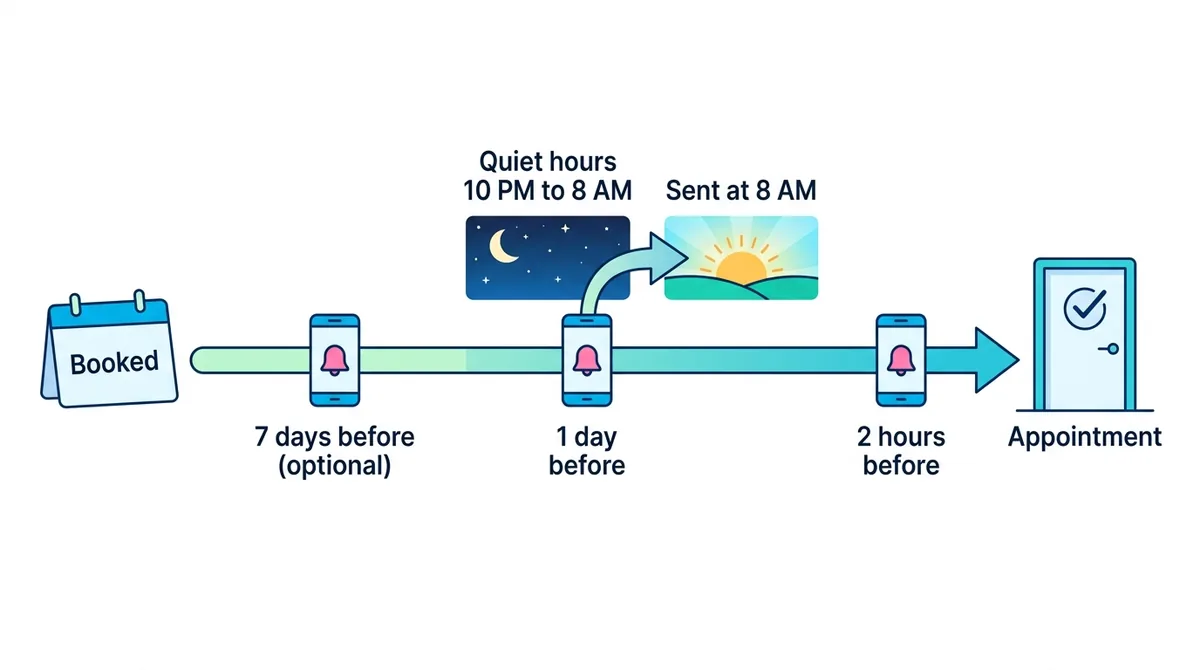
The trials in the Cochrane review sent their reminder 24 to 72 hours before the appointment, and that remains the most reliable single reminder. In practice, two reminders work better than one:
- 1 day before: gives time to rearrange the day, or to cancel early enough that you can refill the slot.
- 2 hours before: catches the people who remembered yesterday and forgot this morning. For video calls, this is the message that carries the join link.
- 7 days before (optional): only for appointments booked weeks in advance, where the long lead time is itself the risk.
Three timing rules save a lot of awkward messages:
- Skip reminders that would arrive after the fact. If someone books at 11 AM for a 2 PM slot, they do not need a “your appointment is tomorrow” message. Only send reminders whose time had not already passed when the booking was made.
- Respect quiet hours in the customer’s timezone. A reminder due at 11 PM should wait until 8 AM. If the appointment starts before 8 AM, skip that reminder rather than wake someone up.
- Do not send late reminders after downtime. If your system was down for a few hours, a “your meeting is in 2 hours” message sent 30 minutes before the meeting does more harm than good.
20 Appointment Reminder Text Templates
Copy these, swap the details in braces, and keep each one to a single action. They work as SMS, as WhatsApp templates (with the buttons described later) or as the first lines of a reminder email.
Clinics and healthcare
1. Day-before reminder
Hi {Name}, this is City Clinic. A reminder of your appointment on {Tue, 20 Oct} at {3:00 PM}. Reply YES to confirm, or tap to reschedule: {link}
2. Same-day reminder
Hi {Name}, see you today at {3:00 PM} at City Clinic, {12 Park Road}. Please arrive 10 minutes early. Need to change? {link}
3. First visit with paperwork
Hi {Name}, your first visit at City Clinic is on {Thu, 22 Oct} at {11:00 AM}. Please bring a photo ID and any current prescriptions. Reply YES to confirm.
Dental
4. Check-up reminder
Hi {Name}, your dental check-up with Dr {Rao} is on {Mon, 26 Oct} at {9:30 AM}. Reply YES to confirm or RESCHEDULE to pick another time.
5. Cleaning reminder with prep
Hi {Name}, your cleaning at Bright Smile Dental is tomorrow at {4:00 PM}. Please skip the coffee an hour before. Tap to confirm: {link}
Salons, spas and beauty
6. Stylist appointment
Hi {Name}, your {haircut} with {Priya} at Studio Nine is tomorrow at {5:30 PM}. Running late or need another time? Tap here: {link}
7. Long treatment
Hi {Name}, your {90-minute spa package} at Calm Rooms is on {Sat, 24 Oct} at {11:00 AM}. Please arrive 15 minutes early to check in.
Consultants, coaches and agencies
8. Online consultation
Hi {Name}, your strategy call with {Arjun} is today at {4:00 PM IST}. Join here: {video link}. Need to move it? {link}
9. Discovery call, booked far ahead
Hi {Name}, a reminder of your discovery call with {Maya} next {Tuesday, 27 Oct} at {10:00 AM EST}. Still a good time? Confirm or reschedule: {link}
Sales demos
10. Demo, day before
Hi {Name}, looking forward to your {ChatMaxima} demo tomorrow at {2:00 PM GMT} with {Sam}. Any questions you want covered? Just reply here.
11. Demo, 15 minutes out
Hi {Name}, your demo starts in 15 minutes. Join: {video link}
Real estate
12. Property viewing
Hi {Name}, your viewing of {2 bed apartment, Lakeview Towers} is tomorrow at {6:00 PM}. {Agent name} will meet you at the lobby. Confirm or reschedule: {link}
Fitness and wellness
13. Personal training
Hi {Name}, your PT session with {Leo} is tomorrow at {7:00 AM}. Bring water and a towel. Can’t make it? Cancel by tonight so we can offer the slot: {link}
14. Class booking
Hi {Name}, you are booked into {Spin 45} on {Wed} at {6:30 PM}. Spots are limited, so please cancel here if your plans change: {link}
Home services
15. Technician visit
Hi {Name}, our technician {Ravi} will visit {14 Elm Street} tomorrow between {10 AM and 12 PM} for your {AC service}. Please make sure someone is home. Reply to change the time.
Confirmations, changes and follow-ups
16. Booking confirmation (sent right after booking)
Hi {Name}, you’re booked: {Consultation} on {Tue, 20 Oct} at {3:00 PM}. We’ll remind you the day before. Add to calendar: {link}
17. Reschedule confirmation
Done, {Name}. Your appointment has moved to {Thu, 22 Oct} at {11:00 AM}. See you then.
18. Cancellation with a way back
Your {Consultation} on {Tue, 20 Oct} is cancelled. Whenever you’re ready, book a new time here: {link}
19. Missed appointment follow-up
Hi {Name}, we missed you at today’s {3:00 PM} appointment. No problem, these things happen. Book a new time that suits you: {link}
20. Waitlist slot open
Hi {Name}, a {3:00 PM} slot just opened tomorrow at City Clinic. Want it? Reply YES within the next hour and it’s yours.
Two small details make these work. Reply words should be one word (YES, RESCHEDULE, CANCEL), because people answer reminders with their thumb while doing something else. And the missed appointment follow-up should be friendly, since a guilt-trip message makes a second no-show more likely, not less.
SMS vs WhatsApp vs Email Reminders
The “text” in appointment reminder text usually means SMS, but where WhatsApp is the default messenger it is often the better channel, and email still earns a place for detail and calendar invites.
| SMS | |||
|---|---|---|---|
| Best for | Any phone, no app needed | Markets where WhatsApp is the main messenger | Details, links, calendar invites |
| Tap-to-confirm buttons | No, reply words only | Yes, quick-reply buttons | Yes, as links |
| Approval needed | Sender registration in some countries | Meta template approval | None |
| Consent | Required for automated texts in many markets | Opt-in required before you message | Normal email consent |
| Cost per reminder | Carrier rate per message | Meta utility rate per message | Effectively free |
| Attention | High | High | Lower, competes with the inbox |
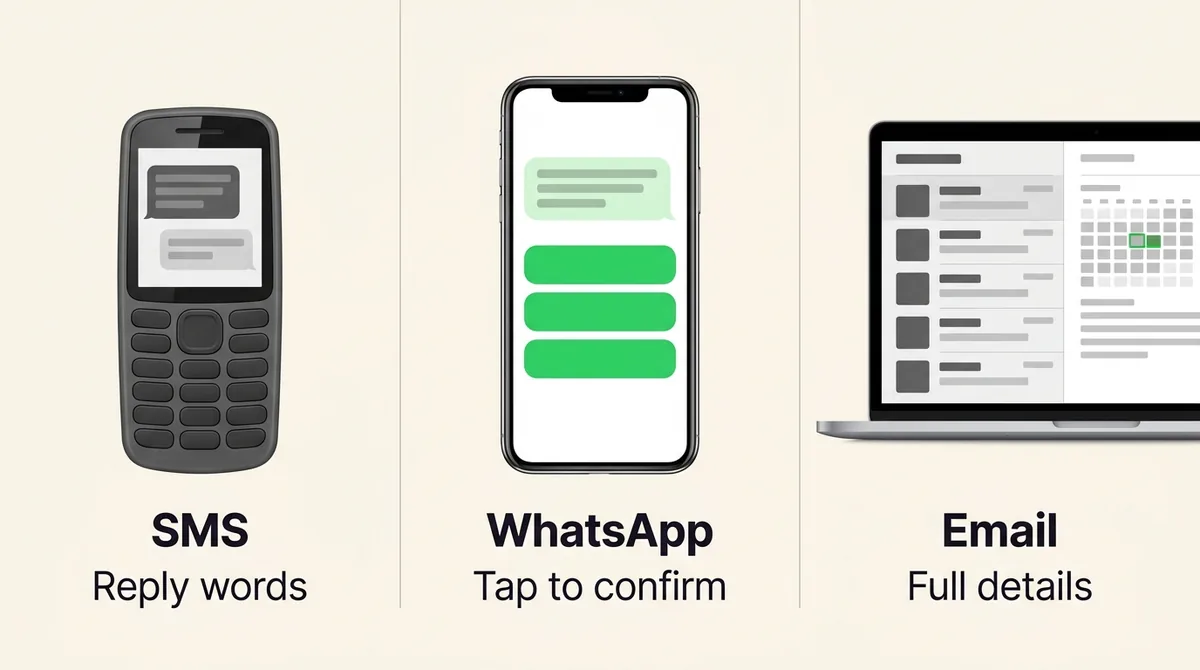
SMS reaches every phone and needs nothing installed, but two-way handling is clumsy (people reply “ok” or “yes!!” and your system has to guess) and many markets have rules on business texting. In the US, for example, texting customers from a regular local number needs 10DLC registration, and automated texts need recorded consent.
WhatsApp lets you add quick-reply buttons, so the customer taps Confirm, Reschedule or Cancel instead of typing. Reminders you send first must use a Meta-approved message template, and each one is billed at your market’s utility rate. Since 1 October 2026, utility messages sent in reply to a customer are also charged per message, and free-form service replies are free only up to 1,000 per phone number each month (Meta, 2026). We break down what that means for your bill in our guide to WhatsApp service message pricing from October 2026.
Email costs nothing and carries the full detail, but it competes with everything else in the inbox. Use it alongside WhatsApp or SMS, not instead of them.
The best setup for most businesses is email for everyone plus WhatsApp for those who opt in: email guarantees a reminder reaches every booker, and WhatsApp adds the one-tap confirm that actually changes behaviour.
How to Write a WhatsApp Appointment Reminder Template Meta Approves
A WhatsApp reminder you send first is a template message, and it has to be approved by Meta before you can use it. Reminders fall under the Utility category, which covers messages triggered by something the customer did, like booking an appointment. A few rules keep a template approved and in that category:
- No promotional content. Meta automatically re-categorizes a utility template as marketing if it contains marketing material. “Show this message for 10% off” turns your reminder into an ad.
- Use variables for everything that changes. Name, service, date, time and link become `{{1}}`, `{{2}}` and so on.
- Keep quick-reply buttons short. Each label can be up to 25 characters. “Confirm”, “Reschedule” and “Cancel” fit easily.
- One language per template. If you serve customers in two languages, create two templates.
- Ask for opt-in first. WhatsApp requires the customer’s permission before you message them. A checkbox on your booking form, “Send me reminders on WhatsApp”, is the simplest way to record it.
A template that works well:
Hi {{1}}, this is a reminder of your {{2}} on {{3}}, with {{4}}. Join or find us here: {{5}}. Please let us know if you can still make it.
[Confirm] [Reschedule] [Cancel]
Notice what the body leaves out: no greeting from a brand mascot, no emoji wall, no offer. That is what keeps it a utility message.
How to Automate Appointment Reminders with ChatMaxima
If you take bookings through ChatMaxima’s booking pages, the reminders above can go out on their own. Each event type has its own reminder settings, and every booker can opt in to WhatsApp on the booking page itself.
Step 1: Turn reminders on for an event type. Go to Contact Hub, then Bookings, and open the event type (for example “Discovery Call”). Switch on Send automatic reminders.
Step 2: Pick when to remind. Choose up to three times, from 15 minutes to 7 days before the meeting. New event types start with 1 day and 2 hours before, which suits most businesses.
Step 3: Choose the channels. Tick Email, WhatsApp or both. For WhatsApp, pick the number to send from and an approved template. The template’s variables are filled in this order: {{1}} booker name, {{2}} meeting name, {{3}} date and time in the booker’s timezone, {{4}} host name, {{5}} meeting link or location. Quick-reply buttons map by position: with three buttons they become Confirm, Reschedule and Cancel; with two, Confirm and Cancel.
Step 4: Leave quiet hours on. With “Respect quiet hours” ticked, a reminder due between 10 PM and 8 AM in the booker’s timezone waits until 8 AM, or is skipped if the meeting starts before then.
Step 5: Share your booking page. Bookers see a “Send me reminders on WhatsApp” checkbox. If they tick it, they enter their number with the country code, and WhatsApp reminders go only to people who opted in. Everyone still gets the email reminder.
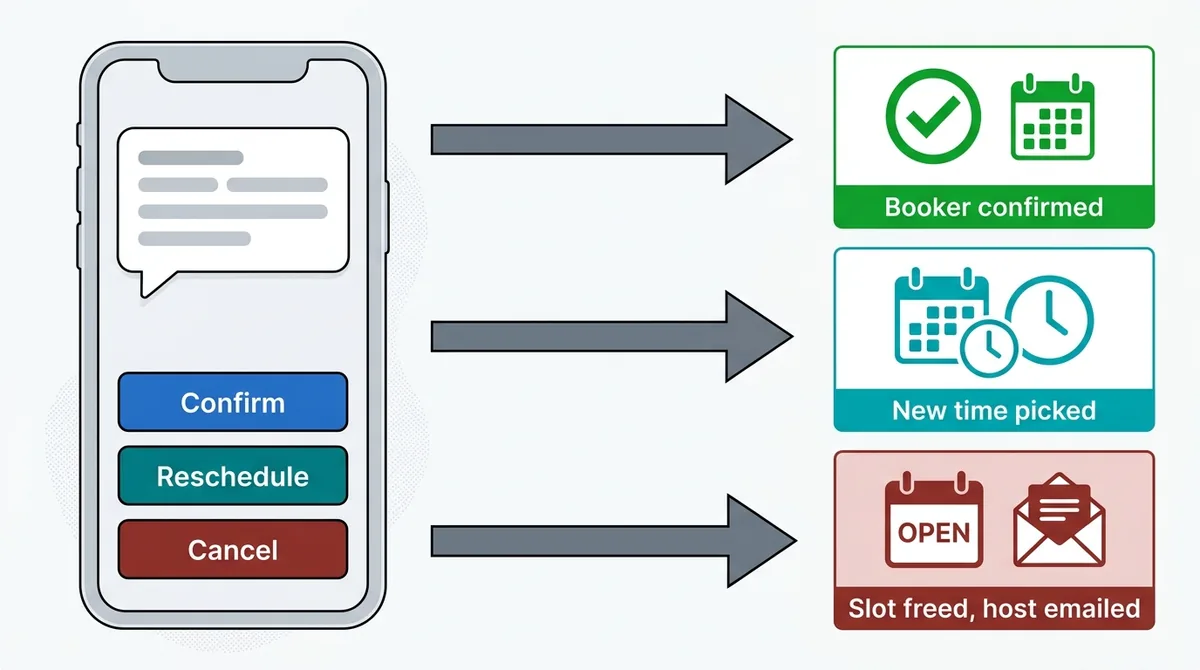
Here is what happens when a reminder lands:
- Confirm marks the booking as “Booker confirmed” on your bookings list, and the booker gets a short thank-you reply.
- Reschedule sends the booker a link to pick a new time on your booking page. The old booking is cancelled automatically when they choose the new slot.
- Cancel cancels the booking, removes the event from your Google Calendar (if one is connected) so the slot opens up again, emails the host, and sends the booker a link to book again later.
The reminder email carries the same three actions as buttons, and every WhatsApp reminder and tap shows up in the booker’s conversation in your shared inbox. If someone replies with a question instead of tapping (“can we do 4 PM instead?”), it reaches your team like any other message, or the AI agent you already run on that number, so nothing gets lost. If you are still deciding whether an AI agent should handle those conversations, our guide to the AI receptionist for small business covers what to automate and what to keep human.
A few honest limits: reminders cover bookings made on ChatMaxima booking pages, not appointments created in another calendar tool. SMS reminders are not available yet, so the channels are email and WhatsApp. And templates with an image header or a dynamic link button cannot be used for reminders, since there is nothing to fill them with.
Measure Your No-Show Rate Before and After
Reminders are easy to switch on and easy to forget about, so measure them. The formula is simple:
No-show rate = appointments missed without notice / total appointments booked
Track it for a month before you turn reminders on, then for a month after. Count late cancellations separately: a cancellation the day before is a success for your reminder, not a failure, because you had a chance to refill the slot.
In ChatMaxima’s bookings list, each booking shows which reminders went out (or were skipped, and why), whether the booker confirmed, and after the meeting you can mark it completed or a no-show. That gives you the numbers for the formula without a spreadsheet.
Then look at the patterns. If most no-shows come from bookings made more than two weeks ahead, add the 7-day reminder. If people confirm and still do not turn up, the 2-hour reminder is probably arriving too late to change their plans, so try 3 or 6 hours. And send template 19 to every no-show: a friendly “book a new time” message wins back a surprising share of them.
Appointment reminders are also a natural service to offer clients if you run an agency. Our list of AI agent business ideas shows how a no-show reduction service fits alongside lead qualification and support automation.
Start Sending Appointment Reminder Texts That Get Replies
A no-show is rarely a customer who does not care. It is a customer who forgot, or who could not easily tell you their plans changed. A clear appointment reminder text at the right time, with a one-tap way to confirm, reschedule or cancel, fixes both, and the research shows attendance climbs by around 11 percentage points with reminders alone.
Start with the two-reminder schedule (1 day and 2 hours before), pick the templates above that fit your business, and send them on WhatsApp to customers who opt in and by email to everyone else. If you want those reminders to send themselves, with the confirmations and cancellations flowing straight back into your calendar and inbox, see ChatMaxima’s plans and set it up on your first event type today.