
The first branch is easy. One phone sits at the counter, whoever is free picks it up, and customers get answers. Open a second location and the cracks start: a customer messages the wrong branch, a manager forwards a screenshot, and nobody is sure who replied last. By the fifth location, the phone at the counter has quietly become the busiest and least managed channel in the business.
WhatsApp for multi-location businesses comes down to two decisions that most owners make by accident: how many WhatsApp numbers you run, and how each conversation reaches the people at the right location. Get those two right and the rest (bots, reminders, promotions) slots in neatly. Get them wrong and every new branch adds more noise than revenue.
This guide is for owners and operations leads of salon chains, clinic groups, restaurant brands, gyms, car service centres, real estate offices and retail stores. It compares the three setups that actually work, shows where Meta’s current rules change the math, and ends with a 30-day rollout plan you can follow branch by branch.
Why the WhatsApp Business app stops working after two branches
The free WhatsApp Business app was built for a single shop. It lets a handful of linked devices share one account, which is fine for a front desk and an owner. It was not designed for 15 staff across six addresses, and the gaps show up fast:
- No assignment. Every staff member sees every chat, so two people answer the same customer or, more often, nobody does.
- No per-branch view. The downtown team scrolls past uptown chats to find their own. Head office cannot see response times by location.
- No automation beyond greetings. There is no way to ask “which branch?” and route the answer.
- Data walks out the door. When each branch runs its own app on a staff phone, the customer history leaves when that phone, or that employee, does.
That is why growing chains move to the WhatsApp Business Platform (the API) with a shared inbox on top. The API removes the device limit, but it does not decide your structure for you. You still need to choose a number strategy.
The three setups for WhatsApp across multiple locations
Every multi-location setup we see in practice is one of three shapes. None is universally right; each fits a different way of running branches.
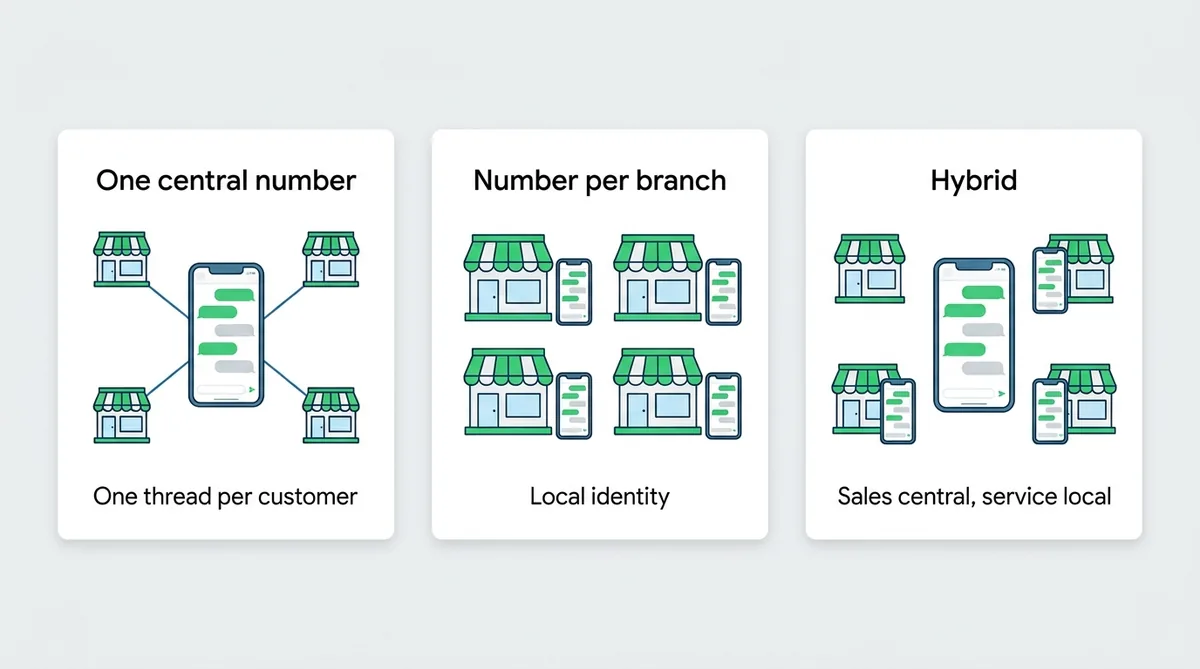
Setup 1: one central number for the whole brand
Every branch shares a single WhatsApp number. It appears on the website, on ads, on receipts and on every store door. When a customer writes in, a bot or a central agent works out which location they need and passes the conversation to that branch’s team.
Where it shines: brands that advertise centrally, customers who visit more than one location, and chains where a central desk already handles calls. One number also means one quality rating to protect, one opt-in list to manage, and one thread per customer no matter which branch they visit.
What it needs: reliable routing. If the branch question is clumsy, or repeated on every visit, customers feel it immediately.
Setup 2: one number per branch
Each location gets its own WhatsApp number, usually the same number printed on its Google Business Profile and storefront. Each number carries its own display name and business profile, so the address, hours and description in WhatsApp match that branch.
Where it shines: franchises and branches that operate almost independently, with their own staff, their own local promotions and customers who rarely cross over. A pizza outlet whose orders are all local delivery is a classic fit.
What it needs: more administration. Each number is registered, verified and monitored separately, and head office has to watch many inboxes instead of one.
Setup 3: hybrid, central for new customers and local for existing ones
A central number handles everything acquisition-related: ads, the website button, new enquiries. Branch numbers serve customers who already have a home location, printed on their invoices, appointment cards and local listings.
Where it shines: businesses where the first conversation is sales-heavy (best handled centrally) but repeat service is local, such as clinics, car service centres and gyms.
What it needs: discipline about which number appears where, so customers are not confused about whom to message.
Comparing the three setups side by side
| Factor | One central number | Number per branch | Hybrid |
|---|---|---|---|
| Where the number appears | Everywhere | Branch listings, storefront | Ads and web central, invoices local |
| Routing work | High, every chat needs a branch | Low, the number is the branch | Medium |
| Customer threads | One per customer | One per branch visited | Usually two at most |
| Head office visibility | One inbox, filtered by branch | Many inboxes to watch | Two layers |
| Local promotions | Need segmentation | Natural | Natural for existing customers |
| Best fit | Central desk, cross-branch customers | Independent branches, franchises | Sales central, service local |
What Meta’s 2026 rules mean for multiple WhatsApp numbers
A common assumption is that more numbers mean more sending capacity. That used to be partly true. It no longer is, and two of Meta’s rules shape the number decision more than most guides admit.
Messaging limits are now shared across the portfolio. Since 7 October 2025, Meta sets messaging limits on the business portfolio rather than on each phone number, and every number in the portfolio draws from the same allowance (Meta, messaging limit changes). Ten branch numbers do not give you ten times the broadcast volume. Choose per-branch numbers for local identity and ownership, not for throughput.
New portfolios start with a cap of two registered numbers. That ceiling lifts to 20 after business verification, or after the portfolio earns a 2,000 messaging limit (Meta, business phone numbers). A twelve-branch chain that wants a number per location should finish business verification before planning the rollout, and a chain heading past 20 locations should expect to lean on a central or hybrid design.
A few other points owners often ask about:
- Can two branches share one WhatsApp number? Yes. That is exactly Setup 1. The number belongs to the business, not to a branch, and any number of agents can answer from it through a shared inbox.
- Can staff use their own phones? They can log in to the inbox from a browser or the mobile app, but the WhatsApp number stays with the business. Nothing is tied to a personal SIM.
- Do message templates need approval per number? Templates belong to the WhatsApp Business Account, so every number under that account can use the same approved templates.
Five questions that decide your setup
Before registering anything, answer these five questions honestly. The pattern of answers usually points to one setup.
1. Do customers pick a branch, or does the branch pick them? If customers choose a location to visit (a salon, a clinic), they can tell you which one. If the business assigns the location by delivery area or territory, the customer may not know, and routing must rely on the address or pin code they share.
2. Who answers today? A central desk that already takes calls for every branch is a strong sign for one central number. Branch receptionists who know their regulars by name point towards per-branch numbers or a hybrid.
3. Where does your marketing spend go? Click-to-WhatsApp ads, website buttons and QR codes on packaging all need one destination. If most new customers arrive through central campaigns, a central number captures them without splitting the budget across ten ad sets.
4. How many locations will you have in two years? Plan for the chain you are becoming. With the 20-number ceiling and the work of verifying each number, a brand opening a branch a month should design around a central number from day one.
5. Do branches run their own offers? If each location runs its own weekend specials, per-branch numbers or careful segmentation on a central number are both workable. If promotions are always brand-wide, the central number wins.
Making one central number work: identify the branch in the first reply
A central number lives or dies by how quickly it works out the right location. The goal is to ask once, remember the answer and never make a regular customer repeat themselves.
Ask with a list, not a free-text question
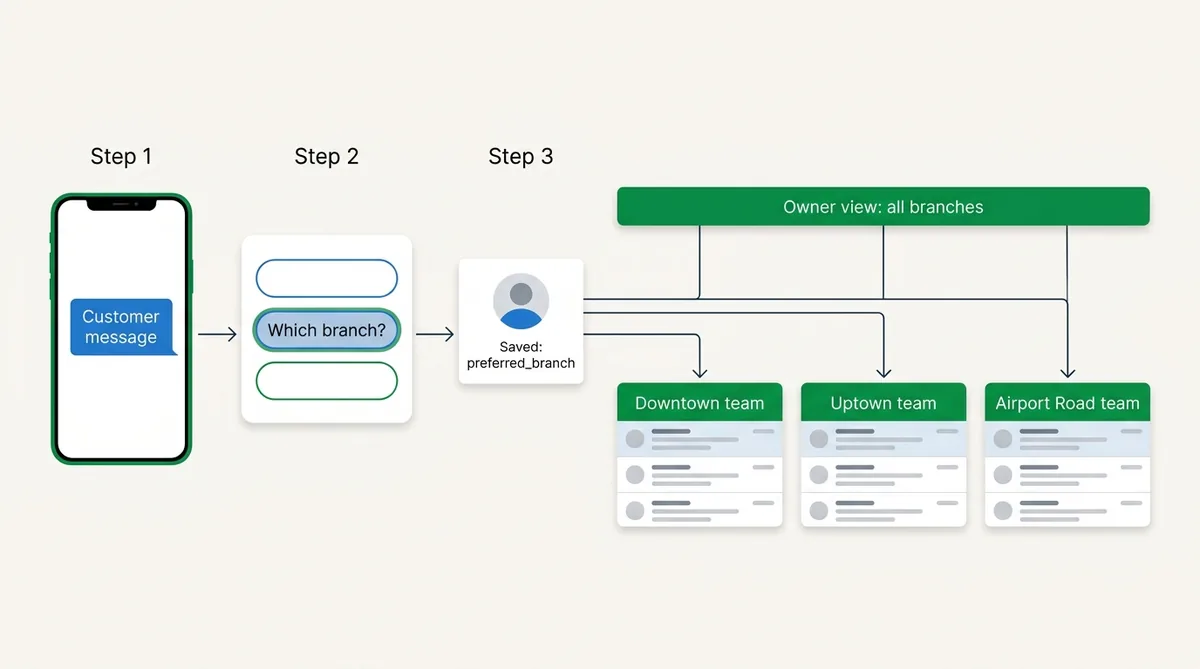
In ChatMaxima, the Button / List block shows customers a tappable menu of branches. WhatsApp lists hold up to 10 rows, so a chain with more locations should ask for the city first and then show the branches in that city. Tapping is faster than typing, and it removes the “Downtwn” and “near the mall” answers that a human then has to interpret.
Remember the answer as a contact attribute
Save the choice as a custom contact attribute, for example preferred_branch, using the MaxCRM block. On the next visit, a Condition block checks whether the attribute is already set and skips the question entirely. The customer gets a greeting that already knows their location, which is a small detail that makes a large chain feel local.
Use location sharing when customers do not know the branch name
For delivery and service-area businesses, the Location Input block sends WhatsApp’s native location request with a one-tap button and stores the shared pin in a variable. Your team sees exactly where the customer is. If you want the bot to match the pin to the closest location automatically, a short Code block can compare the shared coordinates against your branch list. We covered more ways to use location data in how adding location to your chatbot helps your business.
Let your ads pre-select the branch
When someone arrives from a click-to-WhatsApp ad, ChatMaxima captures the ad referral on the first message, including the ad ID and ad title. A Condition block can branch on those variables, so a campaign for the uptown opening lands customers straight in the uptown flow without a menu. This pairs well with an AI agent that qualifies the enquiry before a human sees it, as described in CTWA AI agents that qualify leads 24/7.
Let AI handle the questions that are not branch-specific
Many first messages are not about a branch at all: prices, services, what to bring, whether you accept a payment method. The MaxIA – AI Assistant block answers these from your knowledge base. For questions that differ by location (parking, which specialists work there, local menu items), create one knowledge base per branch and point each branch’s flow at the right one. When the customer needs a person, the AI exits to a Talk to Agent block that hands the conversation to the right team.
Departments as branches: who sees which conversations
Routing is only half of the job. The other half is visibility: branch staff should work a short, focused queue, while the people running the chain keep a view across every location.
In ChatMaxima, a team is called a Department. The simplest structure for a chain is one department per branch: Downtown, Uptown, Airport Road, and so on.
Handing a conversation to a branch. The Talk to Agent block has an Assign to department field. Once the bot knows the branch, it sets the matching department, an optional handoff message (“Connecting you with our Uptown team”) and the conversation status.
Keeping branch staff in their lane. The Agent (Restricted) role limits what a staff member can see. Through Restricted Agent Settings, you tie each agent to their branch’s department, and you can decide whether they also see new and unassigned conversations for that department. A receptionist in one branch never scrolls through another branch’s customers.
Limiting by number. If you run per-branch numbers, the standard Agent role can be restricted to specific channels and accounts, so branch staff only see the number that belongs to their location.
Owners and operations leads keep the full picture. Super Admin and Workspace Admin roles see every conversation across every branch and number. That single view is the main reason chains consolidate onto one platform instead of running a separate tool per location.
Spreading the load inside a busy branch. In each WhatsApp number’s Assignment Settings, you can set a Default Department and choose Round Robin as the agent assignment method. New conversations on that number then rotate across the department’s agents, skipping anyone marked unavailable in their Agent Availability schedule. Round robin applies to new conversations arriving on a number, so it fits per-branch numbers especially well; on a central number, the bot’s department handoff decides which branch queue the chat joins.
Measuring each location. The Reports section breaks performance down by Department, Agent, Labels and Inbox, so you can compare response times and volumes branch by branch rather than guessing which location is slow to reply. For a wider view of shared inbox habits, see how a shared inbox changes customer conversations.
Making per-branch numbers work
If the five questions pointed you at Setup 2 or 3, the work moves from routing to administration.
Connect every number to one workspace. Keeping all branch numbers in a single ChatMaxima workspace gives head office the combined view, shared reports and one set of templates. Running several WhatsApp numbers in one workspace requires the Max or Ultra plan; on smaller plans, each branch would need its own workspace, which loses the central view.
Give each number its own defaults. Every number has its own assignment settings: default department, default agent, default status and the round robin choice. Point each branch number at its branch department and conversations land in the right queue without any bot logic at all.
Attach a bot to each number where needed. Each WhatsApp number can have its own connected bot. Many chains build one master flow, duplicate it per branch and swap only the branch-specific details such as address, opening hours and knowledge base.
Fill in each business profile. The WhatsApp business profile for each number should carry that branch’s address, hours and website link. Customers check it more often than owners expect, especially before a first visit.
Remember the shared limit. Broadcasts from all branch numbers count against the same portfolio messaging limit. If one branch sends a large promotion on Friday, there is less room for the others that day. A shared campaign calendar avoids surprises.
After the chat: bookings, reminders and local promotions
The conversation is rarely the end goal. For most chains, it is the step before a booking, a visit or a repeat order.
Booking pages per location. ChatMaxima Bookings lets you create a separate event type, with its own shareable link, for each branch or each practitioner, and connect each one to its own Google Calendar. The bot sends the right link once it knows the branch, and conflicts are checked against that branch’s calendar only.
Reminders that reduce no-shows. Each event type can send automatic reminders before the appointment by email and WhatsApp, up to three of them, with one-tap Confirm, Reschedule and Cancel buttons. The customer opts in by ticking “Send me reminders on WhatsApp” when booking, and the reminder goes out from the WhatsApp number and approved template you pick, which for a per-branch setup can be that branch’s number. Our guide to appointment reminder texts covers timing and wording that keep cancellations low.
Local promotions without spamming the whole chain. A brand-wide broadcast about one branch’s opening offer annoys customers who live across town, and annoyed customers block numbers, which hurts quality for everyone. Use a Dynamic contact list in MaxCRM with a rule such as preferred_branch equals Uptown. The list updates itself as customers choose or change their branch, and the broadcast goes only to people who care, from whichever number you select as the sending account.
Common mistakes when running WhatsApp across branches
These come up again and again when chains move from scattered branch phones to a central platform.
Keeping the branch phones “just in case”. If customers can still reach an old branch number on a staff phone, half of them will, and those chats never reach your inbox or your reports. Migrate the number to the platform or retire it with an auto-reply pointing to the new one.
Asking for the branch on every visit. Store the answer. Regulars who are asked “Which location?” for the fifth time feel like strangers.
Squeezing 25 branches into one menu. WhatsApp lists cap at 10 rows. Ask for the city or region first, then the branch.
Adding numbers to get more volume. Messaging limits are shared across the portfolio, so extra numbers add administration, not capacity. Add a number when a branch needs its own identity, not when a campaign needs more reach.
Forgetting what happens after hours. If you set Bot Working Hours on a flow’s trigger, the bot stays silent outside those hours and messages wait in the inbox. For most chains it is better to keep the bot available around the clock for answers and bookings, and only hand off to people during staffed hours.
Skipping the head office view. If every branch runs its own setup, nobody notices that one location takes four hours to reply while another takes four minutes. Agree on response-time targets and review the department report every week.
A 30-day rollout plan for multi-location WhatsApp
You do not need to switch every branch on the same day. A staged rollout surfaces problems while they are still small.
Week 1: map and decide. List every location, who answers messages there today and which numbers customers already use. Answer the five questions above and choose a setup. Start Meta business verification now if you plan more than two numbers.
Week 2: build the structure. Create one department per branch, invite staff with the right roles (Agent (Restricted) for branch staff, admin roles for head office), and connect your number or numbers. Set assignment defaults and round robin where it helps.
Week 3: build the flow and pilot. Build the branch question, save preferred_branch, add the AI assistant with your knowledge bases and wire the handoff to each department. Pilot with two branches: one busy, one quiet. Watch the first 100 conversations closely and fix anything that confuses customers.
Week 4: roll out and measure. Switch on the remaining branches, update websites, listings and storefront signage, set up booking pages and reminders, and build Dynamic lists for local promotions. Review the department report at the end of the week and set targets for month two.
Choosing the right WhatsApp setup for your locations
WhatsApp for multi-location businesses works best when the structure is decided on purpose. A central number gives you one brand, one thread per customer and one place to advertise, as long as routing asks once and remembers. Per-branch numbers give each location its own identity and ownership, at the cost of more administration and no extra sending volume. The hybrid keeps acquisition central and service local, which suits many clinic, gym and service chains.
Whichever you choose, the same building blocks do the heavy lifting: a branch question that is asked once, departments that mirror your locations, restricted roles so each team sees only its own customers, and a head office view across all of it. If you plan to run several WhatsApp numbers in one workspace, look at ChatMaxima’s Max and Ultra plans. Compare what each includes on the pricing page and start with your two pilot branches this month.