An AI customer service agent is software that reads a customer’s message on chat, WhatsApp, email or the phone, works out what the person needs, looks up data or takes an allowed action in your systems, and then either closes the request or hands it to a person with the full context. The last part decides whether customers like it. An agent that answers well but traps people when it gets stuck does more damage than no agent at all.
This guide is for support leads and owners who have to pick one. It covers what these agents do, which jobs to give them, the 10 worth evaluating with prices from each vendor’s own page, what one month costs on six of them, and a 30-day launch plan. We make one of these products, ChatMaxima, so you will also see plainly what it does not do.
Updated 21 November 2026: every price was re-checked on the vendor’s own site, Forethought is now part of Zendesk, and HubSpot’s Customer Agent joins the list.
What an AI customer service agent is (and what it is not)
Three kinds of tools get sold under the same label. They behave very differently once a real customer shows up.
| Scripted chatbot | AI customer service agent | Agent assist | |
|---|---|---|---|
| Who talks to the customer | The bot, from a fixed menu | The AI, in free conversation | A human, with AI help |
| What it can do | Show answers you wrote, collect fields | Answer from your knowledge, look up orders and bookings, run approved actions, decide when to escalate | Draft replies, summarize the chat, translate, suggest articles |
| Where it breaks | Anything outside the menu | Weak data access, vague rules, no handoff | It saves time but never works alone |
The quickest test is to ask a vendor what the tool finishes without a person. “Shows an article” or “collects details and creates a ticket” describes a chatbot with a language model on top. “Checks the order, books the slot, updates the record and confirms” describes an agent. If you want the longer version of that distinction, our guide to AI agents vs chatbots covers it, and the types of AI agents explainer shows where support agents sit among the rest.
Most teams end up with two of the three: the AI agent takes the first reply, and agent assist helps the humans who pick up the handoffs.
Seven support jobs an AI agent handles well
The best first jobs are frequent, repetitive and easy to check. These seven cover most of the inbox for a typical small or mid-size business:
- Answers from your own knowledge. Opening hours, delivery areas, sizing, warranty terms, setup steps. The agent reads your website, documents and FAQ pages and answers in the customer’s own words and language.
- Status lookups. “Where is my order?”, “Is my booking confirmed?”, “Did my payment go through?” The agent reads the order or booking system and replies with the real status instead of a link.
- Bookings and changes. Finding a free slot and booking it, or moving an existing appointment, inside the rules you set.
- Intake for returns, claims and repairs. Collecting the order number, reason, photos and contact details, then raising a ticket that staff can act on without asking again.
- Contact and account updates. Saving a new email address, delivery preference or company name to the customer record.
- Triage and routing. Working out whether the message is billing, technical or sales, tagging it and sending it to the right team.
- After-hours cover. Answering at night and on weekends, and leaving a clean summary for the morning shift when something needs a person.
Keep some work with people, at least at the start: refunds and credits above a small limit, complaints from upset customers, anything legal, medical or safety related, cancellations you want to save, and every request for a human. Make these hard rules, not judgment calls for the AI. Put money limits in rules rather than in the prompt.
How an AI customer service agent handles a message
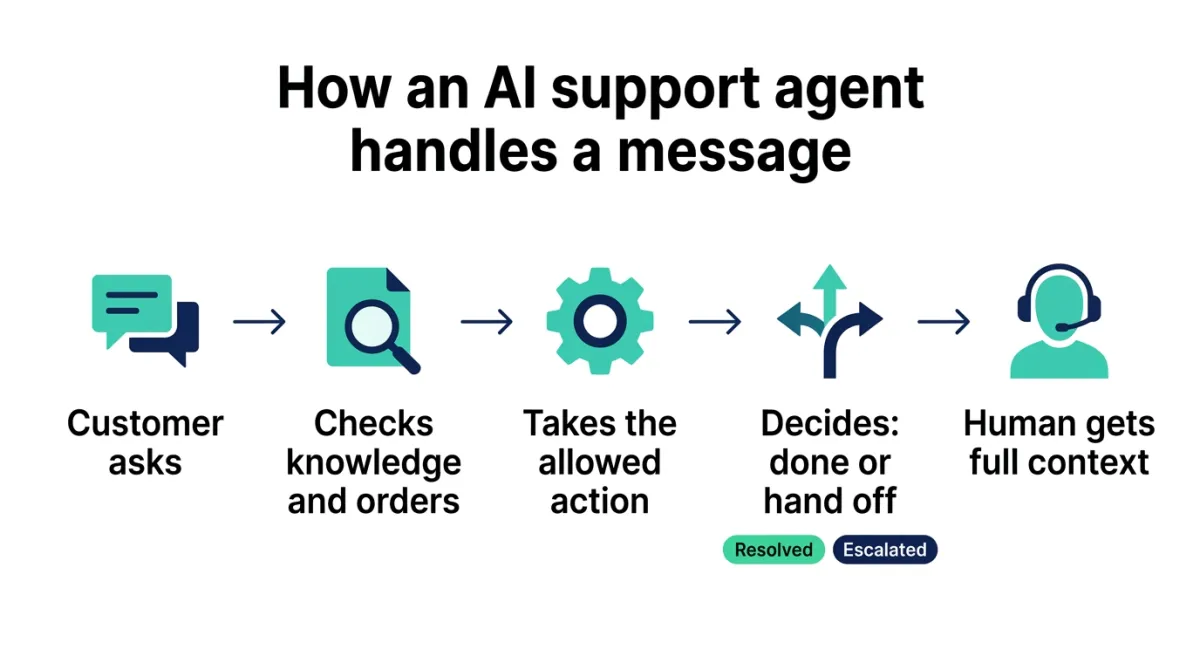
Behind each reply the agent runs a short loop:
- Read the message and the conversation so far, including who the customer is if they are already known.
- Look things up in your knowledge sources and in the connected systems: the store, the calendar, the CRM.
- Act, if it is allowed to. Book, update, create, send. Anything not on the list of allowed actions is simply not available to it.
- Decide whether the request is done. If yes, confirm and close. If the customer asks for a person, the topic is on your escalation list, or the agent cannot find what it needs, it stops.
- Hand off with context. The human sees the transcript, the details collected and the reason for the handoff, so the customer never repeats themselves.
Steps 3 and 5 separate a useful agent from an expensive one: resolution depends more on what the agent can reach than on which model writes the sentences.
Design the handoff before anything else
Customers accept AI when they trust they can get past it. In a Qualtrics XM Institute study of more than 20,000 consumers in 14 countries, nearly one in five people who had used AI for customer service saw no benefit from it, almost four times the failure rate of AI used for other tasks, and half said they worry AI will stop them reaching a person. Your handoff is the answer to that worry.
Four parts make a good handoff:
- Clear triggers. The customer asks for a person, uses words like “complaint”, “cancel” or “lawyer”, mentions money above your limit, or the agent fails to answer twice. Write these into the agent’s rules.
- Context that travels. Transcript, collected fields, order number and the reason for escalation should arrive with the conversation, not in a separate tool.
- Honest wait times. If nobody is free, say so and say what happens next. “Our team is offline until 9 AM; we have your details and will reply first thing” beats a silent queue.
- A ticket when no one is around. Outside staffed hours, the agent should create a ticket assigned to the right team instead of leaving the chat hanging.
For the people side of this, see our piece on keeping support personal while you automate.
How to evaluate AI agents for customer service
Feature grids make every vendor look complete. These six questions predict whether a rollout actually works:
- What can it write to on day one? Reading an order helps; changing it is what removes work. Ask for the list of actions per system on your plan.
- Which channels does it cover natively? A website-only agent misses everyone who writes on WhatsApp or Instagram.
- How does the handoff work? Same inbox, department routing and a clear message to the waiting customer.
- What is the billing unit? Per resolution, conversation, seat or message; each favors a different volume and success rate.
- Can you audit it? You need every step it took and why it escalated, to fix mistakes and answer complaints.
- Does it disclose that it is an AI? Several laws now require it (see below).
The 10 best AI agents for customer service in 2027
Prices below come from each vendor’s own pricing or product pages, checked on 21 November 2026, in USD. “Not published” means the vendor quotes through sales.
| # | AI agent | Best for | Published pricing | Watch for |
|---|---|---|---|---|
| 1 | ChatMaxima | Messaging-first teams: WhatsApp, Instagram, web, voice | Plans from $19/month incl. 10,000 messages; no per-resolution fee | No refunds or order edits out of the box |
| 2 | Fin (Intercom) | Teams on Intercom or another helpdesk | $0.99 per outcome | Cost rises with every success |
| 3 | Sierra | Enterprises wanting a bespoke agent | Not published, outcome-based | Vendor-led build, enterprise budgets |
| 4 | Decagon | High-volume consumer brands | Not published | Needs volume to justify |
| 5 | Agentforce | Salesforce-centred organizations | $2 per conversation, or Flex Credits | Salesforce licences on top |
| 6 | Zendesk AI agents | Existing Zendesk teams | About $1.50 to $2.00 per automated resolution, plus seats | Only “verified” resolutions count since May 2026 |
| 7 | Ada | Multilingual global consumer support | Not published | Combining with Dialpad |
| 8 | Kore.ai | Large contact centers with voice | Not published | Heavy configuration |
| 9 | HubSpot Customer Agent | Teams already on HubSpot | $0.50 per resolved conversation (credits) | Needs Service Hub Pro or Enterprise seats |
| 10 | Botpress | Developer teams building their own | Free tier; Plus $150/month, Team $750/month (annual) | AI usage billed on top |
1. ChatMaxima
Best for: small and mid-size teams whose customers write on WhatsApp, Instagram, Messenger, the website, Telegram, SMS or email, or call in.
ChatMaxima’s AI Agent runs on every channel from one shared inbox. You give it instructions, knowledge sources (your website, documents, Q&A and knowledge base) and a set of tools: order lookups in Shopify, WooCommerce, Salla and Zid; Stripe customer records and invoices; Google Calendar booking; Google Sheets; contact updates in the built-in MaxCRM; email; PDF generation; and any system with an API, through an API Request tool or an MCP server. When its exit rules are met, the flow moves on to a Talk to Agent step, which can assign an agent or department and show a delay message if nobody is free, or to a Create Ticket step for later. Human agents get AI reply drafts, chat summaries and translation in the same inbox, and an Executions log shows every step a conversation took.
Pricing is per plan rather than per resolution: Starter costs $19 a month and includes 10,000 messages plus 3 team members, Pro is $99 with 50,000 messages and 15 team members, and extra messages are $10 per 10,000. The built-in AI model is included; if you want a specific OpenAI, Claude or Gemini model, you connect your own key and pay that provider. See pricing.
What it does not do: the store tools are read-only, so the agent cannot issue a refund, cancel an order or edit an address by itself. You route those to a ticket for staff, or connect your own refund endpoint through the API Request tool with your own limits. There is no built-in CSAT survey report, the voice agent answers inbound calls only, and it cannot transfer a live call to a person.
Pick something else if: your support runs entirely inside Salesforce or Zendesk and almost nothing arrives on messaging apps.
2. Fin (Intercom)
Best for: teams already on Intercom, or on another helpdesk that want a strong resolution agent on top.
Fin charges $0.99 per outcome. Intercom counts an outcome when the customer confirms the answer solved it, does not ask for more help, or Fin completes a defined workflow, and it charges once per conversation. Used with another helpdesk, there is a minimum of 50 outcomes a month; inside Intercom you also pay for seats. Intercom says Fin customers average a 76% resolution rate across more than 12,000 businesses. The pricing lines up with results, but at high volume the bill grows with every success, so model it at three times today’s volume.
3. Sierra
Best for: large consumer brands that want a heavily customized agent and have the budget for a vendor-led build.
Sierra sells outcome-based pricing through its sales team and does not publish rates. It is built for complex, high-stakes conversations across chat and voice, with mature guardrails. This is an enterprise commitment in time and money, not something a small team sets up in an afternoon.
4. Decagon
Best for: high-volume consumer support with sophisticated routing and quality review.
Decagon prices per conversation or per resolution on a custom quote. Its published results are customer stories rather than an average. Like Sierra, it pays off when volume is large enough to justify a proper build.
5. Agentforce (Salesforce)
Best for: organizations whose customer records, cases and processes already live in Salesforce.
Salesforce lists Agentforce at $2 per conversation, or through Flex Credits at $500 per 100,000 credits, which works out to about $0.10 per standard action. Its help pages report that Agentforce resolved more than 63% of conversations instantly across over five million conversations. It is one of the few agents whose own page promises refunds as an action, because it can act on Salesforce data directly. The further your systems sit from Salesforce, the more integration work you take on, and Salesforce licences come on top.
6. Zendesk AI agents
Best for: teams already running Zendesk who want automation without changing helpdesk.
Zendesk bills AI agents per automated resolution, roughly $1.50 on a committed plan and $2.00 pay-as-you-go, on top of Suite seats from $55 per agent per month on annual billing, which include a small monthly allowance of resolutions. According to Zendesk, since May 2026 it sorts resolutions into tiers and only the ones its model verifies as resolved draw on your allowance. Zendesk also completed its purchase of Forethought in March 2026, so Forethought’s triage and resolution tools now sit inside Zendesk. It is an upgrade to a helpdesk you already know rather than a new way of working, which is exactly what many teams want.
7. Ada
Best for: global consumer brands that need many languages at high volume.
Ada sells through sales, with pricing per conversation and an optional per-resolution model. It says it resolves 84% of customer inquiries autonomously. In November 2026 Dialpad announced it is combining with Ada, and said existing Ada customers keep their contracts and pricing. Ask about the product roadmap before a long commitment.
8. Kore.ai
Best for: large enterprises with contact centers, voice requirements and strict deployment rules.
Kore.ai covers voice and digital channels and comes with its own agent desktop for human handoff. Pricing is custom. It is broad and capable, and that breadth comes with configuration work, so it is rarely the fastest route for a small team.
9. HubSpot Customer Agent
Best for: teams whose contacts, deals and tickets already live in HubSpot.
Since April 2026, HubSpot charges $0.50 per resolved conversation, paid with credits, and counts a conversation as resolved when it is not handed to a human within 72 hours. It needs Service Hub Professional (about $90 per seat per month on annual billing, plus a $1,500 onboarding fee) or Enterprise. HubSpot reports a 70% average resolution rate. The appeal is that the agent works on the same records your sales and service teams already use.
10. Botpress
Best for: developer teams that want to build and control the agent themselves.
Botpress has a free tier with 100 conversations, Plus at $150 a month with 250 conversations and Team at $750 a month with 1,500 conversations, both billed annually, with AI usage charged on top and human handoff from the Plus plan. It is the most flexible tool on this list and the most demanding. If a support lead rather than an engineer will run it day to day, look higher up the list.
Also worth a look
- Gorgias AI Agent: built for Shopify stores, at about $0.90 to $1.00 per automated interaction on top of a helpdesk plan, with order tracking and returns handling.
- Help Scout Envoy: Help Scout’s AI agent, at $0.75 per resolution on plans from $25 per user a month. Help Scout says its average resolution rate is 73%.
What vendors say their agents resolve, and how to read it
Every published resolution rate comes from the vendor’s own customers, and each one counts “resolved” differently.
| Vendor | Published figure | How “resolved” is counted |
|---|---|---|
| Ada | 84% of inquiries resolved autonomously | Vendor definition, not detailed on the page |
| Fin | 76% average across 12,000+ businesses | Customer confirms, does not ask for more help, or a workflow completes |
| Help Scout | 73% average | No human help; no charge if the customer clicks “I still need help” |
| HubSpot | 70% average | Not handed to a human within 72 hours |
| Agentforce | More than 63% resolved instantly | Across 5 million+ conversations |
Silence is not satisfaction: a customer who gives up can count as “resolved” under some definitions. Set your own rule, such as no human reply and no repeat contact within seven days, and measure every trial the same way.
Expect the payoff to take work, too. In a Gartner survey of 275 customer service leaders, only 4% had achieved the ROI they expected from their AI initiatives. Intercom’s 2026 report, a vendor survey of more than 2,400 professionals, found only 10% of teams had reached a mature AI deployment. Adoption is no longer the hard part: Salesforce’s own survey of 3,075 service professionals says AI agent use in service teams rose from 39% to 66% in a year. Getting results is. For more numbers, see our AI customer support statistics roundup.
What an AI customer service agent costs: one month, six tools
Different billing units make list prices hard to compare, so here is one example. A team of 3 handles 1,500 support conversations a month, and the AI fully resolves 60% of them, which is 900 resolutions.
| Tool | How the month is billed | Estimated monthly cost |
|---|---|---|
| ChatMaxima | Starter $19 (10,000 messages) plus one $10 add-on, assuming about 12 messages per conversation | About $29 |
| Botpress | Team plan, 1,500 conversations included (annual billing), plus AI usage | $750 plus AI usage |
| HubSpot Customer Agent | 900 x $0.50, plus 3 Service Hub Pro seats at about $90 | About $720, plus $1,500 onboarding once |
| Fin | 900 x $0.99, on top of your existing helpdesk | About $891 |
| Zendesk AI agents | About $1.50 to $2.00 per resolution beyond the seat allowance, plus 3 Suite Team seats at $55 | About $1,490 to $1,935 |
| Agentforce | 1,500 conversations x $2 | About $3,000, plus Salesforce licences |
This is not a like-for-like quality comparison. The per-resolution tools include deeper write actions in their own ecosystems, and enterprise tools include implementation help that the cheaper ones leave to you. What the table does show is how the billing unit shapes the bill. Per-resolution pricing grows with success, per-conversation pricing grows with traffic, and plan pricing grows with messages. Gartner predicts that the cost per resolution for generative AI will exceed $3 by 2030, so check what your contract says about price changes.
Two costs sit outside every vendor’s price. Messaging channels bill separately: on WhatsApp, Meta has charged for service replies beyond 1,000 free per number per month since 1 October 2026 (see our WhatsApp service message pricing guide). And someone on your team will spend time writing knowledge, reviewing transcripts and tuning rules, especially in the first two months. For a broader view of how agents are priced, read AI agent pricing, and to work out the payback, use our guide to calculating support chatbot ROI.
Disclose that the agent is an AI
Disclosure is now a legal question in several places, not just good manners:
- Maine passed a law in June 2025 (LD 1727) that bars AI chatbots that could lead a consumer to believe a person is on the other end, unless the business gives a clear and conspicuous notice.
- Utah requires businesses to disclose AI when a consumer asks, and up front in high-risk interactions, under amendments in force since May 2025 (summary by Alston & Bird).
- California’s BOT Act (Business and Professions Code section 17941) has made it unlawful since 2019 to use a bot to mislead someone about its artificial identity in order to sell to them.
- The EU AI Act, under Article 50, requires systems that talk with people to tell them they are dealing with an AI unless it is obvious, from 2 August 2026.
The simple fix works everywhere: the agent’s first message says it is an AI assistant and how to reach a person. Treat this as a summary rather than legal advice, and confirm the rules in each market you serve.
A 30-day rollout plan
Week 1: choose the jobs. Export your last 500 conversations and tag them by intent. Pick the five most common, well-defined requests, often order status, delivery times, bookings, returns intake and account changes. Write or tidy the knowledge the agent needs for each, and write your handoff triggers.
Week 2: build and test. Connect knowledge sources and the read-only lookups first. Add one action at a time, starting with low-risk ones like booking or updating a contact. Write 30 test conversations, including angry customers, off-topic questions and people asking for a human, and run them until the agent behaves.
Week 3: launch narrow. Turn it on for one channel, or only outside business hours. Add the AI disclosure to the first message. Read transcripts every day and fix the knowledge gaps you find.
Week 4: widen and measure. Add the second channel, add the next actions, and set your baseline numbers. Teams that start with five journeys and expand tend to keep going. Teams that point the agent at the whole inbox on day one often switch it off.
If you are deciding where support fits among the other jobs an agent can do, the AI agents for business pillar gives 30 department-by-department examples, and AI agent workflow shows how to wire one up step by step.
Metrics to track
- Resolution rate, by your own definition, for example no human reply and no repeat contact within seven days.
- Escalation rate and reasons. Rising escalations on one topic usually mean a knowledge gap, not a model problem.
- Repeat contact within seven days, which catches false “resolutions”.
- First response time and handoff wait time. The AI should make the first number tiny; the second shows whether your team can keep up with what it passes on.
- Cost per resolved conversation, including channel fees and the hours your team spends tuning.
- Customer rating. If your tool has no survey report, end each AI conversation with a one-tap rating question and save the answer to a spreadsheet or the contact record.
Where ChatMaxima fits
ChatMaxima suits teams whose customers are on messaging apps and who want one inbox for the AI and the people behind it, at a flat plan price rather than a fee per resolution. It is a weaker fit if you need the agent to issue refunds or edit orders inside your store without any setup, or if your whole operation already lives in Salesforce, Zendesk or HubSpot, where their native agents save integration work.
Comparing it with a specific tool? Our alternatives pages go vendor by vendor. For phone support, see the AI receptionist and how an AI answering service compares with a live one. Ecommerce teams should read AI agents for ecommerce next.
Frequently asked questions
What is the difference between an AI customer service agent and a chatbot? A chatbot follows a script you wrote. An AI customer service agent understands free-form questions, looks up your data, takes allowed actions in your systems and decides when to hand off to a person.
Can an AI agent fully replace human support staff? Not for most businesses. Agents take the repetitive share of the inbox; people handle complaints, exceptions, money decisions and anything sensitive. Plan for the AI to absorb growth and after-hours volume, and for your team to spend more of its time on the conversations that need judgment.
How much does an AI customer service agent cost? On the big helpdesk platforms, published prices run from $0.50 to about $2.00 per resolution or per conversation, usually on top of seat licences. Messaging platforms like ChatMaxima use flat plans instead, from $19 a month. Enterprise tools such as Sierra, Decagon, Ada and Kore.ai quote through sales.
Which is the best AI agent for customer service? The one that matches where your customers reach you and the systems your team already uses. Messaging-first teams should start with a platform built for WhatsApp and social channels; teams living in Intercom, Zendesk, Salesforce or HubSpot should try the native agent first.