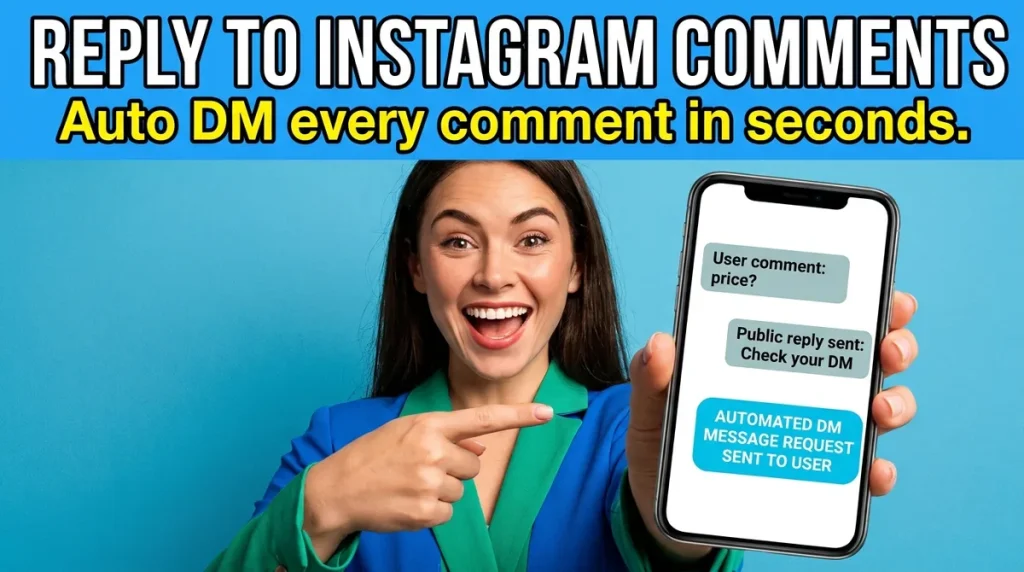
Knowing how to reply to comments on Instagram sounds trivial until a post takes off. Tapping Reply under one comment takes five seconds. Answering two hundred comments that all say “price?” takes an evening, and by the time you reach the last few, those people have already bought somewhere else.
This guide covers both halves of the job. First, the manual way to reply to Instagram comments in the app, on desktop and from your business inbox, plus what to say and when to take the conversation to DMs. Then the part most guides skip: how to auto reply to comments with a safe Instagram comment bot, so every matching comment gets a public reply and a private message in seconds, and your team picks up the conversation in one inbox.
The second half uses ChatMaxima’s Comment Automation, which we filmed end to end on a real demo store. You can watch the full walkthrough further down.
How to reply to comments on Instagram in the app
Instagram’s own steps are short. On a post or reel, open the comments, tap Reply under the comment, type your answer and send it. Instagram adds the person’s @username at the start, so they get a notification that you answered them specifically (Instagram Help Center).
A few in-app options are worth knowing because they change how a reply lands:
- Reply to a comment with a reel. On reels, you can answer a comment with a new reel that shows the comment as a sticker. It works well for questions many people are asking, because the answer becomes content in its own right.
- Like the comment. A heart is the lightest acknowledgement. It works for compliments, not for questions.
- Pin the best comments. Pinning a helpful question with your answer keeps it at the top, so the next ten people see the answer before they ask again.
- Hide or filter. Hidden Words filters offensive comments and the phrases you add yourself. Use it for spam, not for criticism you would rather not see.
Replying from a computer
On instagram.com, open the post, click the comment and choose Reply. It is the same flow with a keyboard, which is faster when you are writing more than a line. For a business account, the Meta Business Suite inbox also lists Instagram comments next to messages, so a social media manager can work through them without switching phones.
Replies that only work in public
Some comments should be answered where everyone can see them. A thank-you, a correction, an answer that helps every reader (opening hours, delivery areas) and a calm, helpful response to a complaint all belong in the thread. Ignoring a public complaint reads worse than the complaint itself.
When to reply in the comments and when to move it to DMs
The comment thread is a shop window, not a till. A useful rule: answer in public when the answer helps everyone, and move it to a direct message when the answer is specific to one person or one price.
| Comment | Best reply | Why |
|---|---|---|
| “Love this!” | Like it, or a short public thank-you | Social proof, nothing to sell |
| “What time do you open?” | Public reply | Every reader benefits |
| “Price?” or “How much?” | Short public reply, price in a DM | Keeps pricing out of competitors’ view |
| “Is this available in M?” | DM | Stock and size are personal |
| “Interested” | Public “check your DMs” plus a DM | High intent, needs a conversation |
| A complaint | Public acknowledgement, then a DM | Shows you respond, solves it privately |
| Spam or abuse | Hide or delete | Protects the thread |
Price questions are the clearest case. A public price invites comparison shopping, and the next person who scrolls by sees a number without context. A short public reply (“Sent you the details!”) plus the actual answer in a DM shows that you respond, keeps the details private and opens a conversation you can continue.
That private message has a name in Meta’s tools: a private reply, a DM sent in response to a specific comment. It is the mechanism every comment-to-DM tool uses, and it comes with rules we cover below.
Why manual replies stop working
Manual replies are fine at ten comments a day. They break in three predictable ways:
- Volume. One giveaway, sale or viral reel produces hundreds of near-identical comments. Answering each one by hand means copying the same reply and the same DM over and over.
- Timing. A comment is a moment of interest. Someone who asks “price?” at 11 at night and hears back the next afternoon has often already bought elsewhere. We wrote about this pattern in our guide to speed to lead: the first business to answer usually wins.
- Consistency. Different people on your team answer the same question differently, and the DM half of the job gets forgotten when the thread is busy.
This is where an Instagram comment bot earns its place, as long as it is the right kind.
What an Instagram comment bot is (and what it is not)
Searches for “instagram comment bot” mix two very different things:
- Engagement bots log in as you and leave comments, likes and follows on other people’s posts to fake activity. They break Instagram’s terms, they rely on your password, and they are the reason accounts get restricted.
- Comment reply automation runs through Meta’s official API and only ever responds to people who commented on your own posts. It replies in the thread, sends a private reply, and hands the conversation to a person.
Only the second kind is safe for a business. It cannot message people who never contacted you, and it follows Meta’s private-reply rules:
- One private reply per comment. “Only one message can be sent to the commenter” (Meta for Developers).
- Within 7 days. The private reply must be sent within seven days of the comment. For Instagram Live, only during the broadcast.
- Follow-ups need their reply. You can only send more messages after the person responds, and within 24 hours of that response.
- Top-level comments only. Automated replies go to top-level comments on your posts and reels, not to replies inside a thread, and not to comments you have hidden.
The practical consequence: your one automated DM has to earn a reply. Everything that follows depends on the person answering it.
How to auto reply to Instagram comments with Comment Automation
ChatMaxima’s Comment Automation is the simplest way to automate Instagram comment replies without building a chatbot. You write rules, each rule watches a post (or all posts) for certain words, and when a comment matches, ChatMaxima posts your public reply, sends the private reply and puts the conversation in your ChatMaxima Inbox.
Here is the full walkthrough, filmed on a demo clothing store called Willow Cart:
Step 1: Connect your Instagram account
Your account needs to be an Instagram professional account (Business or Creator). In ChatMaxima, go to Channels, then Instagram, and connect it with your Instagram login or through a linked Facebook Page. If you have not linked the two before, our guide to connecting a Facebook Page with an Instagram account walks through it.
Step 2: Open Comment Automation
In the list of connected Instagram accounts, open the Actions menu next to the account and choose Comment Automation. Rules belong to one account, and any admin in your workspace can see and edit them. With no rules yet, click Add rule.
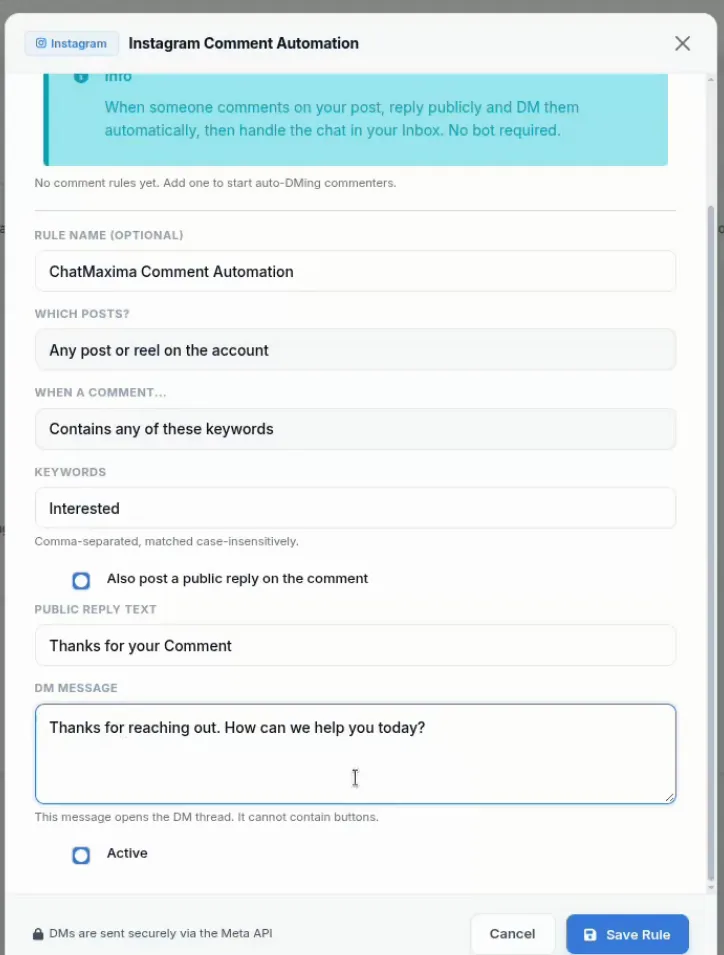
Step 3: Fill in the rule
The form reads almost like a sentence:
- Rule name (optional). Something you will recognise later, like “Pricing comments”.
- Which posts? Any post or reel on the account, or one specific post or reel. For a specific post, paste its link from Instagram.
- When a comment… Contains any of your keywords, exactly matches a keyword, starts with a keyword, or any comment at all.
- Keywords. Comma-separated, matched without regard to capital letters, so “Interested” and “interested” both count.
- Also post a public reply. Tick it and write the reply that appears under the comment, such as “Thanks for your comment!”.
- DM message. The private reply that opens the conversation. It is plain text; buttons are not allowed in this first message.
- Active. Leave it on, and save.
Step 4: Test it from another account
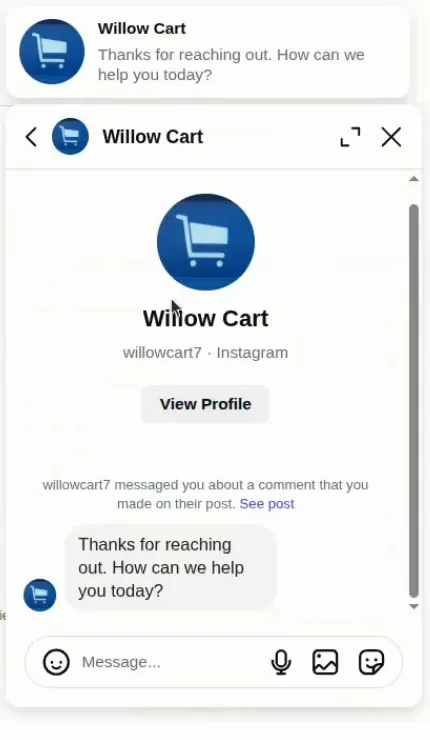
Comment on the post from a different Instagram account, the way a customer would. In our test, the comment “Hi, I’m interested in your collection” got the public reply “Thanks for your Comment” under it, and the DM “Thanks for reaching out. How can we help you today?” arrived within seconds, with nobody at the dashboard.
Step 5: Pick up the conversation in your Inbox
The commenter is saved as a contact, and the private reply shows in your ChatMaxima Inbox as the first message of the conversation. When they reply, your team answers from the same inbox they use for WhatsApp, Messenger and website chat, so nothing lives only on one person’s phone. If Instagram rejects a private reply (an expired connection, or a comment older than seven days), ChatMaxima does not show a message the customer never received.
Instagram comment reply rules: matching and rule order
Most setups need more than one rule: a general one for buying signals and specific ones for product posts. Two details decide whether they work together.
The four match types
| Match type | Keyword | Fires on | Does not fire on |
|---|---|---|---|
| Contains | price | “what’s the price for this?” | “how much?” |
| Exactly matches | guide | “guide” | “can you send the guide” |
| Starts with | info | “info please” | “send info” |
| Any comment | (none) | every comment | nothing is excluded |
Contains is the most forgiving and the right default for questions. Exactly matches suits “comment GUIDE below” campaigns, where you want only the call to action to fire. Any comment is a catch-all; use it carefully.
Oldest rule first, first match wins
ChatMaxima checks an account’s active rules from the oldest to the newest, and the first rule that matches is the only one that answers. Each comment gets exactly one response.
In our demo, the first rule watched every post for “interested”. The second rule watched one product post for “prices, offers”, with the public reply “Check your DM” and the price in the DM. A comment on that post asking “What are the prices and current offers?” skipped the first rule (no “interested”) and got the pricing answer.
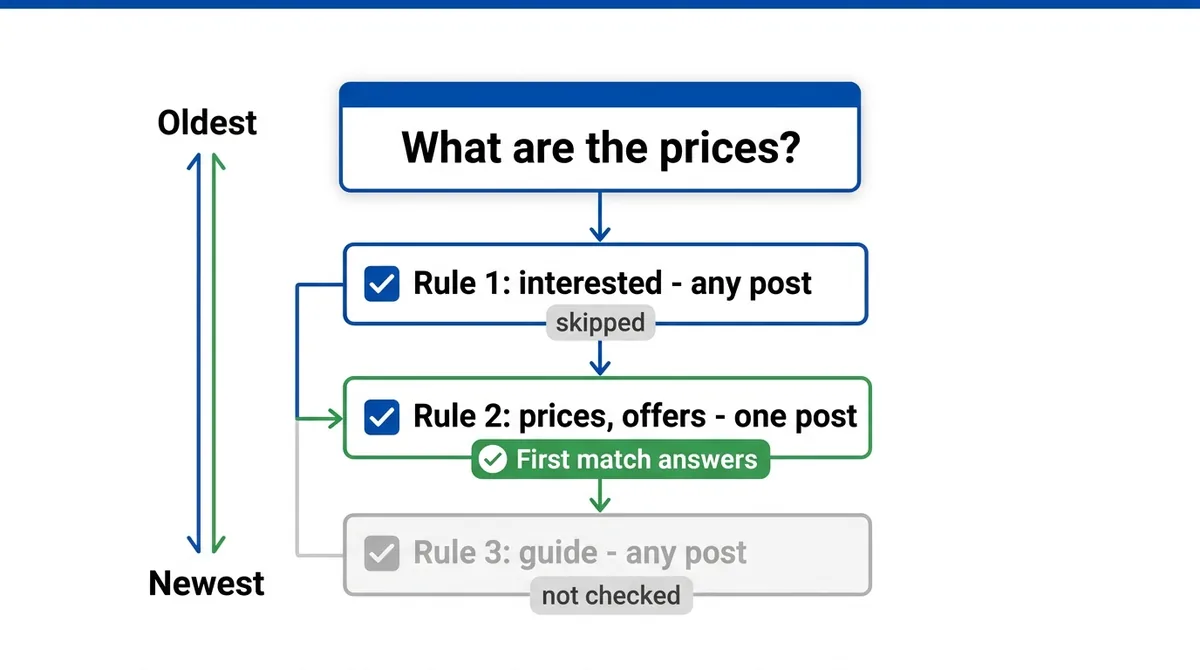
The trap: a catch-all rule created first will answer everything, and the rules you add later never get a turn. Since order follows creation date, create specific rules first and the catch-all last. To change the order later, switch a rule off and recreate it, or delete it and add it again.
Writing comment replies and DMs that get answered
Automation only removes the waiting. The words still decide whether anyone replies. What works:
- Keep the public reply short and point to the DM. Its job is to show you respond and send the person to their messages: “Sent you the details!” or “Check your DM”.
- Keep prices out of the public reply. Put the real answer in the private reply.
- Answer, then ask one question. “It’s $39 and it’s 40% off this week. What size are you looking for?” The question matters because Meta only allows follow-ups after they respond.
- Deliver what the post promised. If the caption says “comment GUIDE for the free guide”, the DM must contain the guide, not “thanks for your interest”.
- Say the keyword in the post. People need to know what to type. Put it in the caption and on the reel itself.
Templates for different situations, from opening hours to giveaway entries, are in our Instagram auto reply guide, which also covers Instagram’s built-in tools for DMs.
Comment Automation or a full bot flow?
ChatMaxima gives you two ways to automate Instagram comment replies, and they suit different jobs.
| Comment Automation | Bot flow with the Instagram Comment Trigger | |
|---|---|---|
| Where you set it up | Channels, Instagram, Comment Automation | Bot builder |
| What happens after the comment | Public reply, one DM, then your team takes over in the Inbox | A full flow: buttons, AI answers, lead capture, branching |
| Best for | Fast answers, price questions, handing warm leads to people | Lead magnets, qualification, product finders, AI agents |
| Setup time | A few minutes per rule | Longer, depends on the flow |
One rule decides which runs: if any bot on the same Instagram account uses the Instagram Comment Trigger block, the bot handles that account’s comments and the Comment Automation rules step aside. Pick one approach per account.
A common path is to start with Comment Automation, see which posts and keywords produce real conversations, then build a bot flow for the ones that need qualification or an AI agent. Our Instagram DM automation guide covers those longer flows, including how agencies run them for clients.
Facebook Page comments work the same way
Comment Automation also runs on Facebook Pages, from the same Channels screen. For a specific post, you pick from the Page’s 25 most recent posts instead of pasting a link. For now, Facebook rules send the private DM without the public reply, so on Facebook it is a comment-to-DM tool rather than a thread reply tool.
How to measure your Instagram comment replies
You do not need a dashboard to know whether this works. Track four numbers for each post you automate:
- Comments on the post.
- DMs sent, the conversations Comment Automation opened in your Inbox.
- Replies, the people who answered your first DM. This is the number your DM copy controls.
- Outcomes: orders, bookings or qualified leads from those conversations.
If comments are high and replies are low, rewrite the DM so it answers and asks. If DMs sent are lower than comments with your keyword, check the match type: “contains” catches far more natural phrasing than “exactly matches”.
Start replying to every Instagram comment
Knowing how to reply to comments on Instagram by hand still matters for compliments, complaints and conversations that need a person. For the repetitive part, the price questions, the “interested” comments and the giveaway entries, an automated reply in seconds beats a perfect reply the next day.
Set up your first rule on your next post, test it from a second account, and add a rule for each post or question that keeps coming up. To set it up on your own account, compare the plans on the ChatMaxima pricing page and start a free trial.