
Plenty of businesses now have an “AI agent” on their website. Far fewer have one that does anything after the conversation: updates the CRM, books the meeting, raises the ticket, sends the follow-up. The difference is not the model. It is the workflow around it.
Company size makes the gap visible. McKinsey’s State of AI research for 2026 shows companies with more than $1 billion in revenue moving fast: the share scaling agents rose to two in five. Among smaller companies, the figure did not move from 22% (McKinsey, 2026). Large companies have teams to wire agents into their systems. Smaller ones need a simpler way to do the same thing.
This guide explains what an AI agent workflow is, how it differs from plain automation and from a standalone agent, how to design one step by step, the guardrails to put in, and five real agentic workflow examples built in ChatMaxima Studio.
What is an AI agent workflow?
An AI agent workflow is a process where an AI agent handles the parts that need judgment, such as understanding a request, asking follow-up questions or choosing which tool to use, inside a structure of fixed steps that handle the parts that must always happen the same way: saving the record, checking a rule, sending the confirmation, alerting a person.
Anthropic draws a useful line between the two building blocks (Anthropic, Building effective agents). In a workflow, the language model and its tools follow paths that a developer defined in advance. In an agent, the model decides its own steps and which tools to call as it goes. Most business processes need both: the freedom of an agent where customers say unpredictable things, and the reliability of a workflow where money, records and promises are involved.
| Rules automation | AI workflow | AI agent | AI agent workflow | |
|---|---|---|---|---|
| Who decides the steps | You, in advance | You, in advance | The model, at run time | You set the frame; the agent decides inside it |
| Handles free text | No | Yes, at set steps | Yes | Yes |
| Calls tools | Fixed calls | Fixed calls | Chooses tools itself | Chooses within the tools you allow |
| Predictability | High | High | Lower | High where it matters |
| Good for | “If form submitted, send email” | Classify and route a message | Open-ended conversations | Real business processes with customers |
The anatomy of an AI agent workflow
Every working AI agent workflow has the same six parts:
- Trigger. What starts it: a customer message, a keyword, an ad click, a comment, a schedule, or an event from another system arriving by webhook.
- Context. What the agent knows: your knowledge sources, the customer’s details, variables set earlier in the flow.
- The agent step. A goal, instructions, the tools it may use, the details it must collect, and exit criteria that say when its job is done.
- Fixed steps. Branches, calculations, loops and app actions that run the same way every time: If/Else, Code, Loop Over Items, CRM, ticketing, messaging.
- Handoff. When and how a person takes over, with the history attached.
- Record. A trace of every step, so you can see what happened and fix what went wrong.
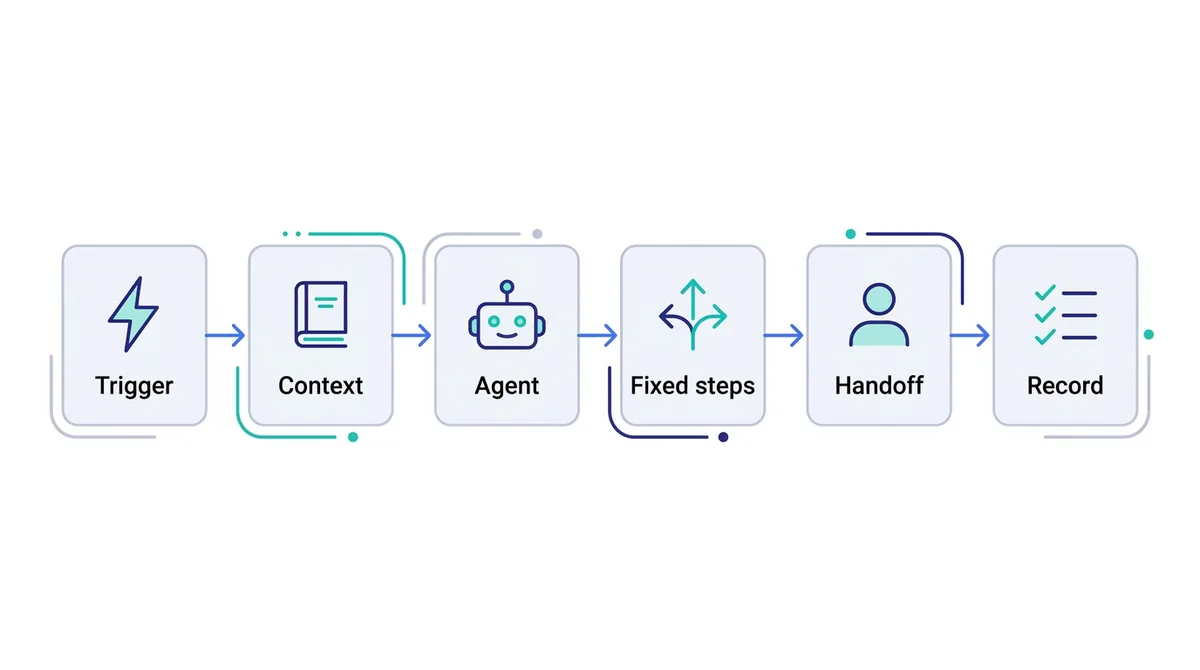
In ChatMaxima Studio, these map directly to blocks. The Starting Step, Schedule, Webhook and Instagram Comment blocks are triggers. Knowledge sources and variables give context. The MaxIA AI Agent block is the agent step: it takes a system prompt, knowledge sources, the variables to extract, the tools it can call and exit criteria, then continues to the next block when the exit criteria are met. If/Else, Code, Loop Over Items, Set Variable and the app blocks are the fixed steps. Talk to Agent is the handoff, and the bot’s Executions page is the record.
Five patterns you will use again and again
Most agentic workflows are combinations of a few patterns:
- Chain. Steps in a fixed order, each using the output of the one before: collect details, then check them, then save them.
- Route. Decide what kind of request this is, then send it down the right path: a sales question to one branch, a billing question to another.
- Tool loop. The agent calls tools as needed until its goal is reached: look up the order, check the policy, answer.
- Human checkpoint. A person approves or takes over before anything irreversible or sensitive happens.
- Batch on a schedule. At a set time, fetch a list and act on each item: every morning, follow up on yesterday’s quotes.
How to design an AI agent workflow in 7 steps
- Start from one outcome. “Qualified leads booked on a sales call” is a workflow. “Use AI in sales” is not. Pick one process with enough volume to matter.
- Write the steps on paper first. List what a good employee does today, in order, including the systems they touch.
- Mark each step as fixed or flexible. Anything that must happen every time, in the same way (saving a lead, sending a confirmation, a compliance message), becomes a fixed block. Anything that depends on what the customer says goes to the agent.
- Give the agent only the tools it needs. An order-support agent needs order lookup and the returns policy, not your calendar or payment links.
- Write clear exit criteria. “Exit when you have the name, phone number, service needed and preferred time, or when the customer asks for a person.” Without them, the agent never hands back control to the workflow.
- Decide the handoff. Which situations go to a person, which team, and what the person should see when they pick it up.
- Test with real messages, then read the traces. Run the cases your team sees every week, including the awkward ones, and check every step in the execution log before going live.
Example 1: Lead qualifier that books sales calls
Goal: turn every inbound enquiry from a Click-to-WhatsApp ad or the website into either a booked call or a lead in the nurture list, within minutes.
Trigger: the Starting Step, on a message from the ad or the website chat.
Flow:
- MaxIA AI Agent greets the lead, answers questions from the product knowledge source, and collects name, company size, need, budget range and timeline as variables. It has the Google Calendar tool, and its exit criteria are “the lead is qualified and a call is booked, or the lead is not a fit, or they ask for a person”.
- If/Else checks the extracted budget and timeline against your rules.
- Qualified path: the HubSpot block creates the contact with every collected field, then Talk to Agent hands the chat to the sales department, where a rep sees the booked call and the full chat.
- Not-yet path: MaxCRM saves the contact to a “Nurture” list for later campaigns, and the conversation ends politely with a useful resource.
What the agent decides: how to answer, which questions to ask next, when to offer a slot. What is fixed: the qualification rule, the CRM record, the routing. Our guide to AI lead generation covers the scoring rules in depth.
Example 2: Order help and returns for an online store
Goal: answer “where is my order?” and handle return requests without a support queue, while keeping a person in charge of approvals.
Trigger: the Starting Step on WhatsApp and the website chat.
Flow:
- MaxIA AI Agent with the Shopify tool, which looks up order details, and a knowledge source holding the returns and shipping policies. It answers order-status questions directly. Its exit criteria: “the customer wants to return or exchange an item, and you have the order number, the item and the reason”.
- Create Ticket raises a helpdesk ticket for the returns team, with the order number, item and reason, the right department and a “Return request” label, and stores the ticket link in a variable.
- A message confirms to the customer that the return is logged and what happens next.
What the agent decides: how to answer each question and when a return request is complete. What is fixed: a person approves every return, through the ticket. Approving refunds stays with your team.
Example 3: Daily quote follow-up on a schedule
Goal: make sure no quote goes unanswered, without anyone remembering to chase.
Trigger: the Schedule block, every weekday at 9 am in your time zone. This flow runs without any incoming message.
Flow:
- Google Sheets reads the rows of your quotes sheet where the status is “Sent” and the quote is more than three days old.
- Loop Over Items goes through the rows one by one.
- For each row, Send WhatsApp Template sends an approved follow-up template to the customer’s number, with their name and quote number filled in.
- Google Sheets updates that row’s status to “Followed up”.
- When the loop is done, the Slack block posts a summary to the sales channel.
Replies arrive in the shared Inbox, and the conversation continues from there with your AI agent or a team member. This example is mostly fixed steps, and that is the point: not every workflow needs an agent at every step. Approved templates are required for messages you start on WhatsApp, and Meta charges for them per message.
Example 4: Website form to first reply in under a minute
Goal: reply to every website form submission on WhatsApp before the lead has closed the tab, and alert the right person.
Trigger: the Webhook block. Your website form posts the submission to the webhook URL Studio generates, and each field is saved to a variable.
Flow:
- Code (sandboxed JavaScript) tidies the data: formats the phone number with its country code, trims the message, and works out the lead’s region from the country field.
- If/Else checks whether the enquiry is urgent, for example when the selected service is “Emergency” or the budget is above a threshold.
- Send WhatsApp Template sends the lead a welcome template with their name and a link to book a call.
- Send Email alerts the sales owner for that region. On the urgent path, Create ClickUp Task also creates a task in the team’s priority list.
- Webhook Response returns a success response to the website, so the form can show its thank-you message.
When the lead replies to the WhatsApp message, the conversation continues with your AI agent or your team. Why does a reply in the first minute matter? The answer is in our speed to lead guide.
Example 5: Instagram comment to booked consultation
Goal: turn people who comment “price” or “info” on a post into booked consultations.
Trigger: the Instagram Comment block, for comments containing your keywords on one post or all posts. It can post a public reply and then opens a direct message with the commenter. It works on Instagram accounts connected through the new Instagram API.
Flow:
- MaxIA AI Agent continues in the DM: answers the question from the knowledge source, asks two or three qualifying questions, and books a consultation with the Google Calendar tool.
- MaxCRM saves the commenter as a contact on your “Instagram leads” list with the booking details.
- Talk to Agent brings in your team whenever the commenter wants a real person, or when the exit criteria say so.
Our guides to replying to Instagram comments and Instagram DM automation cover the comment rules and DM copy.
Testing and monitoring your workflow
A workflow you cannot see is a workflow you cannot trust. Before and after launch:
- Test every branch. Send messages that should take each path, including the edge cases: wrong order numbers, no budget given, a customer who changes their mind halfway.
- Read the execution trace. Each bot’s Executions page lists its runs, and opening one replays it on the canvas step by step: which blocks ran, which branch was taken, and what the integration blocks sent and received. It is the fastest way to find the step that broke.
- Use playgrounds for integrations. API and integration blocks have a playground to send a test request and see the real response before a customer ever triggers it.
- Watch the handoffs. Read the conversations that reached a person each week. They show what the agent could not handle and what to add to its knowledge or tools.
If you would rather describe the workflow than drag blocks, MaxIA, the builder assistant in Studio, can draft it on the canvas from a plain description and ask you for the details it needs, such as which CRM account to use.
Guardrails for agentic workflows
- Least access. Each agent gets only the tools its job needs.
- People approve the irreversible. Refunds, cancellations, discounts beyond a set limit and anything legal or medical go through a person.
- Timeouts and fallbacks. The AI Agent block has a timeout path for when a customer goes quiet; use it to follow up or close the conversation cleanly.
- Clear identity. Tell customers they are talking to an AI and how to reach a person.
- Data care. Collect only the details the process needs, and keep sensitive data out of free-text fields where possible.
- Review regularly. Products, prices and policies change; the knowledge sources and prompts need to change with them.
Common mistakes
- Letting the agent do everything. Saving a lead or sending a confirmation should not depend on the model remembering to do it. Make it a fixed step.
- No exit criteria. The agent keeps chatting and the rest of the workflow never runs.
- Too many tools. More tools mean more ways to pick the wrong one.
- Skipping the handoff. A workflow without a route to a person fails the customers who need one most.
- Never reading the traces. Small failures, such as a CRM field that stopped matching, go unnoticed for weeks.
What’s next
Pick one process with real volume, sketch it on paper, mark what is fixed and what needs judgment, and build the first version in an afternoon. Then read a week of traces before adding the next workflow.
Thirty more ideas, sorted by department, are in AI agents for business. To understand the differences between agent designs, read about the types of AI agents, and for ready-made starting points, browse our AI agent templates.