
“Thank you for calling. Please listen carefully, as our menu options have changed. For sales, press 1. For service, press 2. For billing, press 3.” The caller only wanted to know if you are open on Saturday. None of the options fit, so they press 0, the line rings an empty front desk, and they end up in voicemail. Most of them do not leave a message.
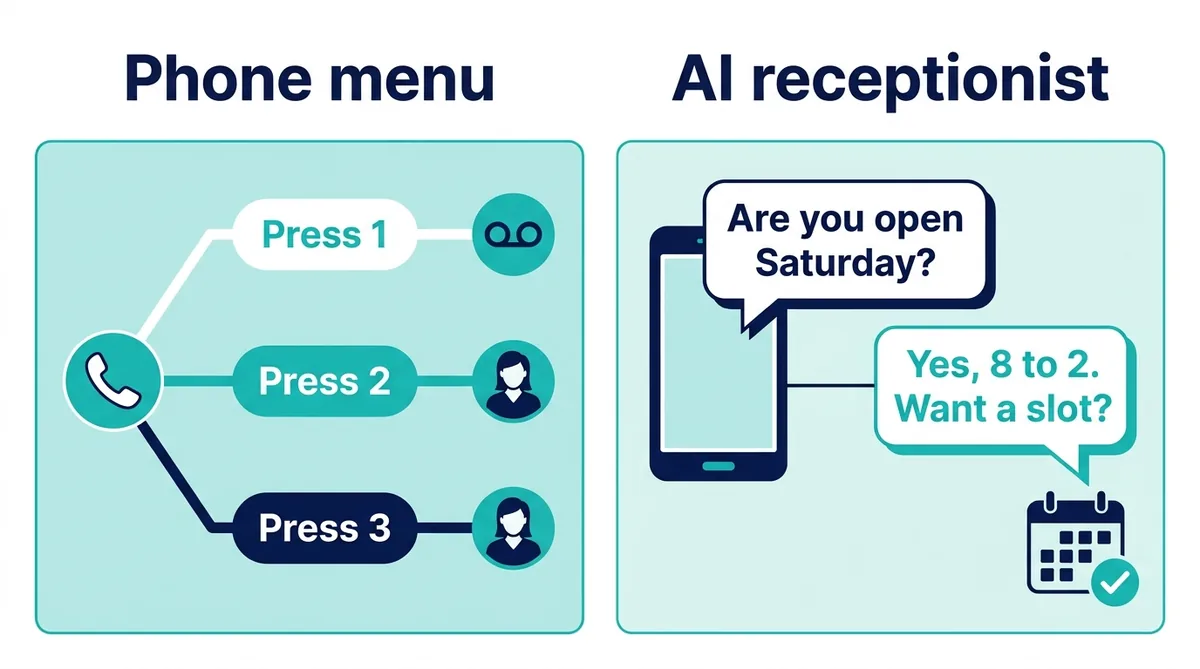
That recording is an auto attendant, and nearly every business phone system ships with one. It is cheap, reliable and good at one job: sending a caller to the right extension. It is not built to answer a question, book an appointment or take down a new customer’s details. An AI receptionist is built for exactly those jobs, but it is a different kind of tool with its own limits.
Below: what an auto attendant is, how it differs from IVR and an AI receptionist, what the research says about menu frustration, and when a menu still wins. Full disclosure: ChatMaxima sells an AI receptionist, not an auto attendant, so the second half shows how to run both on one line.
The short answer
- An auto attendant is a recorded greeting plus a menu. The caller presses a key (or says a word) and the phone system routes the call to a person, a department, a ring group or voicemail.
- An AI receptionist answers in natural speech. The caller says why they are calling in their own words, and the AI answers from your business information, books appointments and records the details.
- A menu wins when every caller needs a specific person and someone is there to pick up. An AI receptionist wins when most calls are questions, bookings or new enquiries, and when no one is free to answer.
- Many businesses get the best result from both: the menu keeps routing calls to staff, and one option, the after-hours rule or the no-answer overflow sends calls to the AI.
What is an auto attendant?
An auto attendant (also called an automated attendant, an auto receptionist or a digital receptionist) is a feature of a business phone system that answers incoming calls without a person. It plays a greeting, offers a short list of choices and connects the caller based on which key they press. Hosted phone systems such as Microsoft Teams Phone, Zoom Phone, Google Voice, RingCentral, Dialpad, Nextiva and 3CX all include one, usually at no extra charge on business plans.
A typical auto attendant can:
- Route by keypress: “Press 1 for appointments” sends the call to the front desk extension or a ring group.
- Dial by name or extension: callers who know who they want can skip the menu.
- Follow a schedule: play one greeting during opening hours and another at night, on weekends and on holidays.
- Send calls to voicemail: per department or per person.
- Reach an operator: pressing 0 rings a person or a group.
What it cannot do is understand a reason nobody programmed. If the question matches no option, all it can offer is another menu, a person or voicemail.
A simple auto attendant script
“Thanks for calling Brightside Auto Care. We are open Monday to Saturday, 8 am to 6 pm. For service appointments, press 1. For parts, press 2. For anything else, press 0 to reach the front desk.”
Three options, the hours up front and a clear way to a person: that is about as good as a menu gets. Trouble starts at six options nested two levels deep.
Auto attendant, phone tree and IVR: what the terms mean
The terms get mixed up constantly, even on phone vendors’ own pages.
- Phone tree: the structure of the menu, drawn as branches (option 1 leads to 1.1 and 1.2, and so on).
- Auto attendant: the feature that answers the call and runs a simple phone tree to route the caller to a destination.
- IVR (interactive voice response): a broader system that can do work inside the call as well as route it. A bank IVR reads your balance after you enter your account number, a utility IVR takes a payment with keypad input, and a pharmacy IVR lets you order a refill by entering the prescription number. Many IVRs recognise a few spoken words (“say billing or press 3”).
- Conversational IVR: an IVR that accepts free speech instead of keys, then still maps what you said to a fixed list of intents and routes you.
- AI receptionist: an assistant built on a large language model that holds a conversation, answers questions it was never scripted for (as long as the answer is in its knowledge), and takes actions such as booking an appointment.
Put simply: an auto attendant routes, an IVR routes and runs scripted self-service, and an AI receptionist talks.
Auto attendant vs IVR vs AI receptionist at a glance
| Auto attendant | IVR | AI receptionist | |
|---|---|---|---|
| How the caller interacts | Keypad, sometimes a few spoken words | Keypad plus fixed voice commands | Natural speech, any wording |
| Main job | Route the call | Route plus scripted self-service | Answer, book, collect details |
| Answers open questions | No | Only the scripted ones | Yes, from your knowledge |
| Books appointments | No | Only with custom development | Yes, into a calendar |
| Connects to a person | Yes, that is its purpose | Yes | Depends on the product (ChatMaxima’s does not) |
| Works when nobody is in | Plays a message, takes voicemail | Self-service only | Handles the full conversation |
| Typical cost | Included in most business phone plans | Project or per-minute pricing | Monthly plan plus call minutes |
| Setup effort | Minutes | Weeks for anything custom | A few hours to write the knowledge and test |
Why “press 1” menus lose callers
The complaint is old and the numbers are consistent. When the Consumer Reports National Research Center asked 1,016 US adults to rate customer service irritants, the top answer was not being able to reach a live person on the phone: 75% were highly annoyed by it. “Many phone-menu steps needed” and “repeatedly asked for the same information” each annoyed 66%, and 57% said they had hung up without a resolution (Consumer Reports, The Problem With Customer Service, 2015).
A Clutch survey of 501 US adults who had called businesses at least three times in six months points at the same problems from the menu side:
- 88% prefer speaking to a live agent over a phone menu.
- 69% named listening to irrelevant options as a top frustration, and 67% the inability to fully describe their issue.
- 70% have pressed zero to get past a menu.
- 72% always or frequently end up talking to a person anyway.
That last number matters most: if most callers reach a person anyway, the menu mostly adds a minute of delay.
A word of caution on statistics in this space. Plenty of blogs quote figures such as “51% of customers abandoned a business because of an automated menu” or “67% hang up out of frustration with IVR” with no traceable study behind them, or with a link to another blog that also has no source. The two studies above are the primary sources we could verify. The Clutch page carries no survey date (it was last updated in April 2025), and the Consumer Reports survey is from 2015, so treat both as direction rather than precise current measurements.
The six ways menus actually fail
- The options follow your org chart, not the caller’s reason. Callers think “why was I charged twice?”, not “billing”. They guess, and a wrong guess means starting over.
- The menu answers nothing. It can read out the hours, but it cannot tell a caller whether you fix their model or take their insurance plan.
- Every path ends at a busy person. The menu only routes. If the front desk is with a customer, the call rings out or goes to voicemail, and the menu has just delayed the same missed call.
- Nights and weekends end in voicemail. The after-hours greeting is usually “we are closed, please leave a message”, which is the moment many callers dial the next business on the list.
- Keypads are awkward on a mobile. People call from cars, job sites and earbuds, and finding the 3 key means taking the phone off the ear.
- The caller repeats themselves. They explain the problem to whoever answers, get passed on, and explain it again, which two in three people in the Consumer Reports survey found highly annoying.
When an auto attendant is still the right tool
A menu is not the villain in every setup. Keep it when:
- Callers need a specific person and someone is there to answer. An accounting firm where every client has a named accountant, or an office with ten departments, needs routing more than conversation.
- Most callers already know where they are going. Existing clients, suppliers and staff do fine with “dial the extension at any time”.
- You want every caller to reach a human. For high-value sales or sensitive services, some owners want a person on every call and use the menu only to pick which person. That is a reasonable choice.
- The budget is zero. If the auto attendant is included in your phone plan and your call volume is low, a well-written three-option menu costs nothing and beats a ringing phone.
The fix there is a better menu, not a different tool (checklist below).
What an AI receptionist does differently
An AI receptionist replaces “choose from this list” with “how can I help?”. The caller explains in their own words and the assistant works out what to do. On ChatMaxima, the AI receptionist can:
- Answer from your knowledge: hours, services, prices, policies, directions and the long tail of “do you…” questions, in plain speech.
- Book appointments: check free times and create the booking in Google Calendar during the call.
- Take down details: name, phone, email and the reason for the call, saved to MaxCRM or a Google Sheet, with an email to your team.
- Work around the clock: the same assistant answers at 2 pm and at 2 am.
- Send a written follow-up: through Missed Call Text Back, every inbound call can trigger a WhatsApp template or SMS with your booking link, address or a direct number.
- Speak the caller’s language: many languages and voices are available.
- Leave a record: each transcript is filed in the shared inbox next to your chats, with call totals and talk time in the reports.
Callers reach it on a Twilio number you own, in a WhatsApp call, or from a voice button on your site.
What it does not do
ChatMaxima is not a phone system, and it is worth being plain about what that means:
- No menus, extensions, ring groups or hold queues. It answers the number your calls are forwarded to and talks.
- No keypad input. Callers speak to it. It does not react to key presses, so do not put “press 1” instructions in its greeting.
- No live transfer. A call stays with the AI from start to finish; it cannot hand the caller to a colleague or ring a staff phone. When a caller needs someone, it takes the message, emails the right person and can read out a direct number to call.
- No time-based switching. ChatMaxima does not change behaviour by the clock. Your phone system or carrier decides when calls go to the AI number, using its own schedule.
- No outbound AI calls. It does not phone customers back or call them with reminders.
Those limits are why the two fit together: the phone system routes and schedules, and the AI takes the conversations the menu cannot.
Four ways to run an auto attendant and an AI receptionist together
Most hosted phone systems let a menu option, a schedule rule or a no-answer rule send calls to an outside number. Check that your plan allows forwarding to an external number, and whether your provider bills the forwarded leg as an outbound call.
1. Give the AI its own menu option
Keep the people options and add one for the calls the AI handles well:
“For appointments, prices and opening hours, press 1. For an existing order, press 2. To speak with the office, press 0.”
Option 1 forwards to the AI number. Callers who want a person still have one, and the questions that used to tie up the front desk go to an assistant that answers instantly.
2. Send the after-hours schedule to the AI instead of voicemail
Leave the daytime menu alone and change only the after-hours rule. At closing time, the phone system forwards the main line to the AI, which answers, books and collects details overnight. The after-hours answering service guide walks through it step by step.
3. Use the AI as the no-answer overflow
Set the ring group to forward to the AI number after four or five rings, instead of dropping into voicemail. Staff still answer every call they can; the AI catches the rest, which is usually lunch hours, busy mornings and the moments everyone is with a customer.
4. Publish a separate number for bookings and questions
Keep the main line on the menu and put a dedicated AI number on your website, ads and business listings as “call or WhatsApp to book”. New customers reach the assistant directly, and existing clients keep dialling the main line and their extensions.
Rewrite your menu before you rip it out
If you keep an auto attendant, a few changes make it far less painful:
- Three options or fewer. One business owner quoted in the Clutch research limits prompts to three choices because callers skip longer menus.
- Most common reason first. Look at what people actually call about and put that at the top.
- Say the reason before the number. “For appointments, press 1” lets the caller stop listening once they hear their reason; “press 1 for appointments” makes them hold every number in memory.
- Put the person option early. Hiding “press 0” at the end of a long list is the main reason callers mash zero anyway.
- Put the hours in the greeting. It answers the most common question before the menu starts.
- Drop “please listen carefully, as our options have changed”. It adds seconds and nobody believes it.
- Kill dead ends. Every path should reach a person, the AI or a voicemail box someone checks the same day.
Before and after
Before: “Thank you for calling. Your call is important to us. Please listen carefully, as our options have changed. For billing, press 1. For accounts, press 2. For technical support, press 3. For sales, press 4. For our address and hours, press 5. To repeat these options, press 9.”
After: “Thanks for calling. We are open weekdays 8 to 6. To book or ask a question, press 1. To speak with the team, press 0.”
One call handled two ways
A customer calls an auto repair shop on a busy Friday morning to ask whether they can bring their car in on Saturday for a grinding noise from the brakes.
With the menu only: they choose “service” from six options, and the line rings while the advisor is busy at the counter. After five rings: voicemail. The caller tries the next shop.
With the menu plus an AI option: they press 1 for appointments and the AI answers. It confirms the shop is open Saturday from 8 to 2, offers the 9 am slot, books it in Google Calendar, takes the name, phone number and car model, and emails the service advisor a note about the brake noise. The Missed Call Text Back flow sends the shop’s standard WhatsApp message with the address and a link to reschedule. The advisor sees the booking and the transcript when they finish with the customer at the counter.
Same two minutes either way; only one ended in a booking.
What it costs
An auto attendant is usually included in a business phone plan, so the honest comparison is “the menu you already have” versus “the menu plus an AI option”.
Here is an example for a shop taking about 1,200 calls a month, where 35% of callers choose the AI option and those calls last 2.5 minutes on average:
| Item | Monthly cost |
|---|---|
| ChatMaxima Starter plan | $19 |
| Voice Calls add-on (2,000 minutes, used: about 1,050) | $50 |
| Twilio phone number | $1.15 |
| Twilio inbound minutes (1,050 at $0.0085) | about $9 |
| Speech services on your own provider key (about $0.02 a minute) | about $21 |
| Total | about $100 |
Add whatever your phone provider charges for forwarding the calls to the AI number. Plans and add-ons are on the pricing page. If you are weighing the AI against a staffed service rather than a menu, the AI vs live answering service cost breakdown and the guide to virtual receptionists vs AI receptionists lay out those costs. To compare AI receptionist tools themselves on features and pricing models, see the AI receptionist software guide.
How to decide
| Your situation | Best fit |
|---|---|
| Every call needs a named person, and staff are free to answer | Auto attendant with a short menu |
| Most calls are questions, bookings or new enquiries | AI receptionist |
| Staff answer in the day, nobody at night | Menu by day, AI after hours |
| Calls often ring out while staff are busy | AI as the no-answer overflow |
| You need balances, payments or account lookups by keypad | IVR from your phone or contact centre vendor |
| Callers must be able to reach a person mid-call | Keep a person in the path; ChatMaxima’s AI cannot transfer |
Set it up on ChatMaxima in seven steps
- List the five most common reasons people call. Pull them from your voicemails, call notes or front desk. These become the AI’s job; everything else stays with the menu.
- Write the knowledge. Hours, services, prices, policies, the area you cover and what the AI should say when it does not know.
- Start from a template. The FrontDesk voice agent is a general receptionist you can adapt; replace its knowledge and rules with yours.
- Connect the tools. Google Calendar for bookings, MaxCRM or a Google Sheet for caller details, and an email address for messages to the team.
- Connect a Twilio number. Point the number’s voice webhook at the URL ChatMaxima gives you in the Twilio Voice channel settings, and turn on Missed Call Text Back if you want a written follow-up.
- Point your phone system at it. Set the menu option, the after-hours rule or the no-answer overflow to forward to that number.
- Test, then read transcripts. Make ten test calls with real questions, fix the answers that miss, and skim a handful of transcripts each week until they stop needing fixes.
What to measure
- Share of callers choosing the AI option, from your phone system’s menu reports.
- Calls answered outside opening hours that used to reach voicemail.
- Bookings and enquiries created from AI calls.
- How often callers ask for a person, from the transcripts. A high rate means the AI’s job is drawn too wide, or the menu is sending it the wrong calls.
Questions people ask
Can an AI receptionist replace my auto attendant? For a small business where most calls are questions and bookings, it can be the main answer point. If callers often need a specific person put through during the call, keep the auto attendant for routing, because ChatMaxima’s AI cannot transfer calls.
Do I need a new phone number? The AI answers on a Twilio number. Keep your published number and forward to it, or publish the AI number as a booking line.
Should the AI say it is an AI? Yes. A greeting such as “Hi, I’m the virtual assistant for Brightside Auto Care” sets expectations from the first second, and nobody feels misled halfway through the call.
What’s next
Phone menus are not going away, and for routing calls between people they still work. They cannot answer a question, though, so keep the menu for routing and let an assistant take the rest.
If you are new to the idea, start with the overview of an AI receptionist for small business. For industry setups, see the guides for HVAC and plumbing, law firms, medical offices, dental practices and property managers. When you are ready to try it on your own line, the AI receptionist page has the details and a free trial.

