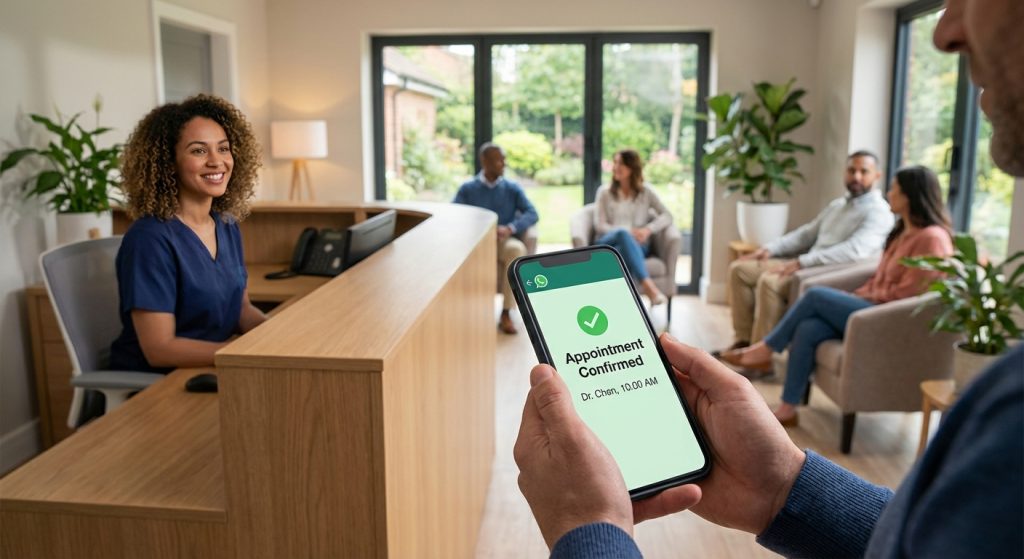
It is 12:40 on a Tuesday. Your front desk coordinator is checking in a family of four, a hygienist is waiting on a chart question, and the phone rings for the fifth time in ten minutes. The caller is a new patient with a cracked molar who found you on a map search. After six rings she hangs up and dials the next practice on the list, which answers on the second ring and books her for Thursday.
That evening a parent calls about a swollen jaw. Nobody is in the office, the voicemail greeting lists hours, and the family ends up in a hospital emergency room.
Neither call is unusual. The ADA Health Policy Institute counted about 2.1 million hospital emergency department visits for dental conditions in the US in 2017, costing roughly $2.7 billion, and 70% of those visits happened outside normal business hours (ADA Health Policy Institute). Meanwhile, practices have room in their books: the average wait for a new patient appointment fell to 12 days in the third quarter of 2026, the lowest in the HPI’s tracking, and about a third of dentists were trying to recruit hygienists, with most of them calling it very or extremely hard (ADA HPI, State of the U.S. Dental Economy Q3 2026).
So the chairs are open and the team is stretched, and the phone is often the place where both problems meet. An AI dental receptionist answers every call, books the routine ones, sorts out the urgent ones and leaves the rest for your team with clean notes. This guide covers what it should handle, what must stay human, emergency wording reviewed against ADA categories, insurance questions, privacy, costs and a setup plan, with ChatMaxima’s real limits stated plainly.
What is an AI dental receptionist?
An AI dental receptionist is software that picks up your practice line and holds a spoken conversation with the caller. It answers questions from your own information (hours, location, parking, accepted insurance carriers, new patient steps), books appointments into your calendar while the patient is still on the phone, and records what it could not resolve so your team can follow up.
It sits alongside two older options:
| In-house front desk | Human dental answering service | AI dental receptionist | |
|---|---|---|---|
| When it answers | Office hours, when someone is free | Overflow and after hours | Every call, any hour |
| Booking | Directly in the practice software | Usually takes a message | Books in your calendar during the call |
| Insurance questions | Can check eligibility and benefits | Reads a script | Says which carriers you accept; cannot check benefits |
| Emergencies | Clinical team decides | Pages the on-call dentist | Gives emergency guidance and the on-call number from your script |
| Typical cost | A full salary per person | Billed by the minute or call | A flat plan, then usage |
The AI does not replace the person at the desk. It takes the calls that would otherwise ring out: during check-in rushes, lunch, staff meetings, evenings and weekends.
The calls a dental office gets, and who should take each
Most practices see the same mix of calls week after week. Sorting them up front makes the AI’s job clear.
| Call | What the AI can do | What stays with your team |
|---|---|---|
| New patient wants a checkup or cleaning | Collect details, explain the first visit, book a new patient slot | Verifying insurance before the visit |
| Existing patient reschedules or cancels | Find a new time in the calendar, note the change | Updating the practice software |
| Toothache, swelling, broken tooth | Ask triage questions, give the wording you approved, book an urgent slot or share the on-call number | Every clinical judgement |
| “Do you take my insurance?” | List the carriers you are in network with | Benefits, coverage and out-of-pocket estimates |
| Billing and balance questions | Take a message with the patient’s preferred callback time | Anything involving account details |
| Post-procedure questions | Read your standard aftercare notes; treat bleeding or swelling as urgent | Advice about a specific patient’s treatment |
| Cosmetic enquiries (whitening, aligners) | Explain what you offer and book a consultation | Treatment planning and quotes |
| Records, referrals, specialist letters | Take the request and the contact details | Sending records |
Notice the pattern: the AI handles information that is the same for every caller, plus booking. Anything that depends on a patient’s chart or account goes to a person.
Emergency triage: wording your dentist signs off
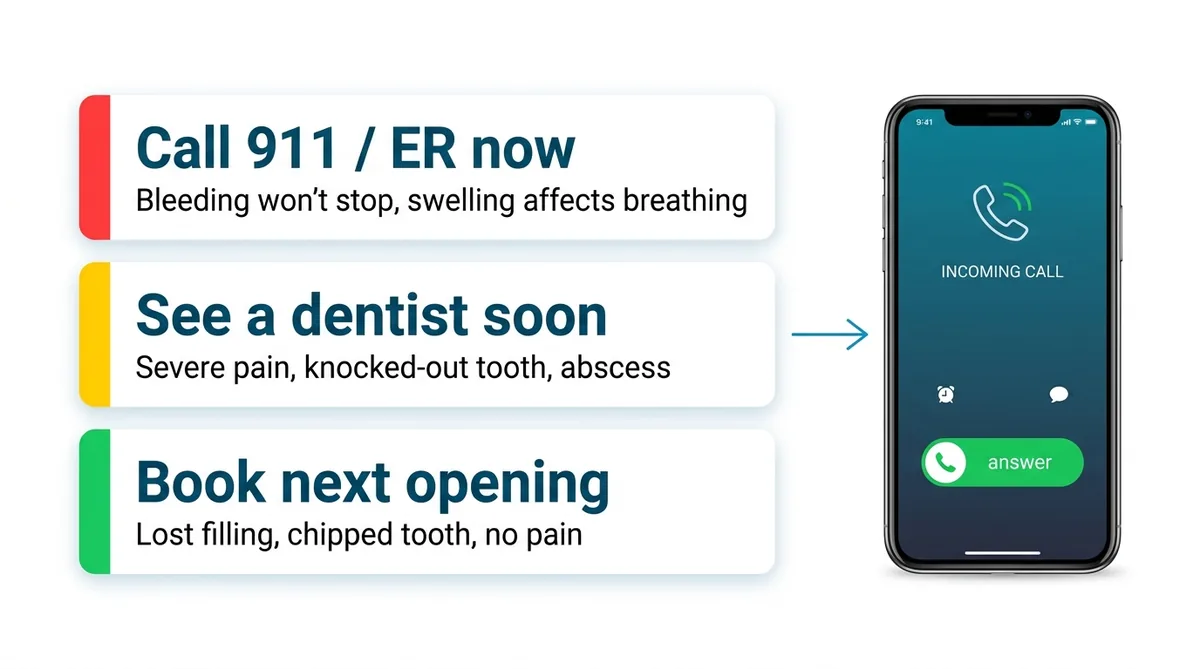
This is the part to get right before anything else. The AI never diagnoses. It follows a short script that your dentist writes, sorted into three levels. The ADA’s own guidance on what counts as a dental emergency is a useful frame: it separates potentially life-threatening problems from conditions that need prompt attention to relieve severe pain or infection, and it leaves the final call to the dentist’s professional judgement (ADA, What Constitutes a Dental Emergency).
Level 1: go to the emergency room or call 911 now
The ADA lists uncontrolled bleeding, swelling from infection that could affect the airway, and facial bone trauma that could affect the airway. Your script should tell the AI to stop asking routine questions the moment a caller describes:
- bleeding that will not stop with pressure
- swelling that makes it hard to breathe, swallow or open the mouth
- a blow to the face with a possible broken jaw or cheekbone
The AI says, in plain words, to call 911 or go to the nearest emergency room now, and then emails the details to whoever covers emergencies.
Level 2: needs a dentist soon
Severe pain, a localized abscess, a knocked-out or loosened adult tooth, a dry socket after an extraction, or a broken tooth with pain. The AI offers the first urgent slot in your calendar, or gives the on-call number after hours, and reads any first-aid lines your dentist has written. A knocked-out adult tooth is time sensitive, so that script should be specific and should come from your clinical team, not from the software.
Level 3: book the next routine opening
A lost filling with no pain, a chipped tooth with no sensitivity, a loose crown, a question about whitening, a cleaning that is overdue. The AI books it and moves on.
What a good after-hours call sounds like
Take an urgent toothache at 7:15 pm, handled with a clear script:
AI: Lakeside Family Dental, thanks for calling. The team has gone home for the evening, but I can book you in or help if it’s urgent. What’s happening?
Caller: My back tooth has been throbbing since yesterday and now my gum is a bit puffy.
AI: I’m sorry, that sounds painful. Is the swelling making it hard to breathe, swallow or open your mouth?
Caller: No, it’s just sore.
AI: Thank you. Pain with some gum swelling should be seen by a dentist soon. Our first urgent opening is tomorrow at 8:30 am. Would you like it?
Caller: Yes, please.
AI: Can I have your full name and the best mobile number to reach you? And have you visited us before?
Caller: Dana Ruiz, 555 0148. It’s my first time.
AI: You’re booked for tomorrow at 8:30 am as a new patient with an urgent visit, Dana. If the swelling spreads to your face or you have trouble breathing or swallowing tonight, go to the nearest emergency room or call 911. Anything else you need from us tonight?
The urgent slot is booked, the safety line is said out loud, and in the morning the front desk sees the appointment and a note in the inbox before Dana arrives.
What to capture on a new patient call
Keep it to what your team needs to prepare for the first visit, and no more:
- Full name and mobile number
- Email address, if they want forms sent by email
- New or returning patient
- Reason for the visit in a few words (“cleaning”, “broken tooth”, “second opinion”)
- Preferred days and times
- Insurance carrier name, or “self-pay”
- How they heard about you
Leave out member IDs, medical history, medications and detailed symptoms. Collect those on your intake forms or at the visit, where your team can handle them properly. Less data on the phone means less to protect.
Insurance questions: where the AI stops
“Do you take my insurance?” is one of the most common calls a dental office gets, and it is a trap if the AI says too much. Give it a short document that lists the carriers you are in network with and how out-of-network visits work at your practice. It can answer “Yes, we’re in network with that carrier” or “We’re out of network with that plan, but many patients still use their out-of-network benefits; our team can check yours before the visit.”
What the AI should never do: confirm a patient’s coverage, quote what a crown will cost after insurance, or promise that a procedure is covered. Those depend on the patient’s plan, and checking them is a front desk job. The AI’s job is to book the visit and note “please verify benefits” for your team.
Booking: how appointments land in your schedule
On ChatMaxima, the AI books into Google Calendar during the call. Many practices keep a calendar per provider or per appointment type (new patient exam, hygiene, urgent visit) and give the AI only the slots they want it to fill, such as a handful of new patient and urgent openings each day.
Be clear about one limit: ChatMaxima has no direct connection to dental practice software such as Dentrix, Eaglesoft or Open Dental. The appointment lands in Google Calendar and the inbox, and your team enters it in the practice software. For a practice that books a few dozen new and urgent visits a week, that takes minutes. If you need the AI to write straight into your practice software, dental-only vendors offer that, usually at a higher monthly price.
Recall, reminders and no-shows
A good share of a dental practice’s income comes from patients returning every six months, and every no-show is an empty chair. Here is what helps, and where the AI fits:
- Reminders: ChatMaxima does not make outbound AI calls. Reminders go out as WhatsApp messages, SMS or email instead. If patients book through ChatMaxima’s booking pages, reminders with Confirm, Reschedule and Cancel buttons can send automatically. Wording and timing ideas are in our post on appointment reminder texts.
- Recall: send an approved WhatsApp template to patients who are due for a cleaning and have agreed to hear from you, with a link to book.
- Follow-up after every call: with Missed Call Text Back, every call to your AI number can trigger a WhatsApp or SMS message from a Studio flow. Dental practices use it to send the booking link, the new patient form and directions. More on how it works in our missed call text back guide.
For the bigger picture on reducing missed appointments, see how healthcare chatbots reduce no-shows.
Privacy and HIPAA: questions to ask before you switch it on
A dental practice handles protected health information, and a call can drift into it the moment a patient describes a symptom. HHS explains that an outside company handling protected health information for a covered practice, for example by storing or sending it, is generally a business associate and needs a business associate agreement (HHS, Business Associates).
ChatMaxima does not claim that its voice agent makes your practice HIPAA compliant, and you should treat any vendor’s claims with care. Before going live:
- Ask every vendor, including us, whether they will sign a business associate agreement, and read what it covers.
- Keep the phone script to the minimum: name, contact, reason in a few words, preferred time.
- Tell the AI not to ask for or repeat diagnoses, medications, member IDs or payment card numbers.
- Decide who on your team can read call transcripts, and how long you keep them.
- Check where call recordings are stored, if you turn recording on.
This is general guidance, not legal advice. Our medical virtual receptionist guide has a longer privacy checklist for healthcare practices.
What ChatMaxima’s AI dental receptionist does today, and what it does not
Here is the honest list, so you can compare it with any other product:
It does:
- Pick up calls to a Twilio number you own, WhatsApp voice calls, and calls started from a talk button on your website
- Answer from your own documents: services, hours, insurance carriers, new patient steps, aftercare notes
- Book in Google Calendar during the call
- Save the caller’s name, phone and email to MaxCRM, and log calls to a Google Sheet if you like
- Email your team or on-call dentist with call details
- Send a WhatsApp or SMS follow-up on every call with Missed Call Text Back
- Speak many languages, including Spanish
- Put every transcript in the shared inbox, with call reports for total, answered and missed calls
It does not:
- Hand a caller over to a human mid-call; instead, the AI reads out the on-call number
- Make outbound calls for reminders or recall
- Connect directly to dental practice software
- Check insurance eligibility or benefits
- Switch between office hours and after hours on its own; you set that up with call forwarding in your phone system
If live transfer or practice software booking is essential for your practice, choose a tool that does those. If you want every call answered, routine bookings handled and every patient followed up in writing for a low monthly cost, read on.
Answering service for dentists: human or AI?
Human dental answering services still have a place. A person can stay on the line with an anxious caller and connect them straight to the on-call dentist, which ChatMaxima’s AI cannot do. Most of them bill by the minute or by the call, and some advertise plans from around $164 a month, such as Abby, with costs rising quickly at higher volumes. Dental AI receptionist vendors vary widely too: one vendor comparison puts standalone dental AI receptionists at roughly $200 to $800 a month per location, and some list plans from about $497 a month.
A simple way to decide:
- Choose a human service if most of your after-hours calls are emergencies and you want every one connected to the on-call dentist.
- Choose an AI receptionist if most of your missed calls are new patients, rescheduling and simple questions, and you want them handled at any hour without a per-call bill.
- Combine them if you want AI to take the daytime overflow and routine evening calls while your phone system sends late-night calls to a human service or the on-call dentist.
For a broader cost comparison, see our AI vs live answering service guide and virtual vs AI receptionist breakdown.
What it costs on ChatMaxima
ChatMaxima pricing has four parts: a plan, voice minutes, the phone number and speech.
Example 1: a single-dentist practice taking around 450 calls monthly, averaging three minutes (1,350 minutes):
- ChatMaxima Starter: $19 a month
- 2,000-minute Voice Calls pack: $50
- Twilio number: about $1.15, plus inbound minutes at $0.0085 each: about $11.50
- Speech-to-text and voice, billed by your speech provider at about two cents a minute: about $27
Total: about $109 a month.
Example 2: a two-dentist practice with about 800 calls a month (2,400 minutes) needs the 5,000-minute add-on ($100). With Twilio at about $22 and speech at about $48, the total comes to roughly $189 a month.
The AI model itself is included in the plan. Prices for Twilio and speech vary by country and provider, so check current rates on their sites. See the current ChatMaxima plans for details.
How to set up an AI dental receptionist
- List your call types. Use the table above and mark which ones the AI books, which it answers and which it hands to your team.
- Write the emergency script with your dentist. Three levels, plain wording, the on-call number, and the 911 line. Have the dentist approve it.
- Build the knowledge document. Hours, address and parking, insurance carriers you are in network with, new patient steps, payment options, standard aftercare notes, cosmetic services you offer.
- Set up calendars. One per provider or appointment type, with only the slots you want the AI to fill.
- Start from the DentAssist template. The DentAssist dental voice agent template in the ChatMaxima marketplace handles booking, rescheduling and cancelling one question at a time. Edit it in Studio to match your script, and connect your Google Calendar.
- Connect your number. Point a Twilio number at the agent, then set call forwarding in your phone system for after hours, lunch and busy lines.
- Turn on Missed Call Text Back. Send the booking link, new patient form and directions after every call.
- Test with real scenarios. Have your team call in as a new patient, a rescheduling patient, a caller with swelling and a caller asking about insurance. Read the transcripts and adjust the wording before you go live.
Questions to ask any AI dental receptionist vendor
- Will you sign a business associate agreement, and what does it cover?
- Can it transfer calls to a person, and to whom?
- Does it book into my practice software or a separate calendar?
- What happens when a caller describes an emergency? Can I review and edit the exact wording?
- Can it check insurance eligibility, or only list carriers?
- Does it make outbound calls or send texts for reminders and recall?
- What languages does it speak?
- How is pricing calculated: per minute, per call or flat?
- Who can read transcripts, and how long are they kept?
What to measure after launch
- Answered call rate: the share of calls that reach a conversation rather than voicemail
- New patient bookings from calls, compared with the months before
- After-hours calls handled, and how many were urgent
- Calls the AI could not resolve, and why; each one is a gap in your knowledge document or script
- No-show rate for appointments the AI booked
- Time your front desk spends on the phone, before and after
Review a sample of transcripts every week for the first month. Most improvements come from small wording changes.
What’s next
An AI dental receptionist will not replace the person who greets patients and calms nervous ones. What it can do is make sure the next new patient with a cracked molar gets booked at your practice instead of the one down the road, and that the parent calling about a swollen jaw at night hears clear, dentist-approved guidance instead of a voicemail greeting.
For a wider look at the technology, see our AI receptionist overview, the small business AI receptionist guide, and how to cover nights and weekends. When you are ready, start with the DentAssist template and a free ChatMaxima trial.