A shopper opens the chat on your store at 11 at night and types: “something warm for a hiking trip, under 200”. You sell three fleece jackets at 149, 179 and 189, all in stock. The chat replies: “Sorry, I couldn’t find any products matching your search.”
Nothing is broken, exactly. The chat searched for the words the shopper used, and none of your product titles contain “warm”, “hiking” or “under 200”. The sale goes to whichever store understood the question.
AI product search fixes that gap. Instead of matching words, it matches meaning, and it treats price and stock as filters rather than as text. This guide explains why keyword search lets shoppers down, the three ways a chat agent can know your catalog, how a product index works in plain language, and how to set one up whether your store runs on Shopify, WooCommerce, Salla or Zid.
What is AI product search?
AI product search is a way of finding products by what the shopper means, not only by the exact words they type. It turns each product, and each question, into a representation of its meaning, then returns the products closest to the question. Price, stock and category sit alongside as structured data, so “under 200” or “in stock” narrows the results instead of confusing the search.
In a chat, that changes the conversation. The shopper asks the way they would ask a person in the shop, and the agent answers with two or three real products, their prices and a link.
Why keyword search lets shoppers down
Store search has a long record of failing people who do not use the store’s own vocabulary. Baymard Institute’s 2026 search benchmark, built from more than 10,000 ratings across over 170 ecommerce sites and apps, found that 56% of sites fail to adequately support users’ search needs (Baymard Institute). The gaps are widest exactly where shoppers describe what they want instead of naming it:
| How the shopper searches | Example | Sites with issues |
|---|---|---|
| By use case | “shoes for standing all day” | 43% |
| By compatibility | “case for iPhone 15” | 44% |
| By feature | “waterproof jacket” | 39% |
| By symptom or problem | “cream for dry skin” | 37% |
| By exact name | “Nike Pegasus 41” | 12% |
Chat makes the problem bigger, not smaller. In a search box people type two or three words. In a chat they type a whole sentence, often with a budget, a size and a reason in it, and frequently in their own language. A keyword match on that sentence almost always comes back empty.
Three ways a chat agent can know your products
Before an agent can recommend anything, it needs your catalog. There are three common ways to give it one, and they behave very differently.
| Crawl your website | Call the store’s live search | Product index from the store’s own API | |
|---|---|---|---|
| Where the data comes from | Your public pages | Your platform’s search, at question time | Your platform’s product API, synced to an index |
| Finds products by meaning | Partly | No, keywords only | Yes |
| Prices and stock | Often stale or missed | Current | Current as of the last sync, checked live before promising |
| “Under 200”, “in stock” | Unreliable | Usually not | Yes, as filters |
| Products not linked from a page | Missed | Found | Found |
| Arabic and English names | Whatever the page shows | Depends on the platform | Both, when the store has both |
Crawling is the quick start most chat tools offer: point them at your domain and they read what they can reach. It works for policies and FAQs. For products it is weak, because a crawler sees a store as web pages. It misses products that are not linked anywhere it visits, reads prices that changed yesterday, and has no idea which variant is out of stock.
Live keyword search asks your store’s own search at the moment the question comes in. Prices and stock are fresh, but it inherits all the keyword problems above, and it cannot understand “under 200” as a number.
A product index reads every product through the platform’s API, the same way your store’s admin does, and keeps a searchable copy built for meaning. This is what AI product search means in practice, and it is how ChatMaxima’s Ecommerce agent works.
How a product index works, without the jargon
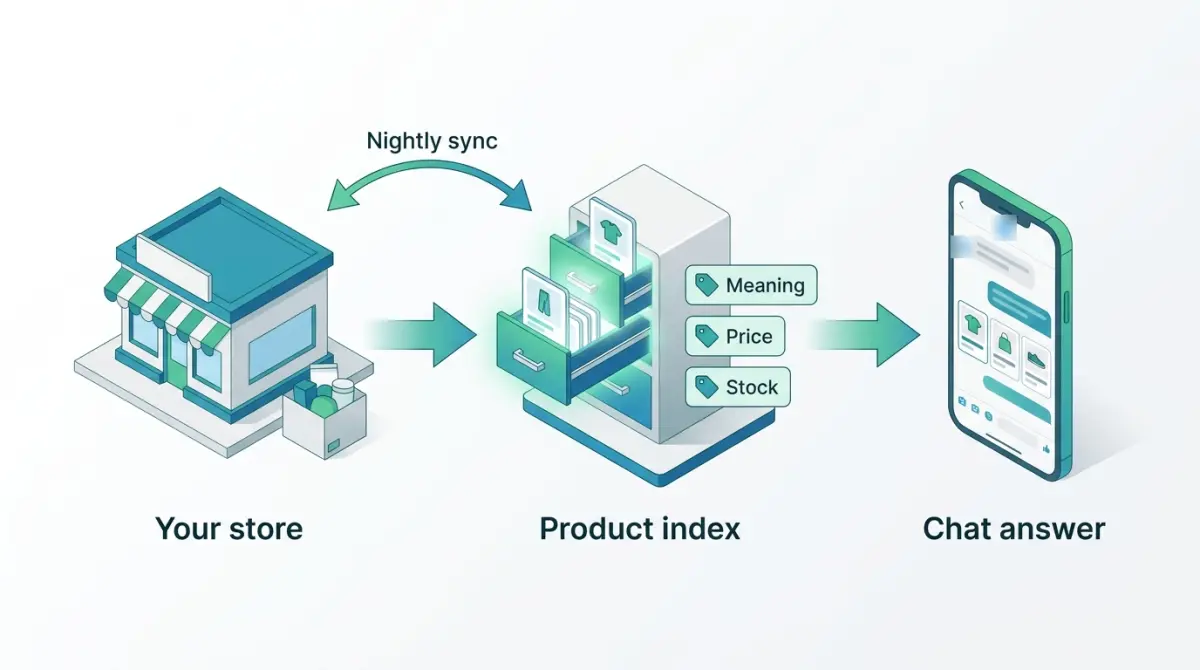
- Read the catalog from the store. The index pulls each product through your platform’s own API (Shopify, WooCommerce, Salla or Zid): title, other-language title, category, tags, brand, options such as size and colour, a short description, price, sale price, stock and the product link.
- Describe each product in words a shopper would use. Name, category, brand, options and description become the text the search understands. Price and stock are deliberately kept out of that text and stored as filters, so two identical jackets at different prices still look identical to the search.
- Understand the question. When a shopper asks something, the agent pulls out any price and stock limits (“under 200”, “بين 50 و 100”, “available”) and searches the rest by meaning.
- Answer from real products. The closest matches come back with price, sale price, stock and link. For anything it is about to promise, the agent can re-read that single product from the store first.
- Stay current. A fresh copy is pulled from the store every night. After a launch or a price change, a manual sync from the setup page brings it up to date at once.
The questions shoppers actually ask, and how each gets answered
| The shopper types | What the search does |
|---|---|
| “Something warm for a hiking trip” | Meaning search: fleece, insulated and outdoor items come first |
| “Perfume under 200” / “عطور تحت 200” | Perfumes only, capped at 200 |
| “What’s your cheapest?” / “وش أرخص شي عندكم؟” | No product named, so it lists the catalog, lowest price first |
| “Most expensive watch” | Watches, ordered highest price first |
| “Anything under 20?” when nothing costs that little | Tells the shopper nothing is that cheap and suggests the nearest prices |
| “Available in black” / “متوفر” | Only products the store marks as in stock |
| An exact model number or SKU | Index first; when the index finds nothing, the store’s own keyword search |
That last row matters. Meaning search is excellent at descriptions and weaker at exact codes like “SKU-4471-B”. When the index comes back empty, falling back to the store’s own keyword search catches shoppers who already know exactly what they want. Putting SKUs and model numbers in the product title or tags helps the index find them too.
Arabic and English in the same catalog
For stores in Saudi Arabia, the UAE and the rest of the Gulf, many catalogs are partly Arabic and partly English, and shoppers switch between the two in one conversation. A few things make search work well across both:
- Give products both names where you can. Zid stores can hold a name in each language, and the index keeps both. A shopper searching “فستان” and one searching “dress” then land on the same products.
- Expect each language to work best on its own names. A question in Arabic finds Arabic-named products most reliably, and the same for English. If most of your catalog is named in one language, add the other in the title, tags or description of your best sellers.
- Let the agent answer in the shopper’s language. The products are the same; the reply should follow the customer.
What a good answer looks like
Search quality only shows up in the reply. A good one is short, specific and honest:
Customer: عندكم عطور تحت 200؟ (Do you have perfumes under 200?)
Agent: نعم، عندنا ثلاثة خيارات تحت 200 ريال، كلها متوفرة: 1. Luxury Perfume 100ml: 139 ريال 2. Oud Mini Set: 159 ريال 3. Rose Musk 50ml: 179 ريال (كان 199)
تبغى أرسل لك رابط أي واحد منها؟
Three products, not ten. Prices with the currency. The sale price when there is one. Stock stated, not assumed. A clear next step. If the shopper asks something the catalog cannot answer, such as whether a perfume suits sensitive skin, the agent should say what it knows and offer to bring in a person rather than guess.
Setting it up on ChatMaxima
ChatMaxima builds the product index for you when you create an Ecommerce agent:
- In Studio, open Instant Chatbot and choose the Store tab.
- Pick or connect your store: Shopify, WooCommerce, Salla or Zid.
- Sync products. The page shows how many are ready, how many the store has, and your plan’s limit (Starter indexes up to 1,000 products, Pro 5,000, Max 25,000).
- Give the agent a name, a language (Arabic, English or both) and a tone. Keep product questions ticked, add order tracking and handover if you want them, and either choose a channel now or leave it for after testing.
- Create agent. The flow arrives in the builder with the search tool already wired in.
Before going live, try the questions your customers really send in the builder’s preview (Salla and Zid store blocks also have a Playground tab that runs the search directly): a budget, a “cheapest”, a description without a product name, an exact SKU, and the same question in Arabic and English. The Executions page shows what each real conversation searched for and what came back.
For the bigger picture of what an ecommerce agent should do from first question to return, see our guide to the AI agent for ecommerce. Salla and Zid merchants can read more on our Salla and Zid pages.
Mistakes to avoid
- Syncing once and forgetting. A catalog changes every week. Keep the nightly refresh on, and sync by hand after a big launch or a price change.
- Promising stock from the index alone. The index is as fresh as the last sync. Let the agent confirm live details before it promises a size or a delivery.
- Answering with a wall of products. Ten links feel like a search results page. Two or three, with a reason for each, feel like advice.
- Ending on “no results”. When nothing matches the budget, the closest options keep the conversation going. A dead end sends the shopper to another store.
- Letting the agent invent products. Tell it in plain words to recommend only products returned by the search, and to say so when nothing fits.
- Ignoring the other language. If half your shoppers write in Arabic and your best sellers only have English names, add the Arabic names.
What to measure
- Questions that returned nothing. Read them weekly. Each one is a missing product, a missing name in the other language, or a gap in the catalog data.
- Clicks on product links from chat. The most direct sign that recommendations are relevant.
- Product questions handed to a person. If many go to your team, the catalog data is probably thin: add sizes, materials and use cases to the descriptions.
- Orders that follow a chat. Compare them with your site’s normal conversion to see what the conversation is worth.
Frequently asked questions
Is AI product search the same as a site search bar? No. Site search tools improve the search box on your website. AI product search, as described here, is what your chat agent uses to answer shoppers in a conversation on WhatsApp, Instagram or web chat. The underlying idea, matching meaning instead of words, is the same.
Does it work with a few thousand products? Yes. The index holds one entry per product, and the limit depends on your plan: 1,000, 5,000 or 25,000 products.
What happens when I change a price? The nightly refresh picks it up, or you can sync by hand straight away. And before quoting a price as final, the agent can re-read that product from the store.
Can it search in Arabic? Yes. Questions in Arabic and English both work, and price phrases like “تحت 200” or “بين 50 و 100” are understood. Results are strongest when products have names in the language the shopper uses.