
Every AI agent retainer faces the same question around month three: “Is this actually worth it?” If you cannot answer with numbers, the client starts to wonder, and a client who wonders does not renew.
Proving AI ROI to a client is not about a 40-slide dashboard. It is about five numbers, reported the same way every month, compared with where the client started. This guide covers which five metrics to report, how to measure each one honestly, a worked ROI example, and a one-page report template you can send on the first working day of every month.
It is written for agencies and freelancers who build and maintain AI agents for clients, and it is a supporting post for our 25 AI agent business ideas.
Why proving AI ROI decides whether the retainer survives
The market has made clients cautious. Gartner expects over 40% of agentic AI projects to be canceled by the end of 2027, and unclear business value is one of the three reasons it gives. Your client has probably read a version of that headline.
The fix is not a better agent alone. It is a better habit: measuring the same things every month and showing the trend. Retainers can last for years when that works; in a Promethean Research survey of 165 agency leaders, 42% reported average retainer tenure above two years (Promethean Research, 2026). In our experience the ones that last are the ones where the client can see the value without asking.
Three rules make AI ROI reporting credible:
- Measure a baseline before launch. Response time, enquiries per month, missed calls, bookings per week. Without a “before”, every “after” is a guess.
- Report the same five metrics every month, even when one of them goes down. Consistency builds more trust than a good month.
- Convert the result into money, using the client’s own numbers (hourly cost, average booking value), not industry averages.
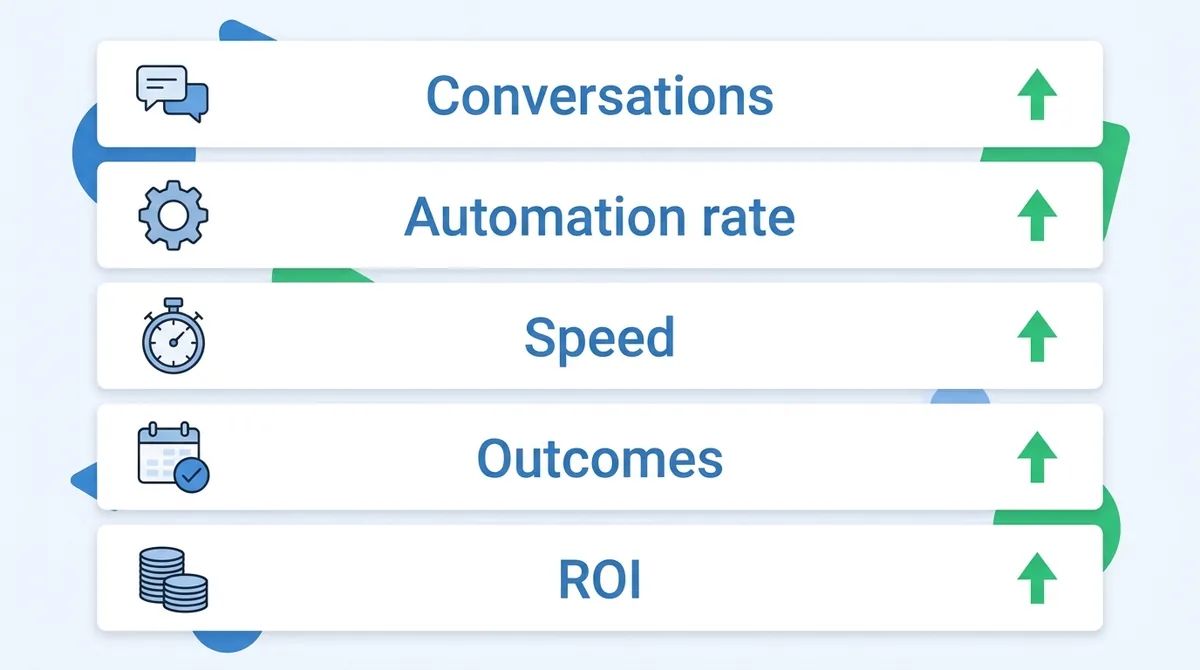
The 5 AI agent metrics to report every month
| # | Metric | What it answers | Where it comes from |
|---|---|---|---|
| 1 | Conversations handled | “Is anyone using it?” | Conversation reports |
| 2 | Automation rate | “How much work did it take off my team?” | Total conversations minus handoffs |
| 3 | Speed | “Are customers answered faster?” | First response and resolution time |
| 4 | Outcomes | “What did it actually get done?” | Bookings, qualified leads, paid orders, resolved tickets |
| 5 | Money | “Was it worth what I pay?” | Hours saved plus outcome value, minus cost |
Metric 1: Conversations handled
The simplest number and the one clients understand instantly: how many conversations the agent took part in this month, and how that compares with last month and with the baseline.
Report it per channel if the client uses more than one. A clinic that sees 900 WhatsApp conversations and 40 web chats learns something about its own customers, and that insight is part of what they pay you for.
How to measure it on ChatMaxima: the Reports section shows conversations, incoming messages and outgoing messages per day, and you can filter by channel and pick a custom date range for the calendar month.
Metric 2: Automation rate (and why containment is not resolution)
The automation rate, often called the containment rate or deflection rate, is the share of conversations the agent handled without a human:
Automation rate = (conversations – conversations handed to a human) / conversations
It is the metric that most directly maps to staff time saved, so clients care about it. It is also the easiest one to inflate. A conversation can be “contained” because the customer gave up, not because they got what they needed. Gartner found that only 14% of customer service issues are fully resolved in self-service, and that even for issues customers described as very simple, only 36% were. An agent that keeps people talking without solving their problem looks great on containment and terrible on renewals.
So always report the automation rate next to evidence of resolution: resolved conversations, completed outcomes (metric 4) and a satisfaction signal (see “Quality checks” below).
How to measure it on ChatMaxima: there is no built-in handoff-rate report, so set one up on day one. Route every human handoff to a dedicated department: the Talk to Agent block can assign a department when it hands over. At month end, filter Reports by that department to count handoffs, and divide by total conversations.
Metric 3: Speed
Speed is where AI agents win most visibly, and it matters more than most clients realise. In a well-known Harvard Business Review study, companies that responded to an online lead within an hour were nearly seven times as likely to qualify it as those that waited even an hour longer (Oldroyd, McElheran and Elkington, HBR, 2011).
Report two numbers:
- Average first response time: how long a customer waits for the first reply. For an AI agent this should be seconds; compare it with the baseline, which is often hours outside office time.
- Average resolution time: how long it takes to close a conversation, including those handed to humans.
How to measure it on ChatMaxima: both appear in Reports, with daily charts for the selected period.
Metric 4: Outcomes
This is the metric that makes AI ROI real. Count the things the agent actually got done, using the outcome the client bought the agent for:
- Bookings made by the agent
- Qualified leads captured with the details sales needs
- Orders and payments completed in chat
- Tickets resolved without a human
Agree in writing before launch what counts. “Qualified lead” means nothing until you define it: budget asked, timeline given, phone number captured.
How to measure it on ChatMaxima:
- Captured leads and answers: Bot Responses lists the variables each bot collected per contact and exports them as CSV.
- Any outcome, as a log the client can see: add a Google Sheet block right after the outcome step (booking confirmed, lead qualified, payment link sent) to append a row. At month end, the row count is your outcome count, and the client can open the sheet at any time.
- Orders and payments: the WhatsApp Commerce dashboard shows orders, average order value and payment status for the last 7, 30 or 90 days. Use the payment status breakdown for money actually collected.
- Resolved tickets: filter Reports by the Tickets channel.
Metric 5: Money
Clients do not renew a percentage; they renew a number with a currency sign. Convert metrics 2 and 4 into money using the client’s own figures:
- Time saved = conversations handled without a human x average minutes a human would spend x the client’s hourly staff cost.
- Outcome value = outcomes x average value per outcome x the share you can fairly attribute to the agent.
- Cost = your retainer + platform and usage costs the client pays.
AI ROI = (time saved + outcome value – cost) / cost
Be conservative on attribution. If the clinic would have taken some of those bookings by phone anyway, count only the share that happened outside office hours or would otherwise have been missed. A modest number the client believes is worth more than a big number they argue with. For the full formula with cost categories, see our guide to calculating chatbot ROI.
A worked AI ROI example
Here is a realistic month for a dental clinic running a WhatsApp booking agent on a $750 Growth retainer.
| Input | Value |
|---|---|
| Conversations handled | 1,200 |
| Handed to a human | 384 |
| Automation rate | 68% |
| Minutes a receptionist would spend per conversation | 4 |
| Receptionist hourly cost | $25 |
| Bookings completed by the agent | 85 |
| Average booking value | $90 |
| Share of bookings counted as extra (after-hours or otherwise missed) | 30% |
| Retainer plus usage costs | $800 |
Time saved: 816 conversations without a human x 4 minutes = about 54 hours x $25 = $1,360.
Outcome value: 85 bookings x $90 x 30% = $2,295.
AI ROI: ($1,360 + $2,295 – $800) / $800 = about 357%, or roughly $4.50 of value for every dollar spent.
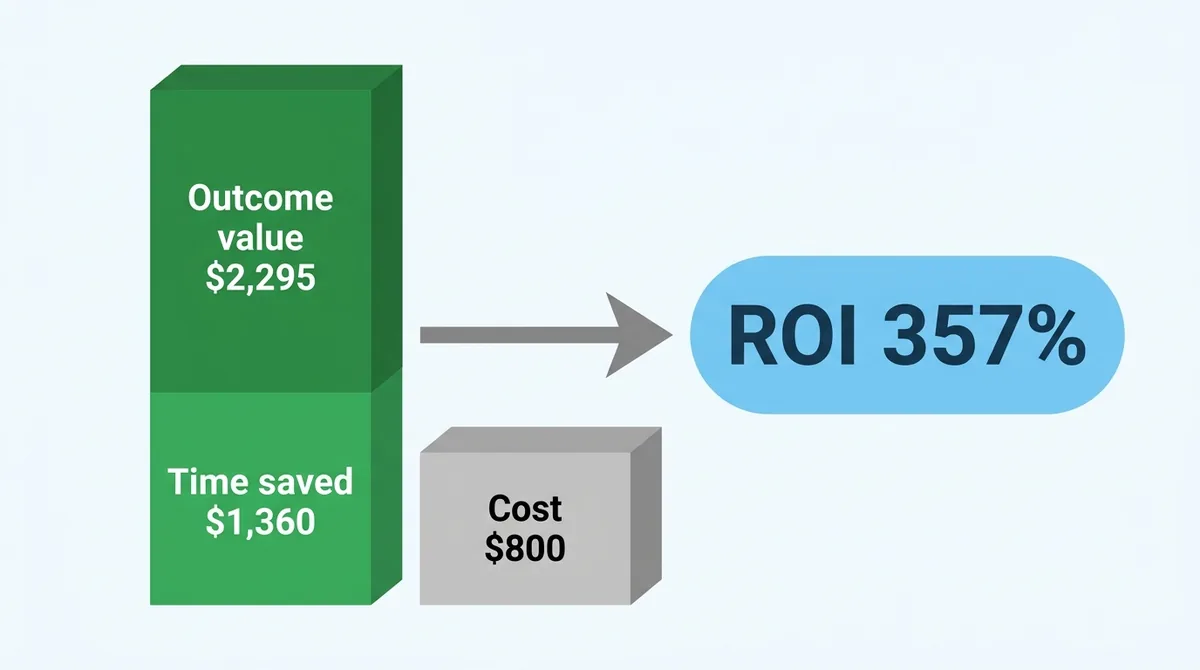
Notice what this example does not count: the patients who got an answer at 11pm and booked a week later by phone, the receptionist’s reduced stress, the reviews. Mention them in one line as “not counted”, which makes the counted number more believable.
Which metric to lead with, by type of agent
All five metrics belong in every report, but each type of agent has one headline number the client cares about most. Put it first.
| Agent type | Lead with | Outcome to count | Watch out for |
|---|---|---|---|
| Booking agent | Bookings made by the agent | Confirmed appointments | Bookings later cancelled or no-shows |
| Support agent | Automation rate plus resolved conversations | Tickets resolved without a human | Containment without resolution |
| Lead qualification agent | Qualified leads | Leads meeting the agreed definition | Sales saying the leads are poor |
| Commerce agent | Paid orders | Orders with payment completed | Counting unpaid orders as revenue |
| Voice agent | Calls answered | Calls answered that would have been missed | Short calls that end without an outcome |
Booking agents are the easiest to prove, because every booking has a date, a name and a value. Report bookings made outside office hours separately; they are the clearest evidence of work no one else would have done.
Support agents need the most care. Lead with the automation rate, but always show resolved conversations and the satisfaction signal next to it, so the client sees quality as well as volume.
Lead qualification agents live or die by the definition of “qualified”. Agree it in writing, and once a quarter ask the client’s sales team how many of those leads turned into real opportunities. If they disagree with your count, fix the qualifying questions before the next report, not after the renewal call.
Commerce agents should report money collected, not order value. An order with an unpaid payment link is not revenue yet.
Voice agents have a simple story to tell: calls that used to ring out are now answered. On ChatMaxima, VoiceBox shows total, answered and missed calls, talk time and average duration, which gives you the before-and-after in one view.
Quality checks: the two numbers that protect the five
Two supporting numbers keep the headline metrics honest. They do not need their own section in the report, but they belong on the page.
Customer satisfaction. Gartner found that only 27% of customers would try a chatbot again after a negative experience. A rising automation rate with falling satisfaction is a warning, not a win. On ChatMaxima, end the flow with a one-tap rating (buttons such as Great / Okay / Poor) stored in a variable, then export Bot Responses and report the share of positive ratings.
Reliability. Show the client that you are watching the agent, not just billing for it. The Executions view traces every bot run block by block, with status, timing and the first error, for the last 30 days. Report the number of failed runs you found and fixed. “We caught and fixed 12 failed booking attempts after the clinic changed its Saturday hours” is the most persuasive line in many monthly reports, because it is proof of the work the retainer pays for.
The one-page monthly AI ROI report
Keep the report to one page and send it on the same day every month. Here is a template:
| Metric | This month | Last month | Baseline | Note |
|---|---|---|---|---|
| Conversations handled | 1,200 | 1,050 | 0 | WhatsApp 92%, web 8% |
| Automation rate | 68% | 63% | n/a | Handoffs down after FAQ update |
| First response time | 6 sec | 7 sec | 3 hrs | Baseline was office hours only |
| Bookings by the agent | 85 | 71 | 0 | 26 made after 7pm |
| Estimated value vs cost | $3,655 vs $800 | $3,120 vs $800 | n/a | ROI about 357% |
Under the table, add three short lines:
- What we fixed: “Updated holiday hours; fixed 12 failed booking attempts.”
- What we learned: “Most after-hours questions are about pricing; we added a price list to the knowledge base.”
- Next month: “Add appointment reminders to cut no-shows.”
That last line matters. It shows the agent improving every month, which is the whole argument for a retainer over a one-off build. Our guide to AI agent pricing covers how to package that ongoing work into tiers.
Mistakes that make AI ROI reports backfire
- No baseline. “6-second response time” impresses no one unless they know it used to be three hours.
- Changing metrics every month. It looks like you are picking the good numbers.
- Reporting containment alone. A high automation rate with unhappy customers is a churn risk, and clients eventually notice.
- Industry averages instead of client numbers. “Agents save 30% of support costs” is a claim; “you saved 54 receptionist hours” is a fact.
- Overclaiming revenue. Count only the outcomes the agent completed, and only the share you can defend.
- Hiding a bad month. Explain it, show the fix, and the next month’s recovery becomes your best proof.
Setting up AI ROI tracking on ChatMaxima
Do this during the build, not at the end of month one:
- Record the baseline with the client before launch: monthly enquiries, response time, missed calls, bookings or leads per week.
- Create a handoff department and set it on every Talk to Agent block, so handoffs are countable in Reports.
- Add an outcome log: a Google Sheet block after each outcome step, appending date, contact and outcome type.
- Store key answers in variables (lead qualification answers, satisfaction rating), so Bot Responses can export them.
- Give the client a Report Manager login in their workspace, so they can open Reports themselves. Clients who check the numbers on their own trust them more.
- Put a monthly reminder in your calendar to pull the numbers, check Executions for failed runs before the 30-day traces expire, and send the one-page report.
What’s next
AI ROI is not proven once at launch. It is proven every month, with the same five numbers: conversations, automation rate, speed, outcomes and money, checked against a baseline and backed by satisfaction and reliability. Report them consistently and the renewal conversation becomes a formality.
If you are still deciding what to sell, start with an offer where the outcome is easy to count; our comparison of an AI agent vs a chatbot explains why outcomes are what clients pay more for. Then check the ChatMaxima plans to set up a workspace for your first client.