Updated October 2026. This guide replaces our Agency Tech Stack 2026, which covered general marketing-agency tools. The 2027 edition is built for agencies and freelancers who build, run and maintain AI agents for clients.
A year ago, an agency tech stack was mostly about content: a copywriting tool, a design tool, a social scheduler and a CRM. In 2027 the agencies growing fastest sell something different. They build AI agents that answer customers on WhatsApp, book appointments, take payments and answer the phone, and they get paid every month to keep those agents working.
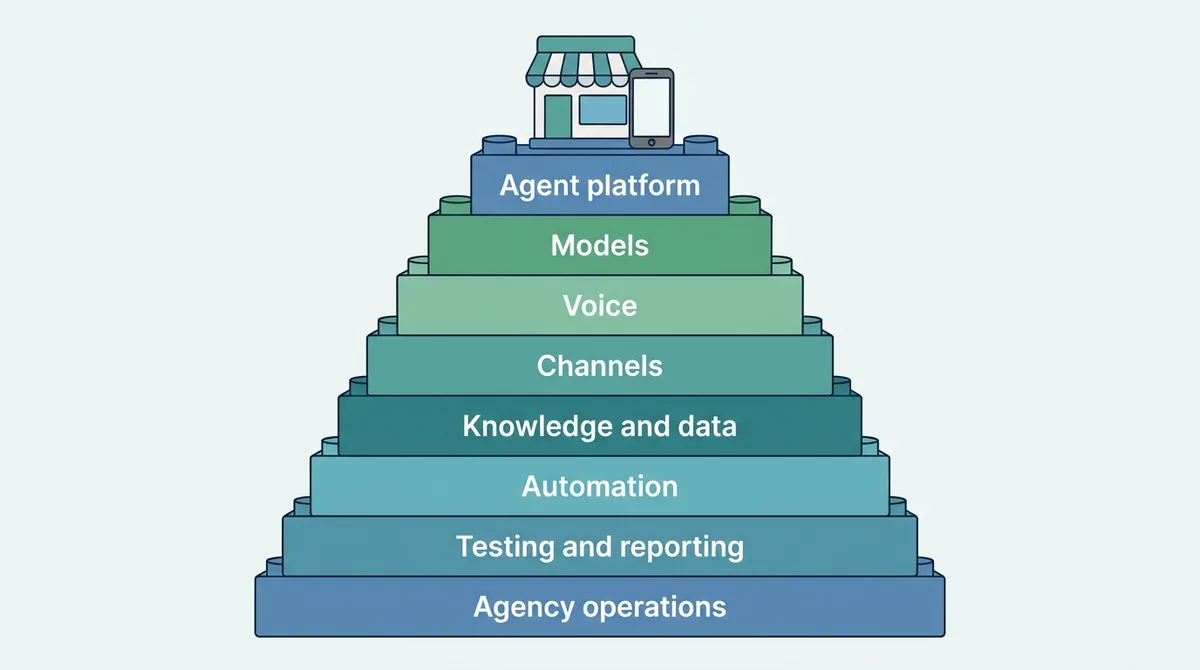
That business needs a different AI automation agency tech stack. You need a platform to build and run agents for many clients, models to power them, channels to reach customers, tools the agents can act through, and a way to prove every month that they work. This guide covers each layer, what to look for, what it costs in October 2026, and three complete stacks by agency stage.
What an AI agent agency stack has to do
Every tool in your stack should earn its place by doing one of five jobs:
- Build agents quickly, ideally without code, so a new client goes live in days.
- Run them reliably across the channels the client’s customers already use.
- Connect them to the client’s calendar, store, CRM and payment system, so the agent can act and not just answer.
- Prove what they did, so the retainer renews.
- Operate your own agency: sell, deliver, bill.
Gartner predicts that 40% of enterprise applications will include task-specific AI agents by the end of 2026, up from less than 5% in 2025. Your clients will expect agents in the tools they use. The agencies that win are the ones with a stack that delivers them cheaply and keeps them running.
The AI agent stack at a glance
| Layer | Job | Example tools | How it is priced |
|---|---|---|---|
| Agent platform | Build, run, channels, client workspaces | ChatMaxima | Monthly plan |
| Models | The “brain” of each agent | OpenAI, Anthropic, Google Gemini | Per token |
| Voice | Phone and voice agents | Twilio, Deepgram, ElevenLabs | Per minute or character |
| Channels | Where customers talk | WhatsApp, Instagram, web chat | Per message (WhatsApp) |
| Knowledge and data | What the agent knows and acts on | Knowledge base, Sheets, CRM, Stripe, Shopify | Mostly the client’s own tools |
| Automation | Workflows between systems | ChatMaxima Studio, MCP | Included in the platform |
| Testing and reporting | Prove it works | Test runs, execution logs, reports | Usually in the platform |
| Agency operations | Run your business | HubSpot, ClickUp or Notion, Canva, Stripe | Per seat or per transaction |
Layer 1: The agent platform
This is the most important choice in your stack, because everything else plugs into it. A platform built for a single company’s support team will fight you at every step when you run 10 or 50 clients.
What to look for
- One workspace per client, so each client’s bots, inbox, contacts and reports stay separate, and you switch between them from one login.
- Pricing per workspace, not per AI resolution. Per-resolution and per-seat pricing make your costs rise with every successful conversation, which eats the margin on a fixed retainer.
- Every channel your clients use: WhatsApp, Instagram, Messenger, web chat, SMS, email, voice.
- Real tool calling, so the agent can book, invoice, look up orders and update records.
- Your choice of models, including the client’s own API keys.
- Human handoff with the conversation context attached.
- Testing and execution logs, so you can find and fix failures before the client does.
- White-labelling once you have enough clients to sell under your own brand.
Our pick: ChatMaxima
We build ChatMaxima for exactly this model, so judge this section with that in mind. Here is what it includes, as of October 2026:
- Plans: Starter $19 a month (1 workspace, 3 team members), Pro $99 (5 workspaces, 15 team members), Max $299 (unlimited workspaces and team members) and Ultra $499. Messages are included per plan (10,000 to 200,000 a month), with add-ons of $10 per 10,000 messages and $19 per extra workspace.
- Channels: website chat, WhatsApp Business, Instagram DM, Facebook Messenger, Telegram, SMS, and email with ticketing.
- The MaxIA AI Agent block: a language model with a system prompt, knowledge sources and tool calling. Tools include Google Calendar, Google Sheets, Stripe, Shopify, WooCommerce, API requests, email, PDF generation and MCP servers.
- Models: bundled MaxIA models that need no API key, or connect your client’s own OpenAI, Anthropic, Gemini or other provider key so token costs sit on their account.
- Integrations: contact sync with HighLevel, HubSpot, Zoho Recruit and WooCommerce, plus Google Sheets, Google Calendar, Stripe, Monday.com and Airtable.
- White-labelling: your own domain and logo on the Ultra plan, with a one-time setup.
Other platforms agencies use include Voiceflow, Botpress and Stammer.ai. Compare them on the checklist above, and especially on how the price changes when you go from 5 clients to 50. Our white label AI platform guide covers that comparison in detail.
Layer 2: Models
The model is the agent’s brain. In 2027 you will use more than one: a fast, cheap model for most conversations, and a stronger one for complex reasoning or tool-heavy flows.
List prices per million tokens (input / output) for each vendor’s mid-tier production model, as of 27 October 2026:
| Vendor | Model | Price per 1M tokens |
|---|---|---|
| OpenAI | GPT-6.1 Sol | $2 / $10 |
| Anthropic | Claude Sonnet 5.5 | $2 / $10 |
| Gemini 3.8 Flash | $0.75 / $3.75 until 31 December 2026, then $1.50 / $7.50 |
Each vendor also sells a cheaper tier for high-volume, simple conversations: OpenAI’s Luna and Anthropic’s Claude Haiku 5.5 are both $0.10 / $0.50, and Google’s Gemini 3.5 Flash-Lite is $0.30 / $2.50.
Two rules for agencies:
- Put token costs on the client’s account where you can. Connecting the client’s own API key keeps your retainer predictable when their volume spikes.
- Track model retirements. OpenAI’s deprecations page lists GPT-4o, GPT-4o mini, GPT-4.1 and GPT-4.1 mini for shutdown on 14 January 2027, and Anthropic retires Claude Sonnet 4.5 on 30 November 2026. Every client agent on a retiring model needs a switch and a retest. Keep a simple sheet of which client runs which model.
Layer 3: Voice
Voice agents are one of the easiest agent services to sell, because a missed call is a lost customer. A voice stack has two parts.
Telephony. Twilio’s US pay-as-you-go prices: $1.15 a month for a local number, $0.0085 a minute for inbound calls to it and $0.0140 a minute outbound (Twilio, August 2026).
Speech. Either a speech-to-speech model, or separate speech-to-text and text-to-speech. Deepgram’s Nova-3 transcription costs about $0.0048 a minute streaming and its Aura-2 voices $0.030 per 1,000 characters; ElevenLabs plans start at $6 a month for Starter and $22 for Creator (vendor pricing pages, October 2026).
On ChatMaxima, voice agents answer inbound calls on the client’s own Twilio number, on WhatsApp calls and through a web voice widget, using either speech-to-speech models or a speech-to-text plus text-to-speech pipeline from providers like OpenAI, Gemini, Deepgram, ElevenLabs and Cartesia. During the call the agent can answer from the knowledge base and book in Google Calendar. Voice minutes come from Voice Calls add-on packs, starting at $50 a month for 2,000 minutes. Be clear with clients about what voice agents on any platform can and cannot do; for example, on ChatMaxima the AI handles inbound calls, not outbound call campaigns.
Layer 4: Channels
Your client’s customers decide the channels, not you. For most small businesses outside the US that means WhatsApp first; in the US it is web chat, SMS and Instagram.
- WhatsApp Business Platform: Meta bills per template message by category and country, and since 1 October 2026 it also bills service replies beyond 1,000 free per phone number per month. Budget it as a pass-through cost on the client’s own Meta account. See our WhatsApp Business API pricing guide for the current rates.
- Instagram and Messenger: no per-message fee, but strict rules on when and how a business can message first.
- Web chat: free to run and the easiest place to start a new client.
- SMS and email: useful for reminders and follow-ups; carrier and provider fees apply.
The rule for your stack: one platform, every channel, one inbox per client. Juggling a separate tool per channel multiplies your maintenance work by the number of clients.
Layer 5: Knowledge and data
An agent is only as good as what it knows and what it can reach.
- Knowledge base: the client’s website, help center, PDFs and FAQs, kept up to date. Most agent platforms, ChatMaxima included, can crawl a website into a knowledge base. For custom scraping jobs, Firecrawl starts at $19 a month (Hobby, 5,000 pages).
- Structured data: Google Sheets or Airtable for price lists, stock, opening hours and anything the client edits often. A sheet the client owns is far easier to keep current than a prompt you own.
- Systems of record: the client’s CRM (HubSpot, HighLevel, Zoho), calendar (Google Calendar), store (Shopify, WooCommerce) and payments (Stripe). The agent’s value comes from reading and writing these.
Layer 6: Automation and workflows
Sooner or later a client needs something beyond a conversation: a lead copied to their CRM, a nightly sync from a spreadsheet, a webhook from their booking system that should trigger a WhatsApp message. Many agencies add a separate automation subscription for this, paid per task or per execution, which is one more bill and one more place where a client’s workflows can break.
On ChatMaxima you build these workflows in Studio, the same visual builder you use for the agents, so there is no second tool to pay for or maintain:
- Triggers: an incoming message or keyword, a schedule (daily, weekly or a custom cron), an incoming webhook from any system, or an Instagram comment.
- Logic: If / Else conditions, loops over lists, variables, delays and a JavaScript Code block for anything custom.
- Apps: API Request for any REST API, plus ready blocks for Google Sheets, Airtable, Supabase, NocoDB, HubSpot, Zoho CRM, GoHighLevel, monday.com, ClickUp, Slack, Dropbox, Stripe, Razorpay, Shopify and WooCommerce.
- Actions: send email, SMS, Telegram and WhatsApp template messages, generate PDFs, create tickets and update contacts.
- AI inside the workflow: drop the MaxIA AI Agent block into any flow to classify, extract or reply.
Because the workflow and the agent live in the same flow, a failed step shows up in the same execution log as the conversation that caused it. If a client already runs workflows in Zapier, Make or n8n, Studio has blocks to call them, so you do not have to rebuild what already works.
Two more pieces matter for 2027:
- MCP (Model Context Protocol). Agents can call tools exposed by MCP servers, and many SaaS products now publish one. On ChatMaxima, an MCP Server block can be given to the AI agent as a tool.
- Your AI assistant as an operator. With ChatMaxima’s MCP connector, Claude or ChatGPT can inspect, build and test your clients’ bots in plain language. Our guide to Claude MCP for agencies shows how agencies turn this into a service.
Layer 7: Testing, monitoring and reporting
This is the layer most new agencies skip, and the one that decides whether clients renew.
- Testing before launch: run scripted test conversations against the real flow, including the awkward cases (fully booked day, wrong order number, angry customer).
- Execution logs after launch: ChatMaxima’s Executions view traces every bot run block by block, with status, timing, input and output, for 30 days. Check it weekly for failed runs.
- Client reporting: ChatMaxima’s Reports show conversations, messages, first response time, resolution time and resolved conversations per workspace, filterable by channel and date. Combine these with outcome counts (bookings, orders, leads captured) in a one-page monthly report.
Gartner’s warning is worth repeating to every client: it predicts that by 2028, 70% of enterprises will abandon agentic AI built by vendor forward-deployed engineering, because nobody owned it after launch. Monitoring and reporting are how you become the owner they keep paying.
Layer 8: Running the agency
The back office is the part of the 2026 stack that carries over best. Keep it lean:
| Job | Tool | Price (October 2026) |
|---|---|---|
| Your own sales pipeline | HubSpot CRM | Free for up to 2 users; Starter $20 per seat a month |
| Projects and delivery | ClickUp or Notion | ClickUp Unlimited $10 per user ($7 annual); Notion Plus $12 per seat ($10 annual) |
| Proposals and visuals | Canva | Pro $18 a month ($12 annual); Business $25 per person |
| Recurring billing | Stripe Billing | 0.7% of billing volume, plus card fees (2.9% + 30 cents for US cards) |
What to drop from a 2026 marketing-agency stack: separate AI copywriting subscriptions for every team member (the frontier models do this inside tools you already pay for), per-seat chatbot tools priced for support teams, a separate automation subscription when your agent platform already runs workflows, and any per-channel point solution your agent platform already covers.
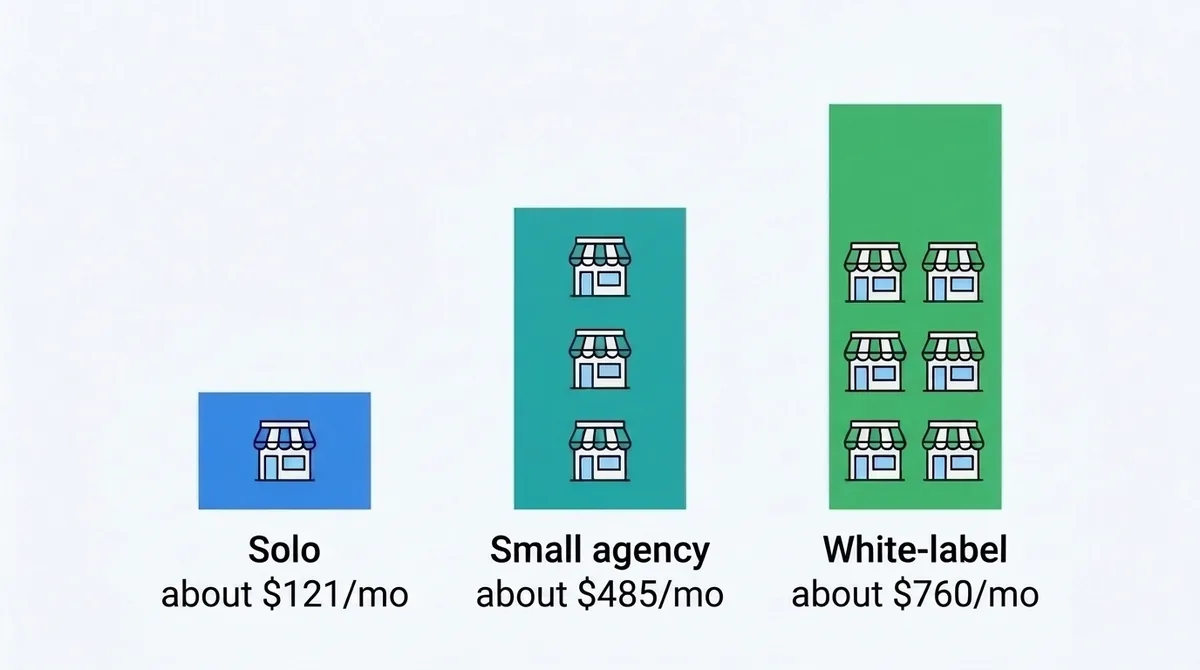
Three AI agent stacks by agency stage
Here is what a complete stack costs at three stages, using the list prices above. Client channel fees, token costs on client keys and Stripe fees are excluded because they scale with usage.
Solo freelancer: up to 5 clients
| Tool | Monthly cost |
|---|---|
| ChatMaxima Pro (5 workspaces) | $99 |
| HubSpot CRM free | $0 |
| Notion Plus (annual) | $10 |
| Canva Pro (annual) | $12 |
| Total | about $121 |
At five clients that is under $25 per client per month. One $300 Care retainer covers the whole stack.
Small agency: 10 to 20 clients, 3 people
| Tool | Monthly cost |
|---|---|
| ChatMaxima Max (unlimited workspaces) | $299 |
| Voice Calls add-on (2,000 minutes) | $50 |
| Twilio local numbers for voice clients | about $1.15 each |
| HubSpot Starter, 3 seats | $60 |
| ClickUp Unlimited, 3 users (annual) | $21 |
| Canva Business, 2 people | $50 |
| Total | about $485 |
At 20 clients that is roughly $24 per client per month. Workflows run in Studio, so there is no separate automation bill.
White-label agency: 25+ clients under your brand
Move to ChatMaxima Ultra so clients log in to your domain with your logo, and add seats to the back-office tools as the team grows.
| Tool | Monthly cost |
|---|---|
| ChatMaxima Ultra (plus a one-time white-label setup) | $499 |
| Voice Calls add-on (2,000 minutes) | $50 |
| HubSpot Starter, 5 seats | $100 |
| ClickUp Unlimited, 5 users (annual) | $35 |
| Canva Business, 3 people | $75 |
| Total | about $760 |
At 40 clients that is about $19 per client per month, and it keeps falling as you add clients. That is why the margin in this model comes from retention, not from new builds.
Mistakes that make an agency stack expensive
- Paying per resolution on a fixed retainer. Your best month becomes your least profitable one.
- One tool per channel. Five channels times 20 clients is 100 things to maintain.
- Agents built on your API key with no usage band. A viral month on one client’s account becomes your bill.
- No execution logs. You find out about failures from the client, which is the worst way.
- Ignoring model retirement dates. They are published months in advance. Put them in the calendar.
- Building the stack before the offer. Pick a niche and an offer first, then buy only what that offer needs. Our 25 AI agent business ideas list each idea with the building blocks it needs.
What’s next
The best AI automation agency tech stack for 2027 is a short one: one agent platform with a workspace per client, two or three model providers, the client’s own channels and systems, workflows built in the same platform, and a lean back office. Everything else is optional until a client pays for it.
Start with the solo stack, sign three clients, and upgrade the platform tier only when the workspace count forces you to. Compare the ChatMaxima plans to see which tier fits your client count today.