Building a client’s chatbot used to mean an afternoon of dragging blocks onto a canvas, wiring every branch by hand and then clicking through the bot yourself to find the dead ends. A no-code AI agent builder changes the first part of that job: you describe the bot in plain language, and a builder agent plans it, asks you the questions it needs answered, places the blocks and tests the result.
That does not make the freelancer optional. It moves your value from wiring blocks to the parts a client actually pays for: knowing what the bot should do, supplying the real business details, checking the test conversations and owning what the bot says once it is live.
This guide walks through that workflow using MaxIA, the builder agent inside the ChatMaxima bot builder. It expands idea 23 from our list of 25 AI agent business ideas with pricing math: done-for-you agent builds with ongoing maintenance. You will see how to go from a client brief to a tested bot, what still needs your hands, and how to price work that now takes a fraction of the time.
Why Freelancers Are Switching to No-Code AI Agent Builders
The demand is real. On Upwork, freelancer earnings from AI chatbot development grew 71% year over year in 2025, the second fastest-growing skill in its coding category after AI integration (Upwork, 2026). Freelancers doing AI work on the platform earn 34% more per hour than those who do not (Upwork Future Workforce Index, 2026).
Businesses are moving the same way. Gartner predicts that up to 40% of enterprise applications will include task-specific AI agents by 2026, up from less than 5% in 2025 (Gartner, 2025). The independent workforce building those agents keeps growing too: a record 74.9 million Americans worked independently in 2026, and nearly 8 in 10 say AI complements their work (MBO Partners, State of Independence 2026).
The catch: most agent projects fail on quality, not on building
Speed is not the hard part any more. Gartner also predicts that over 40% of agentic AI projects will be canceled by the end of 2027, because of escalating costs, unclear business value or inadequate risk controls (Gartner, 2025). And customers are unforgiving: in a 2026 survey of 3,566 customers, only 27% said they would try a chatbot again after a negative experience (Gartner, 2026).
So the opportunity for a freelancer is not “build bots faster”. It is “build bots faster, and spend the saved time making sure they work”. A good no-code AI agent builder should help with both.
What “Building an AI Agent by Describing It” Actually Means
The idea has a name in software. In February 2025, Andrej Karpathy coined “vibe coding” for building software by describing what you want to an AI, and Collins Dictionary made it its Word of the Year for 2025. Builder agents bring the same idea to chatbot flows.
The honest version comes with a warning label. In the 2025 Stack Overflow Developer Survey, 84% of developers said they use or plan to use AI tools, but 46% said they do not trust the accuracy of AI output, up from 31% the year before (Stack Overflow, 2025). A randomized study by METR in 2025 even found experienced developers took 19% longer on real tasks with AI tools, though METR has since said it no longer considers that result representative of current tools (METR, 2025).
The lesson for bot builders is the same in both findings: describing is fast, verifying is the job. A builder agent worth using does not just generate a flow and leave. It asks before guessing, refuses to invent facts, checks its own work and runs a test.
How MaxIA Builds a Bot From a Description
MaxIA (shown as MaxIA Copilot, currently in Beta) lives in the ChatMaxima bot builder. Open any bot, click the wand launcher on the canvas, and you get a chat panel with the prompt “Describe the bot you want to build…”. On an empty canvas it offers starting points such as Lead capture bot, Customer support bot and Appointment booking. On a bot that already has blocks, it offers Test my bot and Improve this bot.
From there, a build moves through five phases you can see in the panel: discover, plan, build, review and done.
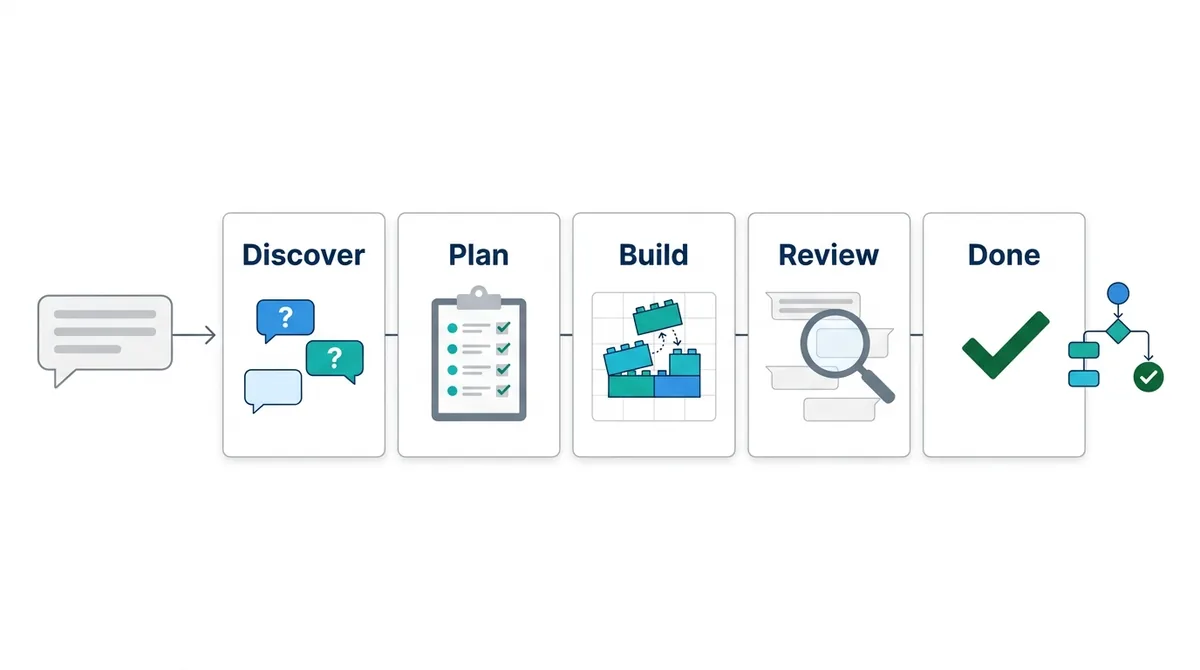
1. Discover: it asks before it guesses
If your first message covers everything, MaxIA skips straight to planning. If not, it asks short questions, usually as tappable choices (up to six, sometimes multi-select) or a small form with draft answers you can edit. When it drafts a welcome message or a reply, it offers Use this draft or I’ll write my own.
It also has a firm rule about facts: URLs, prices, addresses, phone numbers, API endpoints and credentials must come from you. It will ask for them rather than make them up, which is exactly the behaviour you want in a bot that will speak for your client.
2. Plan: you approve before anything is built
MaxIA writes a Bot plan, a checklist of the steps it intends to build, and asks you to approve it. This is the cheapest moment to catch a misunderstanding. If the client wanted bookings to go to a human for confirmation and the plan books directly, fix it here, not after twenty blocks are on the canvas.
3. Build: blocks appear on the live canvas
Once you approve, MaxIA adds the blocks, connects them and tidies the layout on the real canvas, centring each new block so you can watch the flow take shape. It covers all 82 block types in the builder palette: messages, buttons and inputs, conditions and variables, API requests and webhooks, the MaxIA AI Agent and knowledge sources, human handoff, tickets, and integrations such as Google Sheets, HubSpot, Shopify, Stripe and Zapier.
Every step that changes the canvas is saved automatically, with a “Saved” notice and an Undo link that can roll back up to ten steps. If a step goes wrong, undo it and tell MaxIA what to change.
4. Review: it validates and tests its own work
Before calling the bot done, MaxIA validates the flow: a trigger exists, every block is connected and reachable, required fields are filled, variable names do not collide, and block-specific rules are met.
Then it runs a test conversation against the real bot runtime and shows you the transcript. If something breaks, it fixes the flow and tests again. A bot that passes shows as Tested & working in the plan.
5. Done: you hand over the real accounts
Some blocks need things only you can supply: the client’s email account, SMS sender, WhatsApp number and template, knowledge base or voice settings. MaxIA adds those blocks but never invents the account. Instead it shows a one-click Open settings chip so you can pick the real account or template in the block’s own settings.
A Worked Example: A Fitness Studio Trial-Class Bot
Here is what a real brief can look like. Suppose your client runs a fitness studio and wants a website bot that answers questions and books free trial classes.
You type:
Build a website bot for Northside Fitness. Greet visitors, answer questions about classes, prices and opening hours from our FAQ, and offer a free trial class. For a trial, collect name, phone and email, let them pick Yoga, HIIT or Spin, then add them to our Google Sheet and confirm. If someone asks about membership cancellations or anything medical, hand over to a human.
A typical build then runs like this:
- MaxIA asks for what it cannot know: the studio’s FAQ source, the prices it should quote, which Google Sheet to use and the handoff hours.
- It proposes a plan: greeting, a menu with “Ask a question” and “Book a free trial”, an AI agent answering from the knowledge source, the trial form, a class choice, the Google Sheets step, a confirmation, and a handoff branch.
- You approve, and it builds the flow on the canvas, saving as it goes.
- It validates and runs a test, chatting through the trial booking as a test visitor, and reports the transcript.
- You open the settings chips to connect the real knowledge base and confirm the Google Sheet, then run your own test with a few awkward questions.
What used to be an afternoon of wiring becomes a short conversation plus a careful review. That review is where you earn the fee.
What You Still Do by Hand (and Should)
A builder agent changes how fast you build, not who is accountable. In 2024 a Canadian tribunal ruled against Air Canada after its website chatbot gave a customer wrong information about bereavement fares. The airline argued the chatbot was “a separate legal entity that is responsible for its own actions”. The tribunal disagreed and found that Air Canada “did not take reasonable care to ensure its chatbot was accurate” (Moffatt v. Air Canada, 2024 BCCRT 149).
Your client’s bot is your client’s voice, and your name is on the build. Keep these steps for yourself:
- Supply and check every fact: prices, hours, policies, links. The agent asks for them; you make sure they are current.
- Read the test transcripts, not just the “Tested & working” badge. Look for tone, length and anything a real customer would misread.
- Test the awkward cases yourself: off-topic questions, rude messages, a customer who changes their mind halfway through a form.
- Connect the real accounts in each block’s settings and check the client’s WhatsApp templates are approved before launch.
- Decide where humans take over, and agree it with the client in writing.
Know what the test run does and does not cover
MaxIA’s test conversation runs as a website chat against the saved bot, with up to ten visitor messages per test. During a test, blocks that would send or charge something are simulated: emails, SMS, WhatsApp and Telegram messages, payment links and invoices, API requests, webhooks, PDFs and tickets. The transcript says “Simulated” and no real message, charge or API call is made.
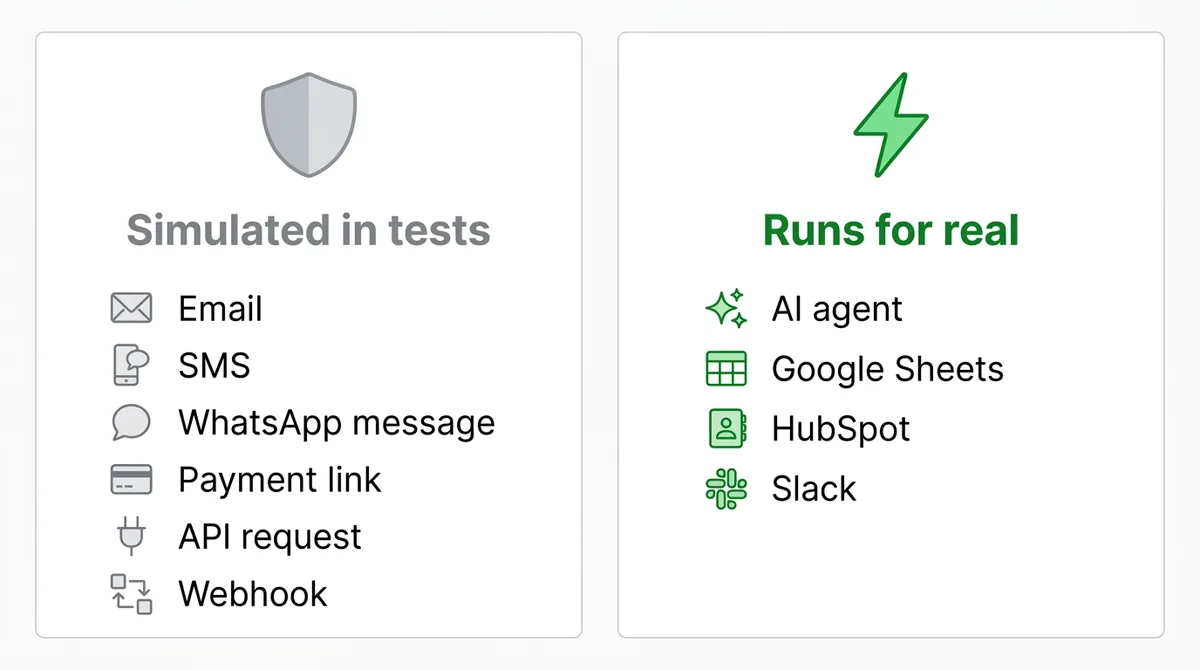
Two things are not simulated, so plan for them:
- AI agent blocks and integrations really run. The MaxIA AI Agent block makes real model calls, and integrations such as Google Sheets, HubSpot or Slack really execute. Point them at a test sheet or test record while you build.
- It is a website chat, not WhatsApp. Channel-specific behaviour, such as a WhatsApp Flow form, cannot be completed in the test. Do a final check on the real channel before launch. Our guide to building a WhatsApp chatbot without code covers the channel setup.
Use the execution logs after launch
Once the bot is live, every bot has an Executions page. Open any conversation and you see a block-by-block trace: which block ran, how long it took, whether it succeeded, was skipped or errored, and the input and output at each step, with secrets such as API keys masked. Traces are kept for 30 days.
This is your maintenance tool. When a client says “the bot did something strange yesterday”, you can find the exact run and the exact block instead of guessing, which is what makes a monthly retainer easy to justify.
Start From a Template, Then Let MaxIA Adapt It
You do not have to start from a blank canvas. The Chatbot Marketplace in ChatMaxima has ready-made bot templates you can use with Use this Bot. Open the copy, then ask MaxIA to Improve this bot: rename it for the client, swap in their questions, add a booking step or a handoff rule. This is often the fastest route for common jobs such as lead capture, FAQs or appointment booking.
For support bots that answer from a client’s own help pages, pair the AI agent block with a knowledge source. Our knowledge base chatbot guide walks through that setup.
What It Costs to Run a Builder Agent
MaxIA runs in one of two ways, chosen in its engine settings:
- ChatMaxima credits: pay as you go, using Claude Sonnet. A pack of 200,000 credits costs $10, credits never expire, and a full bot build uses about 6,000 credits, roughly 30 cents. There is no free allowance, so buy a pack before the first build.
- Your own API key: connect your own Anthropic, OpenAI or Google Gemini key and MaxIA uses it at no extra charge from ChatMaxima. You pick the model, for example Claude Sonnet or Opus, GPT-5.4 or Gemini 3.1 Pro.
Credits and keys belong to a workspace. If you build inside each client’s own workspace, set up credits or a key there.
How to Price Builds That Now Take Hours, Not Days
When a build gets faster, the worst move is to cut your price to match the hours. The client pays for a bot that works, and the market is moving toward complex, outcome-driven AI work: Upwork found that freelancers doing more complex work with AI saw earnings rise 45%, while simple generative content work grew in volume but fell 13% in earnings per contract (Upwork Future Workforce Index, 2026).
Three ways to price
- Fixed price per build. Quote the outcome: “a website bot that answers your FAQs and books trial classes, tested and live”. Upwork’s own rate guide puts typical chatbot developer rates at $30 to $61 per hour (Upwork, 2026). If you used to price builds from those hourly rates, keep the old quote as your floor: the client is buying the result, and a faster build only raises your margin.
- Build plus maintenance retainer. This is idea 23 from the business ideas list: 5 builds at $1,500 plus 17 maintenance retainers at $150 a month comes to about $10,050 a month. The retainer covers content updates, monthly execution-log reviews and small changes.
- Template packages. Build one strong bot for a niche (fitness studios, dental clinics, estate agents), then adapt it per client with MaxIA. Each sale costs you an hour of adaptation and review.
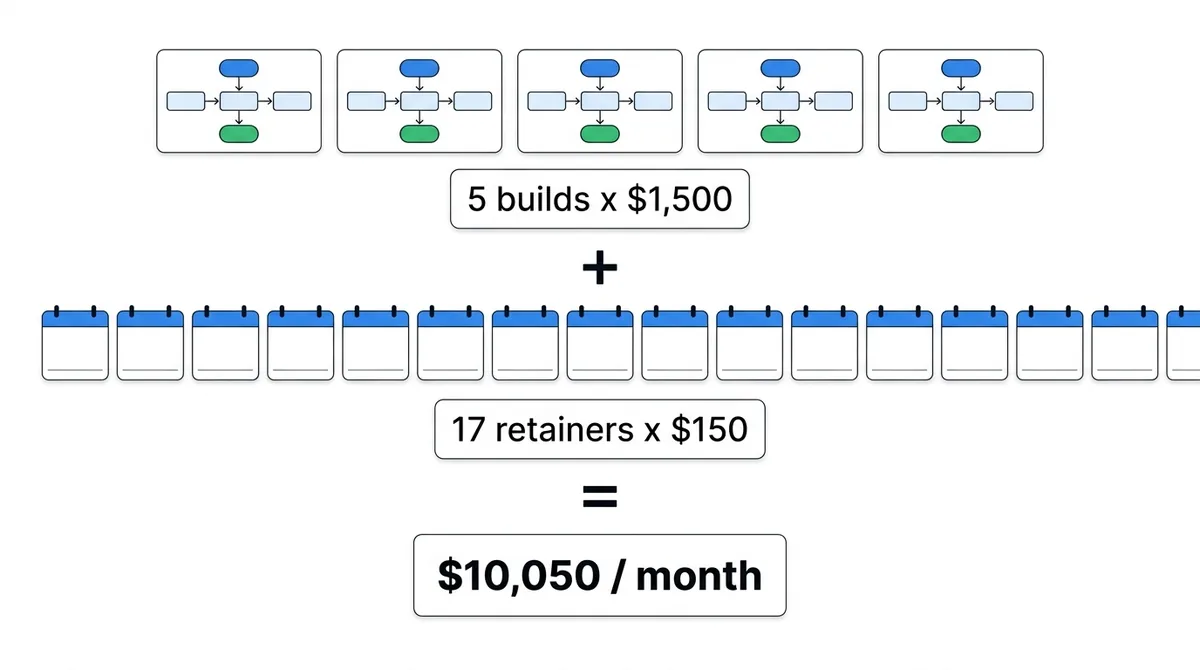
These are illustrative numbers, not promises. Your rates depend on your niche, your market and how well you can show results.
What to include in every proposal
- The plan you approved with MaxIA, written as a plain list of what the bot will do.
- Who supplies which facts and accounts, and by when.
- Testing: the agent’s test run plus your own test script of awkward cases.
- Handoff rules: when a human takes over and who that human is.
- Maintenance: what the retainer covers, including a monthly look at the execution logs.
If you plan to resell under your own brand, our guide to the white label AI platform model covers how agencies set up client workspaces and pricing.
Common Mistakes With No-Code AI Agent Builders
- Skipping the plan review. Approving a plan you did not read is how bots end up booking things the client never offered.
- Letting the agent guess facts. MaxIA asks for them; answer with real, current information, not placeholders.
- Trusting one passing test. A test proves one path works. Customers take the other paths.
- Testing integrations against live data. AI and integration blocks really run during tests; use test sheets and test records.
- Forgetting the channel. A bot that works in the website chat still needs a check on WhatsApp or Instagram before launch.
- Selling hours instead of outcomes. Faster builds should raise your margin, not lower your price.
- No maintenance plan. Bots drift as prices, hours and policies change. The execution logs make a retainer easy to run.
Build Your First Client Bot With MaxIA
A no-code AI agent builder is not a shortcut around doing the work properly. It is a way to spend less time wiring blocks and more time on what makes a bot succeed: clear plans, real facts, thorough testing and steady maintenance. With MaxIA in the ChatMaxima bot builder you can describe a bot, approve a plan, watch it build, review the test run and ship, then use the execution logs to keep it working.
See the plans on our pricing page, then browse the other AI agent business ideas to decide which niche to build your first template for.